Successful Blog

  • Home
  • Community
  • About
  • Author Guidelines
  • Liz’s Book
  • Stay Tuned

The Official Liz Strauss Fundraiser is Finally Live

June 11, 2013 by Rosemary

We’re happy to announce that the official fundraiser for Liz Strauss is finally live! We think we’ve put together some unique items and consultations for you to bid on. The fundraiser will run from 6/11 until 6/25. It will run in two parts with a new set of auction items each week. This week’s auction items include:

  • Signed Guitar by ALL 5 Members of Twisted Sister
  • One Ticket to the SOLD OUT World Domination Summit
  • One-on-one consultations donated by: Jonathan Fields, Gary W. Goldstein, Chris Brogan,Lewis Howes, Jeannie Walters, Andy Crestodina, and Terry Starbucker

Next week we’re featuring such items like a consultation by Steve Farber and a business library put together by Scott Stratten! The auctions on those items will start 6/18. More details soon!

Want to help but would like to donate directly to Liz rather than bid? You can do so directly through Paypal here: Donate

Please help us spread the word about the fundraiser by sharing this post and using the hashtag #LizFund on Twitter.

Again, thank you all for the support and know that Liz appreciates all the many kindnesses that have been sent her way in the last few months. Thank you so much for participating and helping us give back to Liz. Have fun and good luck with the auctions!

Filed Under: Community Tagged With: bc, Community

After Your Blog is Hacked: To-Do List

June 11, 2013 by Rosemary

By Ann Smarty

From the time my blog became a regular part of my life and started to gain popularity, I have had a reoccurring nightmare. One of the regular contributors to the site calls me in the middle of the night, waking me up.

They are noticeably upset as they tell me that the blog has been hacked, and the posts have disappeared. In their place is a very not-safe-for-work animation that is causing all my readers to flood my Facebook and Twitter profiles in shock and anger.
what to do after your blog is hacked
I usually wake up in a cold sweat and can’t get back to sleep until I have fired up the laptop and checked that everything is alright. Can you blame me for my fear? After all, this isn’t some random paranoia. Hacks happen all the time, and some are much worse than others. While I could take a DDoS attack in stride, having my blog actually taken over is terrifying enough to make me jittery just thinking about it.

The sad truth is that we will all have to deal with a hack of some description (or at least an attempt) at some point. When you become a more popular site your chances increase significantly. Prevention is good, but it isn’t enough. Here is a checklist of what to do when you have been hacked.

Before the Hack

First, make sure your hosting is secure. WP Beginner has an awesome resource of best WordPress hosting services. There’s also a good guide into choosing secure web hosting. Also, avoid free hosting unless you are using for personal branding.

Then, you should from this moment on make sure you are backing up your posts, files and data. Each platform will have its own way of doing this, so just check with the FAQ’s to find out how to do a proper backup.

You should also do regular system checks on your desktop. Viruses and malware can be introduced through your local files, then accidentally uploaded through things like photos onto your blog. Just run regular scans using your chosen protective software. I use a combinations of Microsoft Security Essentials and AVG.

Of course, there’s much more to talk about pro-active tactics for WordPress Security but if you landed here to find the answer to the main question (which is in the topic), the hack may have happened already, so let’s quickly list what to do.

After The Hack

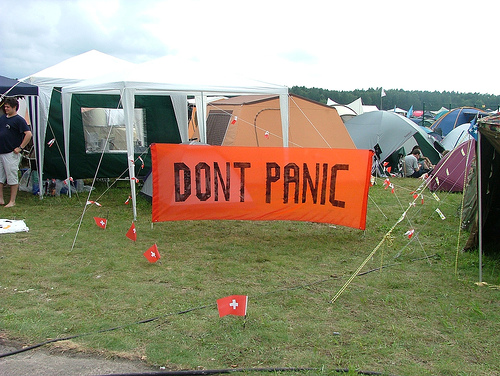
Don’t Panic

The first thing you should do is change your password. That way you know that there won’t be anyone working against your fix while you take care of the problems on the blog. Be sure it is a strong password that has nothing in common with the last one you were using (Tool: strong password generator).
dont panic if your wordpress site is hacked
If you are using WordPress, you also have to change your secret keys so they cannot remain logged into the account. Once you have all that done, log out, clear cache and cookies and log back in.

Next, put the site in maintenance mode. That way you won’t have visitors facing the problems you have encountered while you fix them. This is especially important if you are experiencing a redirect that takes readers to a third party site. Or if you have ads showing up that contain malware and users might accidentally click on.

Identify the backdoor. Backdoor is a method of bypassing normal WordPress authentication. Here’s an awesome guide on fixing a backdoor in a hacked WordPress site, again, courtesy of WP Beginner.

Finally, it is time to take care of the blog itself. Your best bet is to delete everything. Including the core files if you are using WordPress. Yes, this is a major hassle. But it is the only way to be absolutely certain that you get every bit of malicious code. Just going through all files manually will probably not take care of the problem. You may miss a bit of coding, fail to see a file that has been compromised, or a backdoor could still exist to allow the hacker (or hacking software) to slip back in.

If you don’t have a backup of your site, you are facing a dilemma. You could try to save as much as possible before deleting, but this could still run the risk of reinfection by malicious coding, or even infect your desktop. Not to mention the risk that exists to your readers if something goes wrong. I would recommend copy/pasting as many posts as you can into .doc files, then deleting everything on the actual blog and reposting the text fresh. Of course, you will have no choice but to find or reupload all photos.

Conclusion

Yes, this is all a huge hassle. But if you want to keep your site running, and it has experienced a hack, you have no choice. That is why it is so important to backup all files regularly, at the very least once a week. If you update often, then several times a week. This will allow you some peace of mind, as you know that you will only have to delete and then reinstate the data if a problem occurs.

Have you ever had a blog hack? Tell us about it in the comments.

Author’s Bio: Ann Smarty is the (guest) blogger who founded My Blog Guest, the free guest blogging and content sharing platform.

Image Credits: 1, 2.

Filed Under: Web Design Tagged With: bc, hacked, hosting, restore, WordPress

Beach Notes: The Creative Impulse At Work

June 9, 2013 by Guest Author

By Des Walsh & Suzie Cheel

The Creative Impulse At Work

I am always fascinated when I see structures like this on the beach. It reminds me of how innate our desire is to be creative, even with the simplest found objects from nature.

What stimulates your creativity?

The Creative Spirit at Work
– Des Walsh & Suzie Cheel

Suzie Cheel & Des Walsh

Filed Under: Motivation Tagged With: bc, creativity, inspiration, nature

Turning Customers Into Advocates

June 7, 2013 by Rosemary

John Caplan, founder and CEO of OpenSky.com, shares his tips on how leveraging the web’s social tools to build a community around your brand and engage directly with shoppers can grow your business.  

As an entrepreneur, I know how important it is to build a community of people around your business.  As a business owner who is passionate about growing emerging businesses, getting your business online to leverage distribution and build relationships is an essential tool. 
 
At OpenSky, we strive to empower emerging brands to grow their businesses by engaging consumers.  We make sure to communicate and constantly listen to the concerns, questions and feedback from our merchants and our members, which helps us build a platform that works for people we serve.
 
Leveraging the web’s social tools to build a community around your brand by engaging and communicating directly with your shoppers can grow your business.  Here are some ways to help you achieve this.
 

1. Social media makes it easier than ever to connect directly to customers.

Establish your brand on social channels – Facebook, OpenSky, Twitter, Pinterest — where you can have active, real-time conversations.  It’s not only a great way to share updates but often times, it’s that real time feedback from customers that can help you resolve a problem before it impacts a huge number of people.  This will serve as an effective way to give people a great experience because then they share it with their friends and their friends share it with friends and so on.  There is nothing more effective for marketing than a truly happy customer.
 

2. It’s essential to listen to customer feedback on social outlets and respond right away.

  However, as it important as it is, make sure that isn’t the only way you’re getting direct feedback from customers about how you’re doing.  Ask for it anytime an opportunity arises.  From packing slips, to invoices, customer surveys and emails – there are numerous opportunities to ask your customers for feedback and offer a place where they can provide it.
 

3. In addition to blogs and social networks, invite members of your community from customers to partners and vendors into your offices, stores or workshops.

  Whether it’s for a party, focus group, or to demo a new product – creating the face-to-face connection can be invaluable for creating brand loyalty.
 

4. One of the most difficult and stressful elements of growing a business is expanding your products or services. 

Adding a new feature or service can strain your core business and potentially alienate existing customers, especially in the beginning. Open the lines of communication and bring your community into your growth strategy by talking to them during the process.  Working with your core customers early on to help them understand new products and services will keep you on the right track, provide valuable insight and make your loyal customers more forgiving of any mishaps in the road to success.

Author’s Bio: John Caplan is the Founder and CEO of OpenSky, the social network for shopping where members shop with their friends for unique, artisanal finds. Prior to OpenSky, John was the CEO of Ford Models. In five years, he rebuilt the agency, tripling its size and value while expanding it to include Ford’s artist divisions and digital media business. During the late 1990s, John served first, as CMO of About.com leading the brands growth and later as President of the About Network before selling the company to Primedia in 2001 for $500+ million. Caplan has made numerous appearances as a business expert on television shows including CNBC, MSNBC, Bloomberg TV, Reuters TV, TODAY Show, WNBC-TV and many others.

Filed Under: Customer Think, SOB Business, Successful Blog Tagged With: bc, customer-service, entrepreneurship, feedback

10 Step Half-Year Blog Checkup – How YOU Doin?

June 6, 2013 by Rosemary

It’s almost the halfway point of 2013–time to take stock and make sure you’re putting your best foot forward. Remember those shiny dreams and goals you came up with in January?

To quote my favorite Friend, Joey, “how YOU doin?”

Let’s find out by running through 10 quick checkpoints. There’s still the whole second half of the year to do a course correction and kick butt.

10 Step Half-Year Blog Checkup

  1. Go into your Google Analytics and find your most popular post. Use that as a jumping off point for more content. Update the topic, do a “part two,” or simply re-promote it via your social channels. You might be able to get more juice out of it.
  2. Run a poll or send an email to get feedback from your readers about what they need. Use the results to guide your writing for the rest of the year.
  3. Make sure you are up to date with your software and plugins. When’s the last time you updated your WordPress? Are there better plug-ins you could be using? Do you need to renew any licences?
  4. Check current best practices for your sidebar, ads, and extra content. Is it time to delete some of those old conference badges, test removing your social profiles, or add a promo for your new e-book? There’s a great blog/community review video at Live Your Legend.
  5. Do you need to update your logo, tag line, or branding? When is the last time you refreshed your graphics?
  6. Is your editorial calendar set for the rest of the year? You don’t have to have a headline for every day of the week, but it might be good to sit down and come up with broad topic areas for each week or even each month. You’ll be sitting pretty if you feed your stockpile of headline ideas at the same time. How is your blog draft “slush pile?”
  7. Check in with your goals from the beginning of the year. How have you done? Do you need to make any course corrections? Pat yourself on the back if you’ve checked any big goals off the list already. It’s so important to take time to celebrate your wins. If there’s something on the goal list that you haven’t accomplished, think about whether it was a good goal to begin with.
  8. Update your social sharing tools and make sure you’re taking full advantage of new developments. All of the major social networks have undergone major changes since January. There are now verified Pinterest pages for your business, Facebook has changed its cover photo policy to allow more text, and Twitter now has interactive “cards” available to embed in blog posts. Have you looked at List.ly yet?
  9. Get up to speed on disclosure regulations. Are you compliant? It might be time to take a moment and read the updated FTC guidelines.
  10. Is your mobile experience optimized? Check your Google Analytics again and note how much of your audience is reading your blog on a mobile device. My guess is that it’s a big chunk! Take time to ensure that your site is mobile-ready.

Let’s use the rest of 2013 to inspire each other to success!

Author’s Bio: Rosemary O’Neill is an insightful spirit who works for social strata — a top ten company to work for on the Internet . Check out the Social Strata blog. You can find Rosemary on Google+ and on Twitter as @rhogroupee

Filed Under: Blog Review, Checklists, Strategy/Analysis Tagged With: bc, Blog Review, goals, strategy

How to Cut Down on Business Travel Expenses

June 5, 2013 by Thomas

As a small business owner, you or your employees may need to do quite a bit of business travel.

So, it should not come as a surprise that this can add up to be a hefty expense, leaving you to maybe think it’s one area where you could cut some spending.

Over the past years, travel expenses, from airlines to hotels to dining, have increased.

But how can you cut travel expenses while still meeting the needs of your clients?

Check out these ideas to help you do both:

1.     Air Travel

*  Carry on your bags instead of checking them. Often airlines charge a fee for checked bags and you can save a bit here, plus it saves time in the airport.

* Use the long term or off site parking at the airport instead of the high cost hourly parking.

* Check around for flight differences and book the cheapest, even if it’s not the most convenient. Often midweek travel is cheaper than over a weekend (though that is not necessarily true of hotels). See if flying into a close by airport is worth it to save money even if it’s not the absolute closest.

* Join frequent flyer clubs.

* Think about special airline benefits. Airports offer special rooms for airline members that can be earned or purchased. Maybe you have to pay for these, but could it benefit you because you and your employees can get quality work done there or possibly have meetings?

2.     Ground transportation

* Though renting a car seems like a big expense, it’s cheaper than taxis and more efficient than public transportation. Join loyalty programs with rental car companies and gain some benefits here, too.

* If you don’t have a rental car, see if your hotel provides shuttle service to nearby locations and the airport – again, taxis add up, best to avoid them.

* With a rental car, fill it up yourself before turning it in. If you don’t, the car company can charge an arm and a leg to fill it up.

3.     Hotels

* Just like with airlines, check around for deals and specials. Often depending on when you check in and out, your rates will differ substantially. Hotels run specials, and if you join their loyalty groups, you can also sometimes get special treatment.

*  If your hotel offers free breakfast – take it! Not only is it convenient, it will save you the cost of breakfast and transportation.

4.     Have clear, stated policies

* Your employees need to know what they can spend and how it needs to be turned in. It’s best to have these written out and on hand so there is no discrepancy.

* Do you require receipts from taxis and restaurants? Do you have a maximum per diem or do you want to set a price per meal? Do you need to okay arrangements before final booking?

* Be clear in what is reimbursable and what’s not. Can employees have a drink with dinner or is that not part of your expense plan? What is the policy for taking clients out to meals?

Travel is an important, often necessary, part of running a business. It’s costly, though, and you have to make sure it’s not costing you more than it’s worth.

Keep your spending in check and you should be able to keep your customers happy and your expenses from going through the roof.

As a business traveler, what do you do to save some money?

Photo credit: apex-portal.com

About the Author: Heather Legg is a writer who covers topics from small business to how to remove news articles from Google.

Filed Under: Business Life Tagged With: Airlines, bc, expenses, small business, travel

  • « Previous Page
  • 1
  • …
  • 66
  • 67
  • 68
  • 69
  • 70
  • …
  • 959
  • Next Page »

Recently Updated Posts

Is Your Brand Fan Friendly?

How to Improve Your Freelancing Productivity

How to Leverage Live Streaming for Content Marketing

10 Key Customer Experience Design Factors to Consider

How to Use a Lead Generation Item on Facebook

How to Become a Better Storyteller


From Liz Strauss & GeniusShared Press

  • What IS an SOB?!
  • SOB A-Z Directory
  • Letting Liz Be

© 2025 ME Strauss & GeniusShared