Successful Blog

  • Home
  • Community
  • About
  • Author Guidelines
  • Liz’s Book
  • Stay Tuned

6 Tips to Boost Your Productivity

March 4, 2013 by Rosemary

By John Murphy

I don’t think I have ever met anyone who does not want to be more productive each and every day.

The day just never seems enough to get all you want done! Recognize this? Let’s be honest, it is an issue for all of us and is a constant challenge that comes up in all my coaching work.

Books have been written, courses delivered and seminars run on this subject – many wonderful (some not so much!) but the volume of advice can be so overwhelming that it actually inhibits your productivity. Not quite what you were looking for!

So, to assist in the elimination of the overwhelm I have set out my 6 Tips to Boost Productivity, which, if undertaken, will vastly improve your productivity and give you that sense of achievement at the end of the day that you are really seeking.

1. Be Razor Sharp About Priorities.

You can never be effective unless you have clarity about your priorities – otherwise you are just engaged in the next activity that lands on your desk or in your head. Busy? Yes. Efficient? No!

To get really clear about your priorities you need clarity about your goals so that you can decide if the specific activity you are undertaking is moving you towards the achievement of your goal.

Your priorities are those actions that will support the delivery of your goals. So, those things on your to do list today – do they progress your goals or not? If they don’t why are you doing them?

Get your priorities crystal clear!

2. Schedule Your Activities

This is fundamental to any discussion about time management and effectiveness! Schedule your activities as if they are appointments with yourself – and make that time as sacred as a meeting with your most valued client.

If one of your priorities this week is to prepare a performance review of your staff, or draft a proposal to a prospective client, then do not leave that activity on some to do list to do when you find time. Be disciplined about it and schedule to do it at a specific time and then be resolute about adhering to that.

An item on your to do list is an aspiration, a scheduled activity is a commitment! Being productive is all about commitment!

3. Be a Continuous Learner

Never be content about how productive you are – we can all get better! So have an attitude of continuous learning about ways to improve productivity. Now, just to be clear, I am not suggesting you spend your life trying out different systems for productivity. What I am saying is that new technology is being developed all the time that can really help your productivity, and don’t just ignore it. Check it out to see if it will improve your productivity – if it does, then incorporate it. If it doesn’t just dump it!

For example, I have become a recent convert to Evernote – a great tool to capture “stuff” on the go that I can refer to later. It really does help me to be more productive – I can have folders for various pieces of information I want to keep to look at later, and I know it is all in one place.

4. Celebrate Progress.

Every day celebrate your progress! Sound naff? Not at all! There is great value in reviewing your day and celebrating your successes and the progress you made towards your goals.

It is the fuel that boosts your energy for the following day.

5. No Multi-Tasking

I take real exception to those who laud “multi-tasking!” I do not believe it is a male/female thing – I believe it is simply a bad habit we can get into and then justify as a virtue!

Multi-tasking has to be inefficient because we are not giving full attention to any one thing, and consequently the output will reflect the input, which is divided and lacking focus!

Do one task at a time, and do not move to the next one until you have completed it. If you have scheduled the time for that activity, then give it 100%.

6. Restrict Your Time on Email

Email is one of the great tools we posses but it is also one of the greatest time stealers and inhibitors to productivity.

How often do you check your emails every day? Go on, be honest!

Checking your emails that frequently is only ensuring that your agenda is being run by everyone else – you want to know who has sent you what, and then you find that really interesting link.. ! 15 minutes later you realize that you are not doing what you should be.

I heartily advise that you allocate 3 periods in the day to check your email – and that is it! The world will not stop turning because you have not checked your email for 2 or 3 hours! Be in control of your time, not reacting to other people’s priorities.

We all can do something about our own productivity – and it is our responsibility to do so. So, now that you have read this – what are you going to do? And when are you going to do it?

Author’s Bio: John Murphy a business coach who writes about what makes executives and business owners more productive at www.johnmurphyinternational.com. You can find him on Twitter as @jmicoaching.

Filed Under: Business Life, Productivity, Successful Blog Tagged With: bc, Motivation, Productivity

SOBCon Chicago 2013: Who’s Your Ideal Customer?

March 1, 2013 by SOBCon Authors

Post by Britt Raybould  (thanks Britt!)

Over the next few weeks, we’re going to give you a taste of what’s to come in Chicago. First up, the multi-talented entrepreneur and author Ric Dragon.

Last fall, we had the pleasure of learning firsthand from Ric at SOBCon NW in Portland. The response was so positive that we were thrilled when Ric agreed to share his insights and expertise with the Chicago crowd.

Below you’ll find a video of Ric doing his thing in Portland. If you can’t see the video, click through here to watch.

Pretty cool, right? It’s hard not to get excited when you hear Ric speak.

Now, we know it’s hard to think about what’s happening next week, let alone make plans for May. (That’s two months away!)

But here’s the deal, if you haven’t secured your seat at SOBCon Chicago for this May, you’re taking a big risk. You not only want to be in the room, you need to be in the room.

Besides being a room filled with some of the smartest people you’ll ever meet, you’ll also have the pleasure of hearing from some of the best speakers out there, including:

Chris Brogan
Carol Roth
Sonia Simone
Barbara Jones
Alli Worthington
Sean Ogle
Dianna Mullins
Drew Marshall
Jeannie Walters

If you still need convincing (seriously?), we’ll do our best to convince you of why SOBCon is the best event you can attend for yourself and your business in 2013.  See you next week.

Sign up for SOBCon Chicago 2013

Filed Under: SOBCon Site Posts Tagged With: bc

How to Boost Blog Visits: Make Your Blog into a Mobile App

March 1, 2013 by Rosemary

By Natalie Bracco

Just because you know how to write an interesting blog that gets visitors to come back time and time again doesn’t necessarily mean that you know how to make your blog accessible to people who access online content through mobile devices. Without a tech background, it might seem impossible to turn a blog into a mobile app. Luckily, with the right tools, even a newbie can make blogs mobile-friendly and reach even more readers.

Make Your Own App with Conduit Mobile

Conduit Mobile

Creating your own app might sound intimidating, but you don’t need a degree in computer programming to make one that puts your blog into the hands of people using mobile devices.

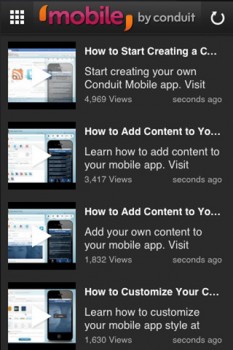
A free tool called Conduit Mobile will do most of the work for you. Conduit Mobile takes content directly from your blog and makes it easy for mobile phones to access. You can even add YouTube videos, RSS feeds, and other social media to stay connected with your readers. Conduit Mobile is currently free for all users.

Go Mobile with GoMobi

GoMobi

GoMobi is similar to Conduit Mobile, but it’s slightly different in that it creates a .mobi domain for your site’s registrar. With GoMobi, you can quickly add your content to a mobile app that lets readers view your pictures, videos, and words. If you can upload images to your website, then you can use GoMobi. GoMobi even adds a link that will take visitors to your full website, allowing them to peruse all of the content that you have available. To use GoMobi, you have to purchase it from one of the product’s authorized dealers, such as eNom or DigiWeb. Typically it will cost about $7.50 per month.

Easy Integration with Uppsite

Uppsite

Uppsite claims that it can take your Web content mobile within two minutes. Its designers created it specifically it to work with popular publishing platforms like WordPress and Twitter, so you can integrate them into your mobile site easily without any technical knowledge. Uppsite also lets you add advertising to your mobile site without bogging down your content with ugly images. That could easily help you make more money. Uppsite comes in three plans to choose from: Basic, Premium, and Deluxe. The cheapest plan costs $9.99.

Use a Plug-in to Reach Mobile Readers

MobilePress

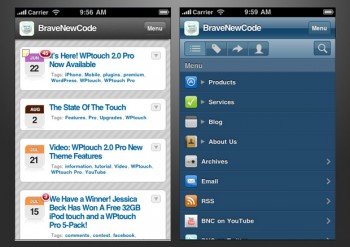
If you already use WordPress for your blog on your website, then you can add plug-ins that will instantly make content readable on smartphones. The basic version of WPtouch makes your WordPress content available without slowing down your website. If you want to maintain the look of your current site and access additional features, then you might need to upgrade to WPtouch Pro, which comes in at $39 per site.

MobilePress is another plug-in that makes your WordPress content easier to see and use on a mobile device. It, and several other plug-ins like it, is totally free.

Mobile devices are quickly becoming the most popular way for people to access online content. What steps have you taken to make sure all the people out there have a good experience when they visit your site?

Author’s Bio: Natalie Bracco writes about technology and blogging, especially on devices like LG cell phones. She also writes about finance and lifestyle. You can follow her on Twitter @NatalieBracco.

Resources

  • http://lifehacker.com/5809888/how-to-make-a-blog-or-site-into-a-mobile-app-without-programming-knowledge
  • http://www.bravenewcode.com/product/wptouch-pro/
  • http://wordpress.org/extend/plugins/wptouch/
  • http://gomobi.info/take-a-tour/

Filed Under: Tools Tagged With: bc, mobile, plug-in, tools

Clarify Your Site’s Purpose and Stop the Terminator

February 28, 2013 by Rosemary

The average web page visit lasts less than one minute.

Humans are programmed to sort everything they see into familiar labels, or buckets. Our brains scan the immediate environment to find threats, food, competitors, and potential mates. Like the Terminator searching for John Connor, we make fast assessments and move on.

The same thing is happening with visitors to your blog or website.

You’re doing the same thing right now reading this blog post. You read the headline, decided it was applicable to your situation, and started scanning. Maybe these quick bullets will keep you reading.

Tactics for Building a Useful Web Presence

  • Use your Google Analytics to view landing and exit pages. If certain landing pages lead to an immediate exit, tweak the content. Keep testing what is resonating with your visitors.
  • Have a clear path. People don’t usually land on the home page and click a giant “buy” button immediately. Have a plan for how you want visitors to progress through your information, and where you want them to end up.
  • Use markers like arrows, visual flow, friendly text. Design can’t be an afterthought. In “Terminator” mode, people need simple visual clues about where to click next.
  • Make your “ask” very clear. Is your site supporting a business? What are you selling? Is it a hobby/journal blog? Are you supporting a non-profit? Don’t make your visitors guess.
  • Declutter. Set up a routine review of your blog or website, with the intention of taking out anything that’s not crucial. Old badges, social buttons, ads that aren’t getting clicks, be ruthless, like you are with your closet.
  • Stop sending people away to other sites. You may have noticed that a lot of the big bloggers have started removing their “follow me on…” buttons from the home page (replacing it with email capture instead). Consider whether you really want to send your visitors away like that.
  • Check your mobile experience too. Whip out your smartphone and look at your site. Is it fugly? Do something about it! Here’s a handy post from Shonali Burke if you’re running WordPress.

Why do you have a blog or website? How do you make that clear to your visitors?

Author’s Bio: Rosemary O’Neill is an insightful spirit who works for social strata — a top ten company to work for on the Internet . Check out the Social Strata blog. You can find Rosemary on Google+ and on Twitter as @rhogroupee

Filed Under: Blog Review, Checklists, Strategy/Analysis, Successful Blog Tagged With: bc, Blog Basics, Design, retention, traffic

Quick LinkedIn Checkup

February 27, 2013 by Rosemary

By Charles Mburugu

LinkedIn is the world’s leading professional social network. With a membership of almost 80 million, it has become a popular marketing tool for many businesses and individuals. Here are some tips which will help you make the most out of LinkedIn.

Your LinkedIn Profile

Your LinkedIn profile is basically an online resume. Therefore, it needs to be updated and complete. Some of the details which need to be completed include:

  • Your profile summary
  • Your current position
  • Two past positions
  • Your education
  • Your specialties
  • At least three recommendations

Be sure to add a clear, professional-looking photo of yourself to the profile. A good photo will not only reveal your identity, but will also be a vital aspect of your personal brand.

Choose Your Keywords

Many professionals and businesses are using LinkedIn to identify top talent. Therefore, you need to think about what keywords do you want to be known for. Carry out some research to find out which keywords would be most suitable for your skill set, and make sure these words appear prominently on your profile. This will result in a high page rank, thus ensuring better visibility for your profile.

Customize Your URL

Make sure your name appears in your LinkedIn URL. This will make you more visible in the LinkedIn search bar, as well as in search engines. To make changes, go to “edit profile”. Scroll down to the “public profile” section, click on the edit link and add your name to the URL. If you have a common name, you could consider adding a period or hyphen between the first and last name.

Add Your Full Experience History

Don’t leave out any details of your work history. A full history gives a clearer indication of your abilities. Remember to include targeted keywords to enhance your ranking. You can find many free templates online which will help you create your digital resume. Once complete, the resume can then be imported to your profile.

Make Use of LinkedIn Applications

You can enhance your LinkedIn experience by using one of the many applications available. Events and TripIt would be useful for people who travel a lot and want to share their experiences. People with Twitter accounts or blogs can use WordPress or Blog Link to add posts to their LinkedIn profiles. SlideShare is ideal for people who would want to share presentations with others.

Recommendations

To leave a good impression on other professionals, make sure you have positive recommendations on your profile. Get in touch with people you have worked with before and ask them to put in a good word for you. The more recommendations you have, the more credible your profile will be. Don’t forget to also offer positive recommendations to other people. They will be grateful and might even return the favor.

Have you brushed up your LinkedIn profile lately?

Author’s Bio: Charles Mburugu is a HubSpot-certified content writer/marketer for B2B, B2C and SaaS companies. He has worked with brands such as GetResponse, Neil Patel, Shopify, 99 Designs, Oberlo, Salesforce and Condor. Check out his portfolio and connect on LinkedIn.

Filed Under: Marketing /Sales / Social Media Tagged With: bc, expertise, LinkedIn, profiles, resume

Does Your Accounting Software Account for Success?

February 27, 2013 by Thomas

While saving money is a great thing for the small business owner, trying to do that at the cost of service to your company can come with a price. Unfortunately, that price over time can be lost business.

For those owners who are looking for an accounting software program, be it for the first time or to replace the one they currently have, a number of factors should always go into the decision making process.

Meantime, those business owners looking to outsource their accounting needs should do so with the idea that such a decision should be well researched. If you choose the wrong accounting provider, you could be left with more than just financial headaches.

In searching for the right accounting provider at the right price, remember to:

* Determine your needs – What got you to consider outsourcing your accounting needs in the first place? For many small business owners, their workforce size is manageable enough that they can hire an in-house accounting person and/or even oversee it themselves. In the event the company grows over time, then they can outsource the need if it becomes too big a responsibility for the person on staff. Take a look at your current needs, your projected growth in the next year or two, and if you will save more money by keeping the task in-house;

* Shop around – If you pick and choose the first accounting company you come across, you may get lucky, then again you may not. Just as in shopping for other important needs for your company, choosing an accounting provider demands the right amount of time too. Look at each company’s financial stability, customer service record, any issues with the Better Business Bureau (BBB), rates, and its ability to meet your needs. At minimum, get anywhere from 3 to 6 quotes, giving you a number of providers to choose from;

* Look at more time in the office – In the event you do go with outsourcing your accounting needs, think of the time and manpower you free up in your office. Presumably, one or more of your workers has been or would have been doing accounting tasks for you. With the need outsourced, that person or persons can direct their efforts to other responsibilities. You also presumably put your accounting needs in the hands of a company that does this on a regular basis, meaning you should get quality service in turn for your monetary agreement with them. By outsourcing, you also lessen the need by one employee (at least) to have someone on hand strictly do accounting. You not only save on salary, but also health benefits, etc.;

* Impress upon security – Finally, whether your accounting needs are handled in-house or outsourced, security should never be taken for granted. Given you are dealing with personal information of employees including incomes, Social Security numbers, addresses and more, security needs to be prioritized. Make sure any outside provider makes security a priority, preventing you and themselves from running into any potential legal issues.

If this is the year you decide to outsource your company’s accounting responsibilities, make it your business to run the numbers on which provider best fits your needs.

Photo credit: Zodiacproedge.com

Dave Thomas covers a wide array of topics for various websites, including gray hair treatment.

Filed Under: management Tagged With: accounting, bc, outsourcing, small business, software

  • « Previous Page
  • 1
  • …
  • 81
  • 82
  • 83
  • 84
  • 85
  • …
  • 959
  • Next Page »

Recently Updated Posts

Is Your Brand Fan Friendly?

How to Improve Your Freelancing Productivity

How to Leverage Live Streaming for Content Marketing

10 Key Customer Experience Design Factors to Consider

How to Use a Lead Generation Item on Facebook

How to Become a Better Storyteller


From Liz Strauss & GeniusShared Press

  • What IS an SOB?!
  • SOB A-Z Directory
  • Letting Liz Be

© 2025 ME Strauss & GeniusShared