No Kidding! Immediately!!
I’m a writer, not a gamer. I don’t need much from my computer. A few partitions to make feel safe when I wander the Internet blogging. Safety from nasty creatures that want to attack and room to move between multiple windows and social networks.
In the last few weeks, my computer has let me know that I’m asking too much of it. I stripped down the processes and even so, I was having to keep a watch on my memory. It was a pain. Things were slow.
It was serendipity that I came across this little darling that I have since shared with others who have had the same experience as I did.
Great Find: MemoKit by Software Benefits Inc.
Under US$30
Permalink: http://www.memokit4all.com
Target Audience: PC users
Content: I was having a problem with my virtual memory. I shut down all extraneous background processes, stripped my start up menu, and kept my cache clear. Yet I was still having memory problems that were slowing down my productivity and my sense of humor.
Enter a well-targeted program that does one thing well, MemoKit. I loaded it up and I was sailing again. This program’s basic function is to keep track of memory, give a view into memory leaks, manage them and allow me to it manually at a moment of severe memory shortage. It’s cool too. Just look.
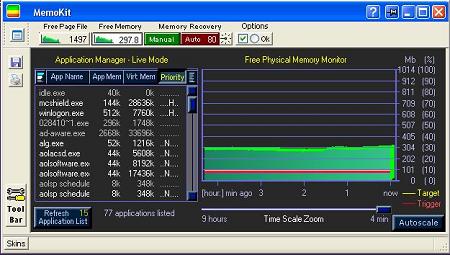
What does it do? This from the easy read-me manual that is under that question mark in the nav bar.
Windows Page (Swap) – Basics
A virtual memory Page File (Swap File) is used by Windows whenever it is necessary to move (swap) some of the information from the Physical Memory (RAM) and store it temporarily on the hard disk. When the stored information is necessary, it is transferred back to the RAM again, and other information takes its place in the swap file. There is a permanent information exchange between RAM and swap file, which enables the PC user to work with more programs at a time than it is allowed by RAM only.
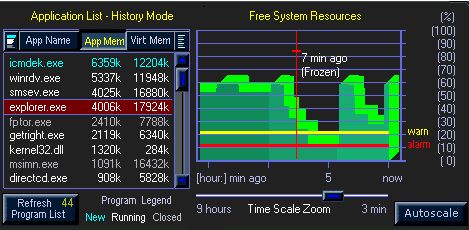
By moving the red line cursor across the graph to where the memory drops, I can see which applications are sucking resources, close them to see whether Windows lets go, or whether the resources hang in memory. (Programs that don’t release memory require that the machine be rebooted to get that memory back, but the culprits are identified.)
A trav icon keeps track of the resources and their state of us. A calculator can be used as a pullout. Lots of nifty details are fun to delve into.
If you’re having any such issues, get this program. I’ve had it for days and it’s lovely. I delighted with it.
–ME “Liz” Strauss
Related
Sandy’s Great Graphic Find: PictureTrail
Great Find: A Smart Banner to Boost Traffic
Sandy’s Great Graphic Find: IconArt
