This is a how-to post. I’ll keep this post simple.
Background
I think I am a lazy person actually. Whenever I write a blog post, I know that the next thing I must do is to tweet about it in my Twitter account so that I can let my followers know. Such a task can be leveraged to the computer to help us do it since it is just telling our twitter followers about our new blog post.
Requirements
- You must be using a WordPress platform.
- You must be an administrator in order to configure this properly.
- It is ok if you are using the free wordpress.com platform, or if you have installed wordpress in your own domain name.
Let’s get it started!
Step 1: You will need to download “Twitter tools“.
Step 2: Unzip the contents of the entire folder “twitter-tools” and upload into your wp-content/plugins/ directory. (You’ll need to know how to use FTP)
Step 3: Go to the Plugins page in your WordPress Administration area and click ‘Activate’ for Twitter Tools.
Step 4: Go to the Twitter Tools Options page (Options > Twitter Tools) to set your Twitter account information and preferences as shown in the screenshot below.
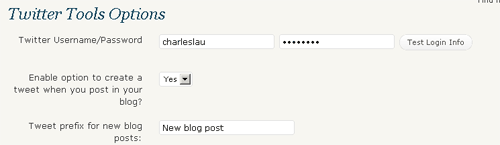
This is my way of tweeting automatically after adding my new post. What other methods have you used?
This post was written by Charles. He has been an Internet reviewer since June 2007. He pours his passion for Internet marketing and Internet branding into his Twitter account actively at @charleslau,
