by
Franklyn Stephen

Social media reporting in Google analytics
Google analytics provides a reporting which would make you understand little bit easier that efforts you put in social media marketing are worth the investment. Also it gives you in-depth analysis about which social channel gives value to your business and which plans are most effectual.
Business metrics with Social Media
These new reports are framed in a way to span the gap between business metrics and social media. Using these reports, you can assess the traffic/clicks comes to your site from different social channels and how they leads to conversions, future conversions, and where the users navigate within your website and many social activities that are going on and off the website which enables to do in-depth analysis and take further actions in social media for the growth of your business.
If you are unaware of these updates, check through as you log in next time. Here are few things that you can keep an eye.
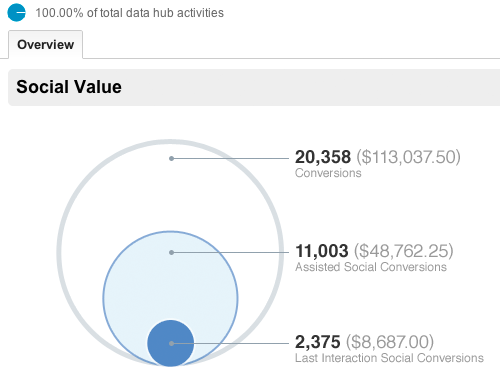
By the above overview report, we can have a quick look at how much conversions has been produced by social channels. Also it gives you comparison between the money invested and profit obtained from all your goal completions obtained through social referrals.
Social Channel Conversions
We can evaluate the conversion rates of each social channel whereby it allows marketers to measure the value of each social network that drives profit and supports your business. This conversion report gives influence of the social content whether it may be from facebook conversion post, or Google plus post or stumble upon post or new video.
Social Plugins Report
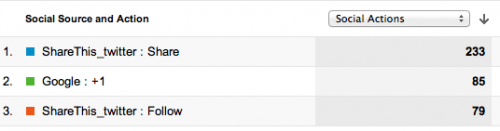
Social plugins report gives good insight of how the article pages of website is influenced by the social media through the social buttons (like facebook, Google plus, twitter) being clicked on the article page to share them. By this, clear picture can be availed of which articles are most engaged, interesting among the users and how the users are following socially with your content on and off your site.
Activity stream: What is going on outside of your website?
All other reports would depict the social content as how it is being engaged inside the website, While this activity stream report will present the activities that are carried out in the social content off the website across the social web.
Social content shared publicly as how it is shared, where it is shared (through facebook, twitter, Google plus, stumble upon etc), what people have commented and URLs of all these sources can be seen. Presently activities are covered for Google+ and the list of social data hub partners is growing which includes Meetup, Badoo, Hatena, Echo, etc…These new reports can be availed through standard reporting tab.
Sources of Social visits
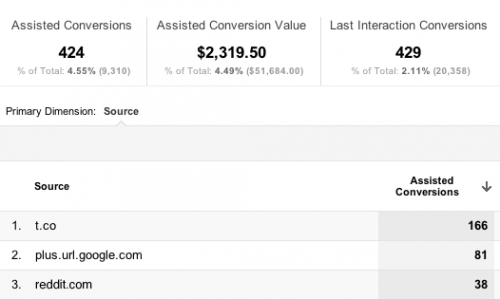
This report gives visits received to the site through different social referrals and how users behave in the site, as shown in the parallel comparative picture . The in-depth details of conversion metrics of each social network and how the content is engaged and interacted among the people is depicted. This report turned out to be handy, because whether visitors are getting the desired outcome in the website can be examined here, which is essentially and really you want to know.
Focus on Content
Recently, Google analytics has brought few updates which enable the users to get adept understanding about their social impact. For the long time this was lagging being unable to find how much the content was socialized. But now Google analytics is able to measure the social reach of content/website/product/services. Notwithstanding the availability of tools on hands, social reach is all about how the content is being used and shared. Keeping all these in track, Google has released few updates designed in its analytics tool. Two significant new updates are centered on assisting the users to get clear understanding on how the content is socializing online and how itâs being viewed across different devices.
Content Experiments
Users can experiment content to test and improvise the website. Site owners can create different versions of a page say A, B, and C experiments to measure how effectively each versions get the visitors to convert. Google analytics already have this facility called website optimizer. It is now called as âcontent experiments’ and incorporated into analytics. Website optimizer isn’t a standalone product any more from August 01_2012. Content experiments assists to hone toward the goals that have already set in the Google analytics which will help to find out which page design and content is most effectual.
To start up with these content experiments, open Standard Reporting of Google analytics, and in the Content section, click Experiments.
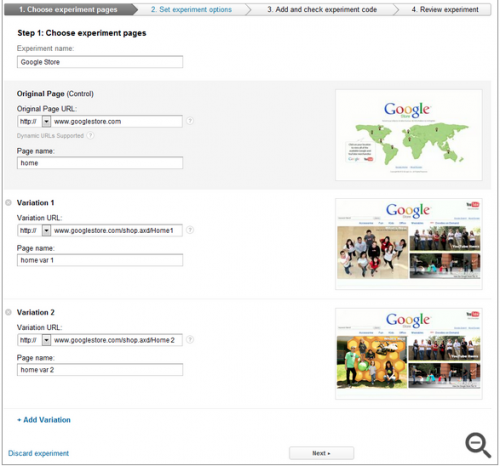
Here you have to go through four steps to complete the set up wizard.
Browser-Size Analysis
The visible portion of a web page is very smaller than the actual screen resolution for the users who are accessing through mobile platforms due to many toolbars and welters. Essential factors for conversion rates are items that are above the fold on a web page. To find the percentage of visitors for whom the page items displays below or above the fold is really baffling. Therefore Google analytics facilitates users by creating a visualization to ascertain which parts of page are viewable to which percent of visitors.
Go to the Content section of Google Analytics, and click In-Page Analytics. Then click on the browser-size to see the shaded portions of the web page that are underneath the fold. Now click in at any place of the screen to find how much percent of visitors can view it or just hold the threshold percentage by using the slider.
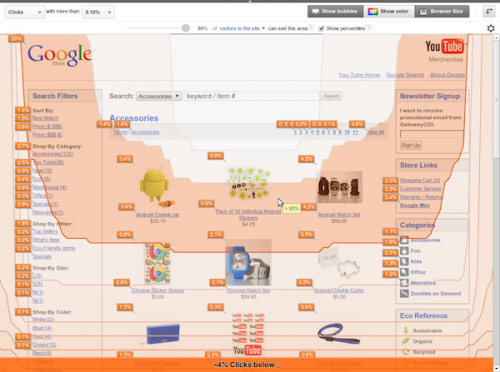
Clicking on show-percentiles will display the summary visualization of several percentiles. This depiction will help to get the clear picture of how the browser sizes are dispersed among different devices. For instance, if you select to compare all the visitors of mobile device traffic, solid difference can be noted.
Concentrating on the good content and where the content flows is so essential to the sound health of any website as well as the experiences it gives to users. Thus far, web analytics focused on page clicks/visits and traffic sources to get the picture of what is working and what not is working in the website. Although it is significant, it is also as important as to perceive how content in the each page of the website impress the userâs/visitors. With this new website optimization tool, more mystification comes into picture!
Conclusion
These new reporting styles will significantly and ultimately help the marketers to generate the desired results who want to produce solid numbers and assist them in furthering their marketing efforts. Nevertheless, it is important for the company to set the fair and sensible goals which would really convert them into indispensable and worthwhile.
Franklyn Stephen Issac.J is a webmaster having substantial four years of experience in analytics, Search engine optimization, social media marketing, SEM and PPC. His achieved results will highlight his profile as one having great passion for analytics and ecommerce solutions. More than 50 keywords ranked prove his strong insight knowledge on keyword research and analysis.
