Successful Blog

  • Home
  • Community
  • About
  • Author Guidelines
  • Liz’s Book
  • Stay Tuned

Welcoming the Offline Customer: Does Your Blog Create A Good Impression?

August 14, 2008 by Guest Author

by Scott McIntyre

Scott McIntyre — The Avid Blog Reader Without a Blog

Last week, I suggested ways in which your blog could potentially benefit from participating on Social Media sites, and highlighted 10 Social Media tips for connecting with non blogging customers.

From your comments, it seems that this is an area of promotional activity which many of you would like either to develop more fully or to engage in for the first time.

I know that Liz herself is passionate about helping us all to better understand the reality of Social Media. Liz suggests maintaining a degree of perspective about Social Media and to think about whether your online offering is what people are actually searching for.

So, what might offline customers be looking for when they come to your blog, or website, for the first time? What would you like them to discover when they arrive? It would be great to read your views in the comments section.

Today, I want to look at those features of a blog which can influence how a first time, non-blogging visitor reacts to your site.
Ideally, you want to create a positive impression, to be welcoming. Make the offline customer feel ‘at home’ on your blog from the outset and you’re well on the way to connecting with them successfully.

Is Your Blog Appealing to the Non-Blogging Customer?

For all of you, I’m sure your blog is the result of much strategy development, planning, and hard work. You’ve invested resources- time, effort, and money- into developing an online offering to attract your target audience.

From the overall design to the little finishing touches, you’ve thought long and hard about ways to make your readers’ experiences as positive as possible. This can be achieved by addressing issues relating to usability and accessibility, amongst other factors.

But I wonder whether you’ve ever taken the time to see your blog from the perspective of a non-blogger? Perhaps you’ve asked a non-blogging contact to review your blog and give you feedback? If you have, you may have been a little surprised at what they told you.

As I’ve mentioned previously, there are still many people who either do not blog themselves or have never been exposed to the medium of blogs. This sizeable group of consumers represents a potentially lucrative target market for your online activities.

Of course, the nature of your online business will affect how much you need to be concerned about addressing the needs of a first-time visitor to your blog. If your product or service is aimed specifically at bloggers, you can safely assume that they will already have a good level of awareness about blogs.

If your market offering, however, is non-blogging based then you might need to pay a little more attention to making your blog as welcoming as possible to visitors who don’t blog.

Speaking from my own experience, when I first discovered blogs earlier this year, I was puzzled by the concept behind them. The more I read and researched, the more I gradually came to enjoy reading blogs and to understand their unique nature.

Blogs can be bewildering to a non-blogger…

So, how can you create that ideal first impression, and encourage the non-blogger to come back?

I’m going to briefly consider 6 points below, and would welcome your ideas on any other factors which you feel might attract or put off the non-blogger who pays your site a visit.

  • Content

    Without doubt, providing first-class content is the main way to appeal to a non-blogger visiting your blog. Today’s information hungry consumer is bombarded with data noise on all fronts. Some of this information is brilliant, while much is of an inferior quality. If you can serve up useful articles which satisfy the needs of your target audience, the non-blogger will come back for more. By working hard to deliver regular content of a consistently high standard, you will set your blog apart from the countless other sites producing disposable information. In addition, both the style and readability of your content also plays a crucial role in how it appeals to the non-blogging reader.

    The style you adopt for your writing will be most effective when it speaks directly to your target reader and uses their language. The readability of your articles will affect how easy they are to make sense of. Non-bloggers are used to reading newspapers and magazines which use short and sweet headlines and break down text into bite sized chunks. They will likely expect this from your content too.

  • Ease of Navigation

    It can be a little overwhelming to find your way around the many pages which comprise a blog, if you’ve never browsed one before. There will be lots of good quality content within the structure of your blog which would be of great interest to a non-blogger. Most of it they will never have come across before. You can help to guide them to it by highlighting the very best of what you have to offer. This may be in the form of a section on your front page which points to ‘Best of’, ‘Favorite’, or ‘Popular’ articles. If you can instantly grab the non-blogger’s attention on their first visit, they will appreciate the value of the information you provide.

  • Categories

    When faced with a wealth of content, the non-blogger will likely welcome a helping hand to find the topics you write on. It can be quite confusing to be faced with a long list of categories from which they have to select an article of direct interest.

    It can also be somewhat difficult to find the information you want when it has been filed away under more categories than is absolutely necessary. To assist the non-blogger, it is an idea to cut down or combine your blog’s categories into only the essential ones which best index the content within. When faced with the choice of too many places to find an article, an impatient novice blog reader may not be willing to invest their time in tracking down your excellent content if its hidden away from them on first viewing.

  • Subscribing

    When you have successfully managed to attract the non-blogging customer back to your blog for the first time, once they are there what would you like them to do? One of your main aims might be to encourage them to subscribe and receive the content you have worked so hard to produce. The best way of convincing someone to do something is to clearly point out to them why it is in their best interests to do so.

    With subscriptions, this can mean highlighting your RSS feed and email options in a prominent place on your front page. But, a non-blogger is likely not going to have a clue about what RSS is, what a feedreader is, nor why they would benefit from subscribing to your blog above all others. You would be doing them a favor if, somewhere on your blog, you included information which explained these technical terms and the advantages of subscription to them.

  • Comments Section

    One of the definite attractions of a blog is the ability to be part of an enthusiastic community. Unlike any other form of media, blog readers can interact directly with the blogger and each other, as well as letting them shape the very content itself. The comments section is one of the best bits of a blog!

    You can draw a non-blogging reader into your community by providing content which asks questions. If a reader feels that they have something of value to offer the conversation, they will be moved to leave a comment. From my experience, however, very few non-bloggers leave comments. It’s an issue I am keen to explore. Why do non-bloggers not contribute more to blog conversations? If you’re a non-blogger reading this, I would love you to share your thoughts in the comments section below.

  • Blog ‘Jargon’

    As is the case with any community, individuals coming to it for the first time can be excluded by the overuse of ‘in-house’ language. The same is true of the new non-blogger visiting your site. If you are aiming to target offline customers, many of whom have had little or no prior exposure to blogs, excessive reference to blogging terms can be a little off putting. Why do you call it a ‘post’ rather than an ‘article’? What on earth is ‘link love’? Depending on your desired audience, too much ‘blog speak’ can make the fresh-faced non-blogger feel left out of the conversation. Balance and sensitivity to the needs of your readership is, as always, key.

Like the start of any beautiful relationship, creating the right first impression goes a long way to ensuring long-term success. By building a positive rapport with the non-blogger right from the beginning, you can develop powerful and productive partnerships that will benefit you both.

If you’re a blogger, leave a comment to let me know of the factors which you feel help create a positive first impression for non-bloggers? How do you make your blog appealing to non-blogging customers?

If you’re a non-blogger, tell them what they can do to win you over when you visit their blog.

–Scott McIntyre

Related

Week 1: Connecting with the Offline Customer: A Non-Blogger’s Perspective
Week 2: Targeting the Offline Customer: Do You Blog for Non-Bloggers?
Week 3: Reaching the Offline Customer: Do You Promote Your Blog Offline?
Week 4: Attracting the Offline Customer: Why Do You Promote Your Blog Offline?
Week 5: Top 10 Social Media Tips for Connecting With Non-Blogging Customers
Filed Under: Marketing /Sales / Social Media, Successful Blog Tagged With: bc, customers who don't blog, Scott McIntyre

The Ultimate Guide 3: Every Blog Needs a Platform

August 14, 2008 by Liz

The Ultimate Guide to a Wildly Sticky, Successful and Outstanding Blog
A SERIES

Setting up the Blog — Picking the Platform

If you’re new to code and blogware, take heart. Most bloggers started out knowing nothing about the technical side of blogging. It might seem like a lot to learn, but we all did, just as we all learned to read. You’ll be tweaking your blog in no time. Somehow, playing with the code seems to be in a blogger’s genes.

Choosing or Changing a Domain Name

Naturally the closer your URL matches your blog title, the easier it will be for readers to remember and return to it. When you sign up for that domain, check the box for at least two years. Search engines look more favorably on new domains that plan to stick around. Also consider the option of buying an existing domain, but read up on the subject before you do. Here’s some additional advice.

  1. The site wizard tackles the questions you’ve been wondering about in Tips on How to Choose a Good Domain Name for Your Website
  2. Consider what’s going on in the marketplace when you areChoosing a Good Domain Name.
  3. Seomoz offers realistic Expectations and Best Practices for Moving to or Launching a New Domain If you don’t need this information now, you’ll need it one day.
  4. Sitepoint offers solid guidance on how to Hit the Jackpot! How to Find Money-making Domains. Do the research Mara Miller suggests and you could end up way ahead of the game.
  5. And Don’t Buy that New Domain Name Yet think about the values of buying an old one. Also weigh in the baggage an old domain can bring.
  6. BONUS: How to Use the New Custom Domain Name Feature for Your Blog*Spot Blog: A Tutorial

Choosing the Blogging Platform — What Sort of Home Will You Build?

Bloggers are generous with their time and we’re helpful. Don’t be shy about asking, especially about the technical stuff. Someone will step up to offer the hand you need. Bloggers care about the blogosphere working right.

  1. Start here. USC Annenberg has pulled together the background, a list of the common blogging jargon, and an overview of the blogging tools. [via Frank]
  2. The purpose of this research is to find what your options are. About.com’s Which Blog Platform is Right for You? offers 15 links to blog platforms. The selection is useful to new and advanced bloggers.
  3. A well-thought top-ten list can be helpful. The Top Consideration When Choosing a Free Blogging Platform.
  4. Though most seasoned bloggers might steer you from a “hosted” or free blog — blogger, wordpress. com, or the free SixApart typepad.com — Each has its value. If you’re blog is solely a personal, or a short-term project, a free blog might work best for you.
  5. Be sure to consider the opinions of other bloggers as well as those of reviewers. Which Blogging Platform Do You Use and Why? – Open Mike Some reviewers aren’t as hands on as we might wish they would be.
  6. Keep in mind that the platform or blog software you use will be easier to negotiate, if you are part of a community who use the same tool. Reach out to bloggers when you have a question or a problem to solve. You’ll be blogging sooner and better if you Learn from Someone who Knows.

Choosing Hosting — Who Will You Count on?

Your host is someone you rely on to care for your blog in ways that you cannot. Don’t make price the only issue. As with everything else, in hosting you tend to get what you pay for. Know what you need and what to look for before you choose. Here’s outstanding wisdom on choosing a host.

  1. To understand the specs and the key questions, you might start with What to look for in a Web Host? It’s nice to know the difference between a T-1 and an OC-24.
  2. With those basics, you’re set to consider the values and features that would meet your exact needs. Christopher Heng has outlined solid criteria for choosing a free web host or commercial web host. He includes further references if you want to know more.
  3. In this classic, What to Look for in a Web Host, Dan Cray offers a starter list of questions to ask when you make the calls to web hosts you’re thinking of doing business with.

When choosing a host, ask for recommendations from bloggers you know. Also ask the web host for recommendations from clients they have hosted in the past. We had two great sponsors at SOBCon — Network Solutions and THC. Read their blogs and see which is for you.

Setting up your first blog can be daunting. . . . Recently someone said that he had trouble choosing because the blog software had adequate tech support. No worries there, the whole blogosphere seems to be ready to help a new blogger.

The list is thin by comparison to what’s available. What advice would you add?

–ME “Liz” Strauss
Work with Liz!!
Check out Models and Masterminds too

Filed Under: Blog Basics, Successful Blog Tagged With: bc, Liz-Strauss, ultimate-blogger-guide

Liz and Brent Leary Talk Relationships — Listen In!

August 13, 2008 by Liz

Thanks Brent!

A great conversation with Brent Leary on his fabulous radio show Technology for Business Sake.

Note: In pix isn’t screenshot, click the screenshot to get to the player.

Radio box

–ME “Liz” Strauss
Work with Liz!!

Get your best voice in the conversation!

Filed Under: Interviews, Successful Blog Tagged With: bc, Brent Leary, Liz Strauss Tech for Business Sake.

Time to Save Time When You’re Browsing

August 13, 2008 by Liz

Working Plans logo

This week Chris Hebert has dropped share a blog post. You might know her blog WebDazzling, if you don’t yet this will give you a reason to check it. Great writing and great information.

Make Your Browser Save You Time
by Chris Hebert

Do you have a routine? Most everyone does. I am like most nuclear physicsts (got your attention didn’t I, just kidding) with several customary websites I visit each morning. Wouldn’t it be nice if we could have our browser do the work for us instead of opening several browser windows or tabs each morning? If you use Internet Explorer or FireFox/Mozilla than I have just the trick for you!

What is a Browser Tab?

IE tab 300x 21

What is a browser tab anyway? In Internet Explorer 6 & 7, or Firefox/Mozilla you have the ability to open a new tab each time you explore a new site or start a new search. For those of you who do not know what a tab is within your browser, complete this quick experiment for me. Select “File -> New Tab” and you should now be the proud owner of a new tab.

Why Use Tabs?

The benefit of tab view in a browser is the simplicity of working with one browser window and benefiting from the ability to jump between tabs, as opposed to having several windows open and try to fumble through your task bar and possibly click the wrong link. Come on, we all have did this once or twice. In addition to jumping from tab to tab, the ability to re-order tabs allows the user to prioritize their viewing experience. Merely select the desired tab to move and drag the tab into your order preference.

How To Start Browsing with Multi-tabs

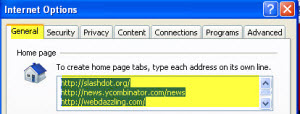
Internet Explorer 6 & 7

Internet Explorer 6 and 7

1. Select “Tools” (depending on your tool bar, it may be on the upper right or lower left)
2. Select “Internet Options”
3. Make sure the “General Tab” is selected (should default to this tab)
4. Your current website home page should be highlighted in blue. We are going to leave it. (If you wish to erase it and change your current home page – press “Backspace” or “Delete” to erase it)
5. Place your cursor at the end of your current home page and “Enter/Return” to the next line (your original site should still be in tact)
6. Type or paste the new URL (website address) name you want to use, then “Enter/Return” to the next line
7. Repeat #4 as many times as necessary (here is an example of what it should start looking like)

http://www.yourfavoritewebsitehere.com
http://www.yourotherwebsitehere.com
http://www.webdazzling.com
http://www.google.com

8. Select “OK” to exit from the “General Tab”
9. Close and Restart your browser to see them all open

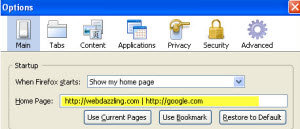
Firefox/Mozilla

FireFox / Mozilla

1. Select “Tools -> Options” (MAC USERS select “Firefox -> Preferences”)
2. Make sure the “MainTab” is selected (should default to this tab)
3. In the “Home Page:” field, enter the addresses you want to use and separate them with a pipe symbol (shift + ) between each URL. With or without spaces between each URL, it didn’t seem to mind (here is an example of what it should start looking like)

http://www.myfavoritewebsite.com | http://www.webdazzling.com

4. Select “OK” (MAC USERS close the “preferences box”)

Let’s Get Colorful & Organized

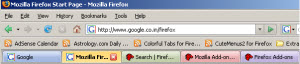
FireFox colortabs

One last trick I would like to share with you, now that you are a tab owner. The ability to have tabs is a great feature, but what if you could color the tabs different colors? If your default browser is Firefox/Mozilla there is a addon https://addons.mozilla.org/en-US/firefox/addon/1368. (I am not aware of a color tab option for Internet Explorer at this time.)

Want to Work Like an Expert?

Shortcuts with Tabs

Open New Tab = Ctrl + T (MAC USERS command + T)
Close Current Tab = Ctrl + W (MAC USERS command + W)

By utilizing these handy web browsing tips, anyone can go from being a novice web surfer to an expert in quick fashion. Don’t be afraid to explore, some of my best work has happened by accident! Go on, save yourself a click with these handy web browsing tricks.

Chris Hebert is a web designer with a passion for learning computer skills and passiong that information in a clear and simple format. You’ll find more of herarticles at WebDazzling.com

Thanks Chris!

–ME “Liz” Strauss
Work with Liz!!
Buy the ebook and find out the secret.

Filed Under: Successful Blog, Tools Tagged With: bc, Chris Hebert, Tabbed Browsing, WebDazzling

The Secret to Making Money Online — or Anywhere!

August 13, 2008 by Liz

The Secret to Making Money Online — or Anywhere!

Working Plans logo

It works like this, and you don’t need to be famous.

1. If,

you have a product or service
that people with money actually want to buy

2. and . . .

you’re willing to do what it takes you to engage that group’s attention

3. and . . .

you can offer that group irresistible buying opportunities

4. and . . .

for which they are willing to pay more than it costs you to
research, make, build, buy, offer, advertise, sell, serve, and otherwise deliver
what they buy

then,

you will make money.

BONUS:

If you want to make more money:
Follow the above formula with more things they want to buy and more opportunities to buy them.

That’s the secret of how to make money anywhere.

Which step do you see people leave out most frequently?

–ME “Liz” Strauss
Work with Liz!! SOBCon08 is May 2,3,4 in Chicago. Have a plan!! Register now!

Filed Under: Business Life, Strategy/Analysis, Successful Blog Tagged With: bc, Biz School for Bloggers, make money online, sobcon08

An Update from Todd Jordan

August 13, 2008 by SOBCon Authors

Todd has written a post that captures the spirit of SOBCon:

We come away from those events on natural highs. We promise ourselves we’ll do some things. Perhaps for you it was simply to stay in touch. Other folks will promise to change their blog, some will say they’ll change their life. Some people even offer business opportunities. It’s a very exciting time in our lives.

Read the whole thing here [link].

Filed Under: Attendees Tagged With: bc

  • « Previous Page
  • 1
  • …
  • 529
  • 530
  • 531
  • 532
  • 533
  • …
  • 1050
  • Next Page »

Recently Updated Posts

The Creator’s Edge: How Bloggers and Influencers Can Master Dropshipping

Is Your Brand Fan Friendly?

How to Improve Your Freelancing Productivity

How to Leverage Live Streaming for Content Marketing

10 Key Customer Experience Design Factors to Consider

How to Use a Lead Generation Item on Facebook


From Liz Strauss & GeniusShared Press

  • What IS an SOB?!
  • SOB A-Z Directory
  • Letting Liz Be

© 2025 ME Strauss & GeniusShared