Successful Blog

  • Home
  • Community
  • About
  • Author Guidelines
  • Liz’s Book
  • Stay Tuned

Analyze Social with Google Analytics Today

September 26, 2012 by Guest Author

by
Franklyn Stephen

cooltext443809602_strategy

Social media reporting in Google analytics

Google analytics provides a reporting which would make you understand little bit easier that efforts you put in social media marketing are worth the investment. Also it gives you in-depth analysis about which social channel gives value to your business and which plans are most effectual.

Business metrics with Social Media

These new reports are framed in a way to span the gap between business metrics and social media. Using these reports, you can assess the traffic/clicks comes to your site from different social channels and how they leads to conversions, future conversions, and where the users navigate within your website and many social activities that are going on and off the website which enables to do in-depth analysis and take further actions in social media for the growth of your business.

If you are unaware of these updates, check through as you log in next time. Here are few things that you can keep an eye.
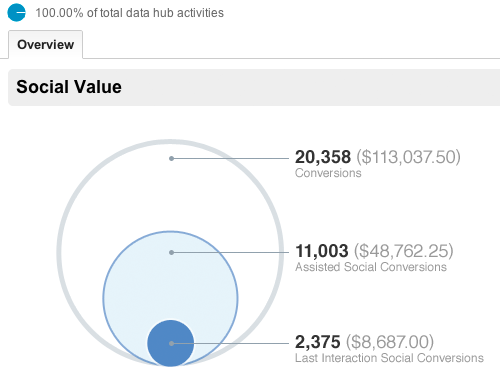
By the above overview report, we can have a quick look at how much conversions has been produced by social channels. Also it gives you comparison between the money invested and profit obtained from all your goal completions obtained through social referrals.

Social Channel Conversions

We can evaluate the conversion rates of each social channel whereby it allows marketers to measure the value of each social network that drives profit and supports your business. This conversion report gives influence of the social content whether it may be from facebook conversion post, or Google plus post or stumble upon post or new video.
Social Plugins Report

Social plugins report gives good insight of how the article pages of website is influenced by the social media through the social buttons (like facebook, Google plus, twitter) being clicked on the article page to share them. By this, clear picture can be availed of which articles are most engaged, interesting among the users and how the users are following socially with your content on and off your site.
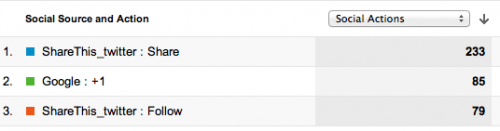
Activity stream: What is going on outside of your website?

All other reports would depict the social content as how it is being engaged inside the website, While this activity stream report will present the activities that are carried out in the social content off the website across the social web.

Social content shared publicly as how it is shared, where it is shared (through facebook, twitter, Google plus, stumble upon etc), what people have commented and URLs of all these sources can be seen. Presently activities are covered for Google+ and the list of social data hub partners is growing which includes Meetup, Badoo, Hatena, Echo, etc…These new reports can be availed through standard reporting tab.

Sources of Social visits

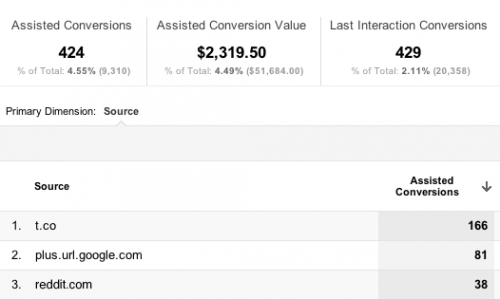
This report gives visits received to the site through different social referrals and how users behave in the site, as shown in the parallel comparative picture . The in-depth details of conversion metrics of each social network and how the content is engaged and interacted among the people is depicted. This report turned out to be handy, because whether visitors are getting the desired outcome in the website can be examined here, which is essentially and really you want to know.

Focus on Content

Recently, Google analytics has brought few updates which enable the users to get adept understanding about their social impact. For the long time this was lagging being unable to find how much the content was socialized. But now Google analytics is able to measure the social reach of content/website/product/services. Notwithstanding the availability of tools on hands, social reach is all about how the content is being used and shared. Keeping all these in track, Google has released few updates designed in its analytics tool. Two significant new updates are centered on assisting the users to get clear understanding on how the content is socializing online and how it’s being viewed across different devices.

Content Experiments

Users can experiment content to test and improvise the website. Site owners can create different versions of a page say A, B, and C experiments to measure how effectively each versions get the visitors to convert. Google analytics already have this facility called website optimizer. It is now called as ‘content experiments’ and incorporated into analytics. Website optimizer isn’t a standalone product any more from August 01_2012. Content experiments assists to hone toward the goals that have already set in the Google analytics which will help to find out which page design and content is most effectual.

To start up with these content experiments, open Standard Reporting of Google analytics, and in the Content section, click Experiments.
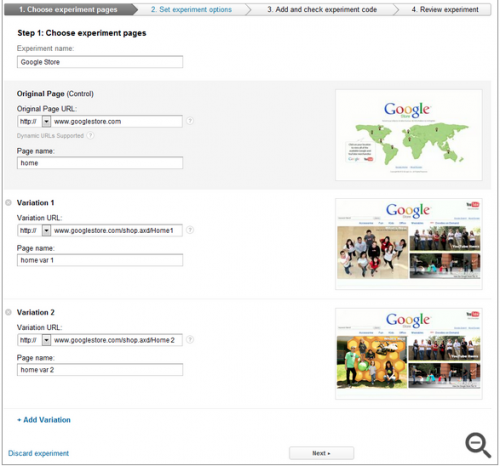
Here you have to go through four steps to complete the set up wizard.

Browser-Size Analysis

The visible portion of a web page is very smaller than the actual screen resolution for the users who are accessing through mobile platforms due to many toolbars and welters. Essential factors for conversion rates are items that are above the fold on a web page. To find the percentage of visitors for whom the page items displays below or above the fold is really baffling. Therefore Google analytics facilitates users by creating a visualization to ascertain which parts of page are viewable to which percent of visitors.

Go to the Content section of Google Analytics, and click In-Page Analytics. Then click on the browser-size to see the shaded portions of the web page that are underneath the fold. Now click in at any place of the screen to find how much percent of visitors can view it or just hold the threshold percentage by using the slider.
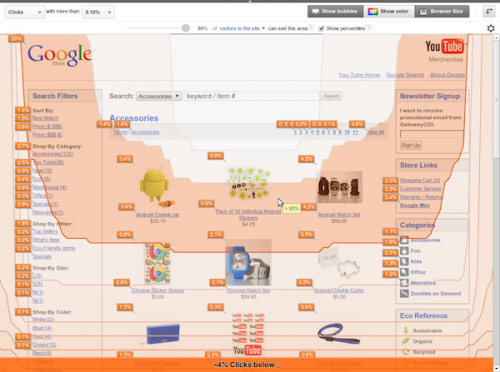
Clicking on show-percentiles will display the summary visualization of several percentiles. This depiction will help to get the clear picture of how the browser sizes are dispersed among different devices. For instance, if you select to compare all the visitors of mobile device traffic, solid difference can be noted.

Concentrating on the good content and where the content flows is so essential to the sound health of any website as well as the experiences it gives to users. Thus far, web analytics focused on page clicks/visits and traffic sources to get the picture of what is working and what not is working in the website. Although it is significant, it is also as important as to perceive how content in the each page of the website impress the user’s/visitors. With this new website optimization tool, more mystification comes into picture!

Conclusion

These new reporting styles will significantly and ultimately help the marketers to generate the desired results who want to produce solid numbers and assist them in furthering their marketing efforts. Nevertheless, it is important for the company to set the fair and sensible goals which would really convert them into indispensable and worthwhile.

Author’s Bio:
Franklyn Stephen Issac.J is a webmaster having substantial four years of experience in analytics, Search engine optimization, social media marketing, SEM and PPC. His achieved results will highlight his profile as one having great passion for analytics and ecommerce solutions. More than 50 keywords ranked prove his strong insight knowledge on keyword research and analysis.


Buy the Insider’s Guide to Online Conversation.

Filed Under: SEO, Successful Blog, Tech/Stats Tagged With: bc, Content Experiements, Google-Analytics, LinkedIn, small business, Social Plugins, Social Visits

Be Accessible

January 26, 2012 by Rosemary

A Guest Post by
Rosemary O’Neill

cooltext443809558_authenticity

You must be accessible if you want to build a human-centered enterprise. I recently participated in a Twitter chat hosted by the Association for Women in Communications (#AWCchat) on the subject of web accessibility, and it made a huge impression on me.

Did you know that people with disabilities are 18% of US population with $175 billion in discretionary spending power? Did you know that adults with disabilities spend 2x as much time online as those without disabilities?

Here are some tips on how to ensure that your web presence is inviting and accessible to visitors with challenges:

  • Include an accessibility checklist in your quality control process (refer to the Web Content Accessibility Guidelines for detailed help: http://www.w3.org/TR/WCAG20/ or this Blog Accessibility Checklist:
  • Remember to consider all disabilities, not just sight challenges (think about keyboard use, auditory, etc.)
  • Always, always use alt tags for images, icons, and graphics
  • Try to use custom, descriptive URLs wherever possible (rather than numbers/codes)
  • Consider polling your audience to find out whether they are having any issues with your site; seek assistance from anyone in your circle who uses assistive technology (like the JAWS reader).
    Provide transcripts for audio and video clips where possible
  • Run your site through an automated checker like WAVE: http://wave.webaim.org/ or one of the tools listed here: http://webmasterformat.com/blog/top-ten-accessibility-analysis-tools
  • Be aware of the font sizes you are using; larger is better, and the ability to resize text is good as well.
  • Make sure that you are not using color as the sole indicator for a required action.

…and here’s the bonus…almost all of these tweaks have the extra benefit of helping your SEO at the same time!

Big hat tip to #AWCchat (which happens Thursdays at 11:30am CST) and the co-host (and source of the statistics) Glenda Watson Hyatt, who is known as The Left Thumb Blogger. You are vessels for good in the world!

_____

Author’s Bio: Rosemary O’Neill is an insightful spirit who works for social strata — a top ten company to work for on the Internet . Check out their blog. You can find her on Google+ and on Twitter as @rhogroupee
_____

Thank you, Rosemary!

You’re irresistible!

ME “Liz” Strauss

Filed Under: Successful Blog, Tech/Stats Tagged With: accesssibility, bc, LinkedIn

Do You Rely on Analytics to Tell the Whole Story?

October 28, 2011 by Rosemary

A Guest Post by
Rosemary O’Neill

cooltext443809602_strategy

The Tools Only Get You Halfway There

Many tools offer to help you analyze your customer community, so that you can capture the elusive “ROI.” These tools evaluate a multitude of data points, including number of followers, likes, blog comments, retweets, etc., to come up with the success equation. Small businesses can be overwhelmed by the sheer magnitude of starting from zero in all of these social categories.

However, I propose that numbers only get you halfway there. The other half is composed of humanity. Information like, “dog’s name,” “has 3 kids,” “is insanely into photography.” The reason that is often left out in the cold is because it’s hard to automate that kind of connection. That type of information is only really gleaned from a steady stream of interactions over a long period of time. And many of us don’t invest the time to build up that data.

There’s an old-school sales trick that says when you walk into someone’s office, you look around and take note of the family pictures, fishing trophies, or other personal items on the desk. Those can be used to start conversations and begin building a connection…”hey, I went to UVa too!” If you want to build up your humanity data, you need to do the digital version of that; i.e., take note of the human information that is available online.

I’m not suggesting cyberstalking in a creepy way, but if your customer is sharing his/her interests publicly, it’s fairly easy to build on that. Here are some concrete ideas:

  • Build a web of connections, via Twitter, LinkedIn, or other networks
  • Promote your customers’ projects and content
  • Work on expanding the ways you connect—if it’s all digital, try the phone. If you’ve always emailed, try finding them elsewhere.
  • When you respond, try to read-up first. If your customer is reaching out to you on your FB page, why not show them you know them. Same with Twitter followbacks.
  • Find ways to allow your customers to be “whole people” in your community, include an area for off-topic socializing. And allow your reps to be human too.

The bonus is that, by including human data, you also build in “delight,” as people recognize that they’re being noticed. And that’s priceless.

—-
Author’s Bio: Rosemary O’Neill is an insightful spirit who works for social strata — a top ten company to work on the Internet. Check out their blog. You can find her on Twitter as @rhogroupee

Thank you, Rosemary! People like you are easy to remember and fun to do business with! 🙂

–ME “Liz” Strauss
Work with Liz on your business!!

Buy the Insider’s Guide to Online Conversation.

Filed Under: Strategy/Analysis, Successful Blog, Tech/Stats Tagged With: Analytics, bc, LinkedIn, Rosemary O'Neill

Steve’s Shorts: #Commentz on Facebook Fatigue, Moms, Influencers and a Dreamweaver Screen

September 24, 2010 by Liz

We Interrupt Regular Blogging for Steve’s Shorts

Take a simple few minutes where a guy who is brilliant makes an observation about the social web that you might have already be thinking. This interruption brought to you by the evil conspiracy that is Steve Plunkett and Liz Strauss.

by Steve Plunkett.

cooltext467743303

A few facts Mr. Plunkett finds interesting …

  • Facebook customer satisfaction is in the bottom 5% of all private sector along w/ IRS tax e-filing, airlines and cable companies. (Source)
  • More than 60% of moms said they would provide info about themselves to a trusted brand if it meant more personalized content. (Source)
  • The 5 “most valuable” types of online influencers are: Megaphone, Open Book, Social Butterfly, Business First, and Enthusiast. (Source)
  • According to Morgan Stanley, within 5 years global internet consumption on mobile devices will surpass the same activity on PCs.
  • — From StevePlunkett, Dallas SEO Blog, via PRSarahEvans

A Short Look at … What’s Next?

dreamweaver

Hope you enjoyed these moments with Steve’s Shorts.

steve_plunkett

M/C/C’s Director, Search, Steve Plunkett, is responsible for all aspects of search engine optimization (SEO) and Internet user behavior. Plunkett’s competitive personality makes him a perfect fit in the competitive world of SEO. As a child and a gamer, he worked hard ensuring that it was his initials at the top of every arcade game unit in his neighborhood. Today, he uses SEO to ensure his clients appear at the top of the search engine results –and offers an array of optimization services that are scoring big for those clients.

Buy the Insider’s Guide to Online Conversation.

Successful-Blog is a proud affiliate of

third-tribe-marketing

Filed Under: Successful Blog, Tech/Stats Tagged With: bc, LinkedIn, SEO, Steve Plunkett

Steve’s Shorts: SEO Lunch and Client First ROI

September 17, 2010 by Liz

We Interrupt Regular Blogging for Steve’s Shorts

Take a simple few minutes where a guy who is brilliant makes an observation about the social web that you might have already be thinking. This interruption brought to you by the evil conspiracy that is Steve Plunkett and Liz Strauss.

by Steve Plunkett.

cooltext467743303

The Seo process does not start with buying ads on Google.

It starts with examing what your actual business is and compartmentalizing it into a sandwich and some chips. the SEO lunch.

– Bread And Butter -> what is the core of your business, where is the majority of the revenue?

– Meat -> (I know.. butter and meat.. but play along please..) Describe your product/services simply, do you sell sporting goods, golf clubs, lingerie? what? Maybe you are a plumber that specializes in Bidet installation?

– Sandwich spread -> what are all the little things that bring it all together? do you customers come from one geographic area? Are they white males, aged 34-50, usually divorced and have busy professional lives? (not dating silly, cleaning services.. geesh!)

Now that you have your sandwich, you want some chips, right?

What kind of chips? phone chips, form chips, email newsletter chips, what is the preferred method of people contacting you? What is the desired action you want them to take.

Now eat your SEO lunch and what do you think about the questions above?

A Short Look at … What’s Next?

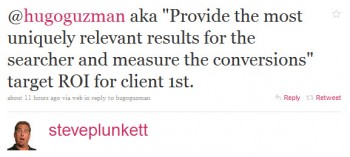
steve-provide-roi

Hope you enjoyed these moments with Steve’s Shorts.

steve_plunkett

M/C/C’s Director, Search, Steve Plunkett, is responsible for all aspects of search engine optimization (SEO) and Internet user behavior. Plunkett’s competitive personality makes him a perfect fit in the competitive world of SEO. As a child and a gamer, he worked hard ensuring that it was his initials at the top of every arcade game unit in his neighborhood. Today, he uses SEO to ensure his clients appear at the top of the search engine results –and offers an array of optimization services that are scoring big for those clients.

Buy the Insider’s Guide to Online Conversation.

Successful-Blog is a proud affiliate of

third-tribe-marketing

Filed Under: SEO, Successful Blog, Tech/Stats Tagged With: bc, LinkedIn, SEO, Steve Plunkett, Steve's Shorts

Steve’s Shorts: Search, SEO, and a Twitter ReTweet Tip

September 10, 2010 by Liz

We Interrupt Regular Blogging for Steve’s Shorts

Take a simple few minutes where a guy who is brilliant makes an observation about the social web that you might have already be thinking. This interruption brought to you by the evil conspiracy that is Steve Plunkett and Liz Strauss.

Search, SEO, and ReTweet Strategy
by Steve Plunkett.

cooltext467743303

– What is Search? Search is about being there when the customer is READY TO BUY. When they ask, hopefully you did your homework and are #1 in the organic results. (also known as.. how to get to #1 and stay there)

– You want to learn SEO..? Examine your analytics and find out which keywords make the cash register ring… Focus on those keywords, Focus on providing the most uniquely RELEVANT content for that keyword.

A Short Look at … What’s Next?

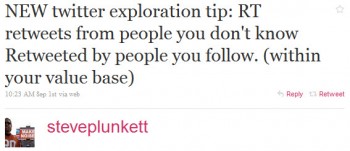
steve-retweet

Hope you enjoyed these moments with Steve’s Shorts.

steve_plunkett

M/C/C’s Director, Search, Steve Plunkett, is responsible for all aspects of search engine optimization (SEO) and Internet user behavior. Plunkett’s competitive personality makes him a perfect fit in the competitive world of SEO. As a child and a gamer, he worked hard ensuring that it was his initials at the top of every arcade game unit in his neighborhood. Today, he uses SEO to ensure his clients appear at the top of the search engine results –and offers an array of optimization services that are scoring big for those clients.

Buy the Insider’s Guide to Online Conversation.

I’m a proud affiliate of

third-tribe-marketing

Filed Under: Successful Blog, Tech/Stats Tagged With: bc, LinkedIn, Steve Plunkett, Steve's Shorts

  • « Previous Page
  • 1
  • 2
  • 3
  • 4
  • 5
  • 6
  • …
  • 19
  • Next Page »

Recently Updated Posts

Is Your Brand Fan Friendly?

How to Improve Your Freelancing Productivity

How to Leverage Live Streaming for Content Marketing

10 Key Customer Experience Design Factors to Consider

How to Use a Lead Generation Item on Facebook

How to Become a Better Storyteller


From Liz Strauss & GeniusShared Press

  • What IS an SOB?!
  • SOB A-Z Directory
  • Letting Liz Be

© 2025 ME Strauss & GeniusShared