Successful Blog

  • Home
  • Community
  • About
  • Author Guidelines
  • Liz’s Book
  • Stay Tuned

How to Balance Your Life and Work

May 17, 2017 by Jessy Troy

balanceMany working individuals, may they be employees or managing their own business are in constant search for the solution to have that work-life balance. Often due to the demands of work and business, time spent on leisure, health and family are jeopardized unintentionally.

But can we be faulted if all we are striving for in working the hours is still for the family’s sake, to gain financial security and guarantee our family’s and children’s future? To ensure that basic necessities are at least covered?

There is no doubt that the efforts we put in our business or work comes with plenty of benefits for the family. But we should not forget that when we decided to have a family, we have the duty of care – give it the same time and attention we give our jobs.

As much as you crave success in your professional life, so should you in the family life. And the consequences of not doing so may be devastating, with relationships and home life adversely affected. But is it possible to achieve that balance? Many believe so and those who have claimed they were able to strike that situation are healthier, happier and more fulfilled.

Here are some tips on how to stop that guilt creeping and put an end to the battle between your work and family life.

Edit your life

Stop and think what is eating up your time in a day, in a week and in a month. Is it the regular meetings of being part of that team building committee at work? A book club?

Volunteering is a good thing but if you are at the time of your life when you barely see your kids or  have a good chat with them about school, then you better shuffle your priorities real soon. Perhaps you can skip that golf game with workmates every weekend. Often, gaining that extra hours in your day makes a huge difference.

Use that time saved to have a picnic or watch a movie with family instead. Do not be afraid to edit your lifestyle. As the more you have on your plate, the more you get tired and stressed and the less time you have for family fun.

Schedule

Once you narrowed down the essential activities, schedule them properly and be sure to stick with them. Use one diary and avoid having a separate diary for work and personal. This way, you can see clearly what time and days are for family affairs.

Schedule your professional work and other extra curricular activities around that family time, and not the other way around. Be diligent and consistent. It may be torturous and inconvenient at first, but soon you’ll get used to the change and the way you move appointments around.

Automate as much work as you can! You cannot be everywhere doing everything. ResultsFirst has a great guide on marketing automation: Check it out!

Be Incommunicado

One of the disadvantages of modern gadgets is they give you a false sense of needing to be accessible to workmates 24/7. Recall how our working parents and grandparents seem to have the time to dilly dally at home on weekends and evenings? Because they didn’t have mobile phones then that rings at the worst time nor emails that beg to be replied to. Do not let technology rule or ruin your life. Implement a no cellphone rule at family dinners and let business mates know.

This gesture will let your family and kids know that your utmost attention is with them at that time or day. Plus, it will help you relax and be less anxious about business matters even for a while.

Ask a mentor

Words of wisdom from people who you deem highly from work or personal relations are great to guide you in the process of finding the right balance in your life. Seek help and let them know your worries and ask them how they were able to manage family and work fairly. Recognize that it takes time to find the equilibrium you are looking for. Be patient and consistent with your goals and one day you’ll get there.

So strike the balance now. Remember that building a career or a business is as important as building your family relationships. And wouldn’t it be better if you can achieve two successes at the same time?
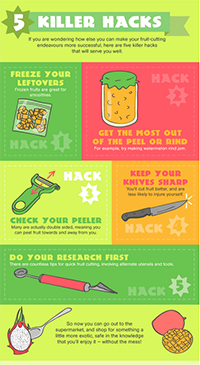
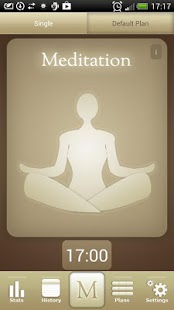
Image source

Filed Under: Personal Development

11 Stress Relievers You Can Try At Your Desk

May 7, 2017 by Jessy Troy

Even the easiest and most enjoyable job can get stressful at times.

If you take a few minutes to de-stress, however, it will make your job easier to handle, and also will prevent you from suffering the ill effects of continued stress.

Here are 11 stress relievers for inter-office relaxation you can exercise at your desk.

1. Do relaxing exercises while sitting in your chair. Close your eyes, take a deep breath, release it, and concentrate on relaxing your whole body from your toes to your head. This is something you can do on your break, perhaps in the employee lounge or somewhere else other than your desk, so you can put all thoughts of work out of your mind for a few minutes.

2. If your job is particularly stressful, ask your supervisor if you can take shorter but more frequent breaks, instead of one long lunch and two extended breaks. Offer to shorten your lunch hour in exchange for them. The more frequent breaks may leave you feeling more refreshed than long ones. If you get permission, take those opportunities to do a few stretching exercises.

3. Keep a book of short devotionals, jokes, poems, or similar subjects at your desk. Take a few minutes to read one after you have finished one project and before you start on another one.

4. Diversify your snacks. Prepare some healthy, yet delicious snacks that have proven to give you joy. Mine is fruit and berries. I love doing some fun stuff with fruit (salads, smoothies, etc.) and enjoy it as snacks.

BucknBear Knives has a great infographic teaching you cut fruit in various creative ways. Steal the idea!

Fruit

5. Play “trashcan basketball” by simply wadding up paper and aiming for the wastebasket. Just remember to pick up the ones that missed! You can do this on one of your frequent breaks or on your lunch hour.

6. Ask your supervisor if you can set up a basketball goal for quick lunchtime games during nice weather. In cold weather, ask if you can bring in portable exercise or indoor game equipment and borrow some empty space. If you can’t think of any type of indoor game equipment, remember this: A ping-pong net stretched across a couple of unused tables will work perfectly. Just add paddles, balls, and players.

7. Play trivia games during downtime. Use online or hard copy materials, or the Trivial Pursuit game. Challenge co-workers to compete against you.

8. Work puzzles during downtime. Keep an actual puzzle book at your desk instead of using online puzzles, unless you have received permission to use online resources for this.

9. Take a walk during your lunch break. On nice days, get outside. On the days with bad weather, walk around the different floors. Not only will you be getting exercise, you may even meet new people.

10.Video games (played only on your personal time, of course) can be a great way to clear your mind. Find someone to play a game that requires two people and get a game going during your lunch break.

Teksocial lists some free meditation apps to help relieve stress.

Meditate

11. If the stress is getting too bad, take advantage of employee-sponsored counseling services. Confidentiality is observed, so nothing you say will get back to anyone.

Don’t be afraid to use de-stressing techniques while at work. Your physical and mental health is more important than any project will ever be. If you’re too stressed to perform at work to your peak capacity, then everyone, yourself included, will be affected.

Filed Under: Business Life

The Art of Relaxed Productivity

April 11, 2017 by Jessy Troy

It is so easy to become frantic when you are in the middle of a busy workday. Even when you are making good time, the sheer amount of items on your to-do list can start to play with your mind. How will you get it all completed in time? How will you keep your energy up? Before you know it, you find yourself lagging and your productivity dropping.

This is something that happens to everyone. For that reason, one of the most common suggestions for productivity is taking frequent breaks through the day. But should we really stop there? Being relaxed through the day will help keep you focused and on track, without the panic.

What you need is to learn the art of relaxed productivity. Luckily, all that takes is a couple of tips.

Hang Out on Social Media

Yes social media can be distracting and you may be rolling eyes seeing it mentioned in the article about productivity but it all depends on how you use it.

Social media is ideal for making connections in the first place that work well for your personal and career growth. Primal has a great guide on using Twitter to build useful relationships. Social media can offer you a few minutes to relax while doing something useful for your personal growth!

Read a Book

Read a Book

Nothing is quite as relaxing as curling up with a good book. Schedule a couple of minutes out of your day every few hours to read a couple of pages. Not only will it calm you down, but it is a great way to find time to tackle that book list.

It’s not easy to find some time for reading but social media driven motivation can help a lot! Try Goodreads – it’s like a reading community that’s always with you!

Go For a Walk

Go for a Walk

Another favorite of the fitness crowd, walks do more than burn calories. They slow your mind down, release endorphins and improve your mood.

This is a great ace up the sleeve for those especially stressful days.

Sneak In a Workout

Sneak In a Workout

You might think that exercise is the last thing you want to do at the office. After all, you don’t want to get sweaty. Well, you don’t have to.

There are some great, simple toning and relaxation inducing exercises that you can find all over the we. Sparkpeople has several dedicated to at-desk workouts, and some that don’t make you sweat at all. YouTube is another good place to search.

Get Quirky With The Furniture

I am a firm believer in the power of an environment to affect someone’s mood, in both a negative and positive way.

When it comes to remaining relaxed and cheerful, having some good furniture can really help. A comfy chair is fine, but why not go with something a bit more energizing and fun? Like a bean bag chair, for example.

Office Depot is great for that, especially with their Office MaxPerks Rewards Program. I use this site to track new deals and programs including the one from Office Depot. It’s very inspiring!

Have a Snack

Have a Snack

Hunger is a killer of productivity and calm alike. You should always be prepared with a snack, and not something that comes out of a vending machine.

Fruits, vegetables, whole grains and lean proteins are nuts are perfect to boost your energy and leave you feeling more relaxed and focused.

Try a Breathing Exercise

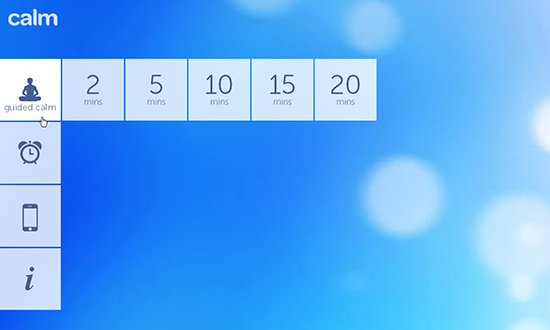
Calm.com

Calm.com… that is a site everyone should have bookmarked. It has short, medium and long breathing meditations, including tiny ones that last only a few minutes.

You would be amazed by how much difference those few minutes will make.

Do you have some tips for relaxed productivity? Let us know in the comments.

Filed Under: Business Life

Monetize Your Expertise with Kajabi

November 9, 2016 by Jessy Troy

Monetizing your blog is tough: The line between making money off your readers and selling something you cannot fully vouch for is blurred.

Various website monetization methods include

  • Offering third-party ads
  • Joining affiliate programs to sell other people’s products
  • Providing all kinds of services including call center services or virtual assistant services
  • Writing and selling ebooks
  • Starting a coaching, training or public speaking services

One of the best ways to monetize your blog is to create your own product, something you can frankly stick up for because you were the one who provide support. The tool I have just discovered seemed quite perfect for the purpose!

The Tool

Kajabi is the easiest way to monetize your expertise to put together an advanced course. It is all-in-one tool that let’s anyone create, distribute and sell content online. This can be online courses, ebooks, training videos and more.

The platform helps with every aspect of course marketing from hosting to selling:

  • Put together an advanced course choosing any types and forms: Training portals, membership sites, live event streaming, premium downloads, etc.
  • Design your course landing pages using the variety of beautiful templates (webinar optin pages, launch pages, sales pages, email registration pages, thank you pages and more)
  • Email marketing: Send emails to your students (including sophisticated segmentation)
  • Upload and host your training videos. No need to rely on third-party video hosting services.
  • Easily design your course and keep the look and feel consistent throughout different sections. All the templates are mobile-responsive, so your students can use your source on their mobile forms.

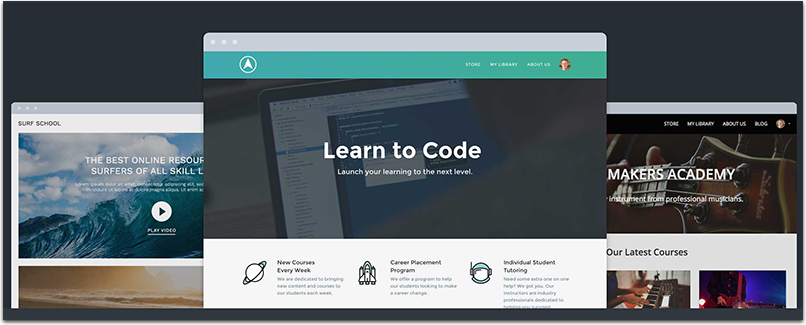
You’re not just selling your content, but the entire learning experience and aesthetic your content is packaged in

Kajabi themes

  • Provide customer support using built-in community features
  • Promote your course though an affiliate program: Automatically track and calculate commissions for partner referrals
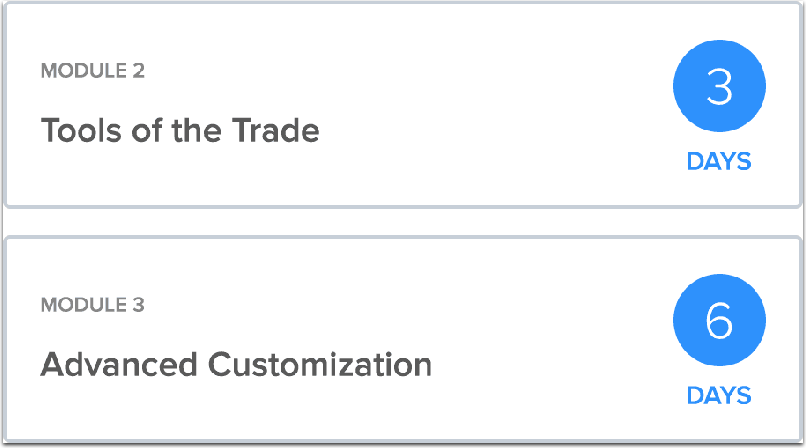
  • Content automation: set your content to go out to users on a schedule based on when they bought the product. They’ll automatically receive an email when new content is released to them.

Content automation

You can also use your own domain for better course branding (This will also allow you to promote your own site).

You can also see your students’ progress (and reach out to them based on that).

Check out dozens of success stories available here.

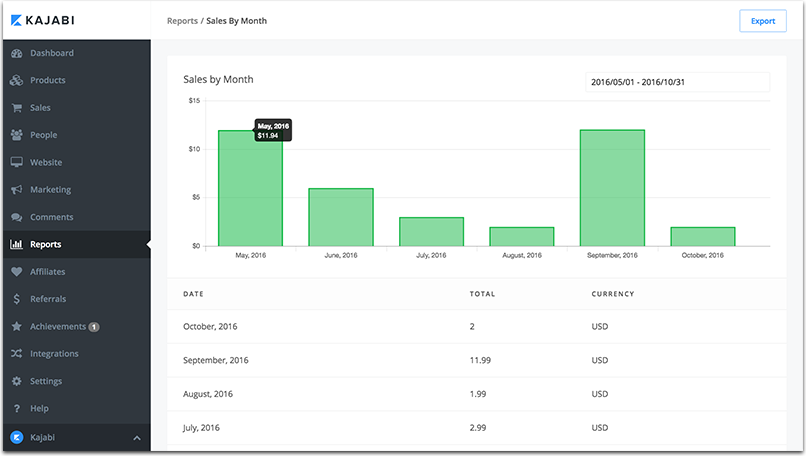
It should be easy to sell your courses using powerful sales tools too! Provide coupons, announce special offers, access easy-to-read sales reports.

Sales reports

In a nutshell, you manage the creation and marketing of your premium content from a single dashboard. This is also a perfect opportunity to establish yourself as a niche expert.

Ideas

I can imagine that someone reading this article is scratching their heads right now. “Expertise? What on Earth can I teach anyone?” You don’t have to be a nationally recognized expert but you can surely share some useful tricks!

Have you learned to be productive in your own unique way? Are you aware of a solid self-learning guitar playing technique you have tried yourself? Is there a unique money saving routine you are using? There must be something useful you can teach people and improve their lives.

Filed Under: Idea Bank

5 Ways Charity Events Can Benefit from Social Media

November 2, 2016 by Jessy Troy

5 Ways Charity Events Can Benefit from Social Media

The world can be cruel, with natural disasters destroying cities, famines facing whole countries, wars killing parents or taking away their livelihood, or just social and economic issues that create a set of difficult challenges. It is through a sense of responsibility in the welfare of our fellow man that we do something to change lives, hopefully for future generations.

Social media and networking have changed the way charities are handled, and especially how they gain support from potential donation pools, company sponsors and even government agencies. On a basic level this is done just by getting the name of an event out onto the Internet where people can see it and share it. This will usually bring people to the event itself, and sometimes alert the press that it will be going on.

But there are other ways that large charity events can be benefited through social media marketing.

1. Expanding the Role of Local Volunteers Within Networks

Any mega event is going to have to have a wider base than just a single city. If you are hosting one, you probably have volunteers in various cities, some major, as well as connections with philanthropists and activists either nationally or internationally. These people can have an incredible impact on your campaign, and through social media they can all assist in spreading the word from where they are.

Giving them free reign to develop their own method of social media for the event will give you an impressive workforce that can be brought together and harnessed for maximum efficiency. This method can also be used outside of the event for your organization year round, keeping people informed in their specific region of events, and just keeping up with current issues and needs.

Tip: Use local hashtags to find and enroll volunteers as well as to keep them engaged.

2. Connect with the Community, Not the Cash

It can be easy to feel yourself falling into the trap of focusing on donations from an event or cause more than the cause itself and the people who support it. With a non-profit that is struggling to remain active while giving significant help to whatever need, this is understandable. But if you lose focus of your community, you will lose momentum and eventually fall flat.

Make the effort to stay tuned in to what your supporters are saying. Communicate with them and keep them up on the goings-on of both your organization and the wider effort itself. Include them and they will return the favor. If you lose that connection, you will lose everything.

Tip: Use Slack to keep engaging with your community and team. Alternatively you can use a self-hosted alternative MatterMost (a cloud hosting would be an affordable option to host a community)

3. Inspire and Empower Through Networks

Don’t think of your social media work for your event as the end-all. What you are trying to do is not create a one-stop place for information, but to inspire people to share, and empower them to get involved in their own way. Your campaign is a spark that will light a fuse, which will then cause sparks all the way down the line in other networks.

Create a passionate network with people who are dedicated to your cause. Then, use your ingenuity to light their interest further, empowering them to get really involved with spreading the word. Watch them do so, giving that same spark to others, who give it to others and continue to pass it on. You might even be inspiring their own events.

4. Communicate With Personal Connections

Never forget the importance of one-on-one contact with people involved in your community. Maintaining personal connections, keeping the lines of communication open and staying directly linked is extremely important. Even with a mega event, you should have a way for people at any level of participation to contact you and receive a response. You also have to regularly communicate with those who are more heavily involved, such as running specific campaigns or smaller events in other areas.

Social media makes this easier. Regular emails, social networking pages like Facebook and Twitter, and even Youtube videos are all ways to keep that line going. Having local branch pages of your non-profit from larger cities you are involved might also help to keep it from becoming too overwhelming from a single source.

Tip: Use Hootsuite to use most of your social media accounts from one place.

5. Use All Your Tools

Relying on one single social media tool can be dangerous. Simply because you are trying to mobilize a greater force using a paltry arsenal. You have to take into account all that you have at your disposal in order to best reach people.

For example, email lists are extremely helpful for long term communication. It allows you to regularlyu update your entire community, and gives them a chance to learn about what is going on in their own time. Sites like Facebook and Twitter are good for real-time updates and regular communication one on one with users. Blogs are good for in depth explanations of events, coming changes or press associated with your cause.

Tip: Sharing programs like Google Drive or Zoho can be a simple way to give access to projects by group members without having to rely on constant email attachments.

Adapting to Technology to Make a Difference

Over the coming years we are sure to see further changes in social media, networking and sharing that will further expand out ability to connect with causes and events. But for now, there are plenty of ways that you can mobilize long and short term support using these methods.

Post image by Stefano Mazzone under Creative Commons

Filed Under: Marketing, Motivation

GetResponse: More Than Just an Email Marketing Tool

September 27, 2016 by Jessy Troy

getresponse-reviewBeing a marketer in the age of the internet makes me one of the luckiest people in the world. I get to reach audiences across the world from right at home, and I can do it with a limited budget, based on the merits of my brand and my creativity. I love my job… usually.

I will admit that there are times when I get frustrated. Sometimes I feel so annoyed with the tedious, never ending tasks of promotion that I feel like selling my computer, moving to the Appalachian Mountains and starting a llama farm, never to see another piece of analytics data again.

Given my endless search for ways to fob off those pesky to-do tasks, and my inability to do so on my team without them wishing me dead, I am slightly obsessed with marketing tools. I have been signing up for free trials in the search for the perfect one, and so far I have found a number that I like.

This is my latest attempt at seeking marketing platform perfection, and I am happy with what I have so far found.

What Is GetResponse?

GetResponse is, at the heart of it, an email marketing platform. You use their email creator to apply templated (of which there are many), and launch campaigns that are targeted to segmented email lists you can upload from your hard drive backups. Pretty straightforward, right?

Actually, no. I went into signing up for GetResponse thinking I would be using a MailChimp clone, like so many others on the web these days. What I ended up with was a unique, helpful marketing tool that covers a number of tasks that I normally hate doing, and makes them easy. And emails are only a part of it.

An Expansive Features List

Email Creator and Templates – There are a lot of templates available, as well as their email creator for your own designs. What I love most about these – other than how simple they are – is that they are responsive. So no matter where the customer is viewing them, they will look the way I intended.

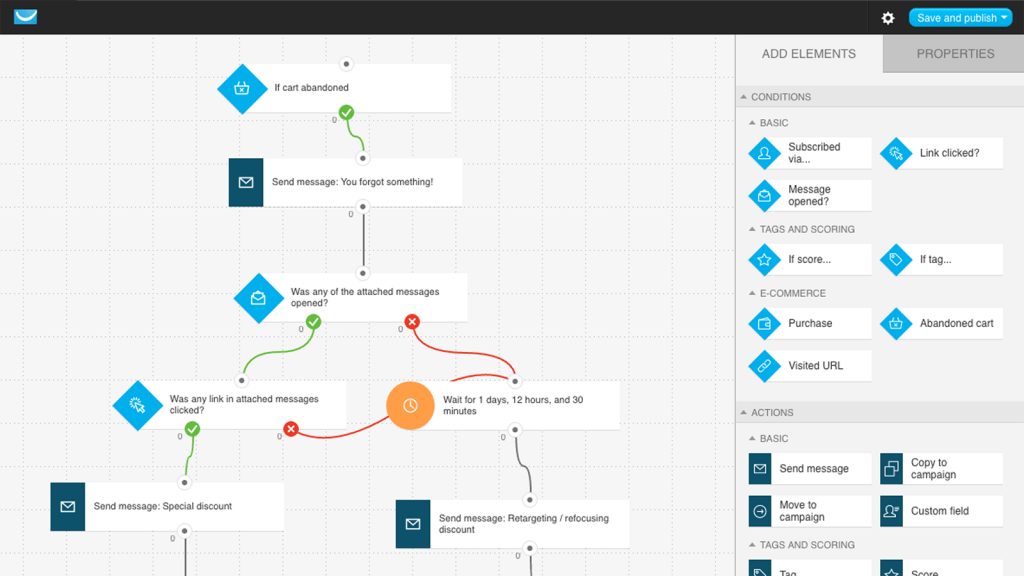
Marketing Automation – In order to create automated tasks, you make a workflow chart using drag and drop. Each connects to different commands, triggered by the behavior of the customer. These automated tasks are a quick way to improve conversions, without having to manually draft messages.

Landing Pages – A solid landing page is a great tool to turn those leads into sales. But making them can be time consuming, and using services that make fast ones cost a lot of cash. Having such a feature available to users built in with the price of their other tools is a great move by GetResponse.

Form Generator – Want to get some feedback on your site or products? You need a form, and they happen to have a generator for you to use. You select the type (scroll, popup, ect), and fill in the different areas. Then they do the rest, hosting the form on your site where it will hopefully catch some interest.

A/B Testing – You have to be regularly A/B testing your materials if you want to make sure you are getting the best possible results. I love that this dashboard has a tester right there for you to use, alongside past campaigns that might offer clues for future success.

Webinars – You have so much to teach and give. Why not host a webinar? You can get this feature with the second tier and above account, and it is worth it.

Auto Responder – Whether it is a message stating that support will be in touch, or a happy birthday message to your customers, you can set up an auto response quickly.

Multi-Source List Import – Build your lists by importing from your hard drive, or pulling them from services like Gmail and MSN. Segment them quickly and easily.

Analytics – Get solid data on your performance with their analytics charts and insights. Make smarter decisions moving forward by seeing the real time successes and failures of your campaigns.

My Experience With GetResponse

I signed up for their second tier plan, for $49 per month. My plan was just to try it for a month and consider the cost an investment that I may possibly lose. I am happy to say that didn’t happen, as I have been loving GetResponse all month.

The email creation is surprisingly easy to use. I am not a designer, which anyone who has seen my attempt at building even simple sites can attest to. Emails are no different, and I have had trouble getting templates to work for me as I customize them on other platforms. Here, I had no trouble at all. Knowing that the emails were responsive also really helped, as I knew they would look good no matter the device.

I had a bit of a tough time figuring out the automation feature at first. But with some tinkering I managed to work the drag and drop automation lines, and created some cool little tasks that I could run in the background. I mostly focused on ecommerce messages, such as if they put things in their cart but didn’t go through with a purchase. They would get a message reminding them of the item.

I also created several landing pages, and A/B tested them to see which led to a greater subscription rate on our newsletter (the biggest source of marketing success for our campaign to date has been through email outreach).

My Rating: Five Stars

I really like GetResponse so far. I haven’t had time yet to try all of their features; webinars has had to wait, but I am eager to give it a shot. Everything else has been awesome, and I couldn’t be happier with how their features have improved the time I have spent on marketing tasks.

All in all, this is a five star product.

Filed Under: Tools

  • « Previous Page
  • 1
  • …
  • 12
  • 13
  • 14
  • 15
  • Next Page »

Recently Updated Posts

The Creator’s Edge: How Bloggers and Influencers Can Master Dropshipping

Is Your Brand Fan Friendly?

How to Improve Your Freelancing Productivity

How to Leverage Live Streaming for Content Marketing

10 Key Customer Experience Design Factors to Consider

How to Use a Lead Generation Item on Facebook


From Liz Strauss & GeniusShared Press

  • What IS an SOB?!
  • SOB A-Z Directory
  • Letting Liz Be

© 2025 ME Strauss & GeniusShared