Successful Blog

  • Home
  • Community
  • About
  • Author Guidelines
  • Liz’s Book
  • Stay Tuned

How Managers and Business Owners Can Better Engage Remote Employees

January 17, 2014 by Rosemary

By Miles Young

Working remotely is both a blessing and a curse. On the positive side, it gives employees more freedom, reduces absenteeism, and lowers employer overhead. However, it creates communication challenges, causes a lack of team bonding, and lowers productivity in some cases. If you’re thinking about adding remote workers to your business, or if you already have a handful, here are some tips to keep them engaged and profitable for your business.

Hire the Right People to Work Remotely

First, make sure you hire people who will excel in a remote position. Working from home doesn’t work for everybody, and you need to be able to assess if a person is capable of staying engaged with your business in this type of position. To do this, look for people who are self-starters, computer savvy, and who don’t have distractions at home.

Some people think they can watch their young children and work from home at the same time. In most cases, this isn’t a healthy situation for your business unless the employees are compensated based on deliverables. When hiring remote employees, make sure you emphasize that watching children at home isn’t a possibility because you expect them to do the same quality and quantity of work you would if they were working from an office with direct supervision. Additionally, you can require remote employees to have a dedicated office space in their home to minimize distractions.

Hold Face-to-Face Trainings and Orientations

Once you’ve hired remote workers, it’s important to quickly establish a strong relationship between employee and supervisor. This is critical to the success of a business, because the supervisor acts as a motivator and a role model. Without this relationship, remote workers can get lost or confused and not know how to engage with your business. It’s easiest to establish this relationship in person. Therefore, hold face-to-face trainings and orientations, when possible.

If your business cannot afford to hold in-person trainings, a video conference call is the next best thing. Remote employers will have an easier time establishing trust and a good relationship with their supervisor if they can attach a face to a name and converse naturally.

Do Frequent Performance Reviews

Traditionally, businesses hold semi-annual reviews for employees. Remote workers need more frequent reviews to keep them motivated and on task since they don’t have the daily interaction provided in an office setting. Performance reviews are a good way to measure the productivity of remote workers and keep them accountable. As a remote worker, it’s easy to slack off without the proper supervision and review cycle, especially in positions where it’s more difficult to measure productivity, such as customer service positions.

On the other hand, burnout can be a problem for some remote workers. This is partially because supervisors cannot directly see how much work and effort their remote workers are putting in on a daily basis. Plus, it is hard to separate work life from home life in a remote position, leading some people to feel like they are constantly working.

During performance reviews with remote workers, ask how they’re doing and if they need anything. Make sure that your remote workers have a workload that is neither too much nor too little. This will help remote workers stay engaged and profitable for your business.

Conduct Meetings Over Video Conference Instead of on the Phone

Video conferencing is the best way to hold meetings with remote workers, because it provides face-to-face interaction and helps everyone feel more involved. Meetings over the phone cause many remote workers to become disengaged, especially when there are a lot of people on the phone. Video conferencing requires remote workers to be alert because they know they’re being watched by everyone else in the meeting.

With the technology available today, it is easy for businesses to implement video conferencing. There are several companies, such as GoToMeeting, that help facilitate video conferencing for businesses. Additionally, large companies can spend money to create their own in-house conferencing systems that are more secure.

Use Multiple Channels of Communication

In addition to video conferencing, it’s important to engage remote employees through multiple channels of communication. This should involve frequent phone calls, emails, and instant messaging. Software that makes working collaboratively with others is also important. Remote workers need more regular communication than on-site employees to foster a sense of belonging.

Instant messaging is one of the best things a business can implement because it gives remote workers instant access to their supervisor and team mates. Remote workers can reach out with questions as if they were working in the same room. This eliminates the wait for people to return phone calls and answer emails, which increases productivity and employee engagement.

Recognize Remote Employers for Their Performance

Sometimes, remote workers do not feel valued for their work. This leads to lower productivity and engagement with your business. This is something that is hard for supervisors to recognize because of the lack of in-person communication. Therefore, you can promote remote worker engagement by giving recognition where it is due.

There are lots of things you can do to recognize remote workers. For instance, you can send gift cards to employees who exemplify an above-and-beyond attitude. Or, if you don’t have a lot of money to spend on recognition gifts, you can order useful promotional gifts like custom pens and send them to your employees as a token of appreciation. It’s better to do something rather than nothing so that your remote workers feel valued and engaged. Having items with the company logo in their workspace will also help them feel like they’re a part of the company and team.

Remote workers are on the rise in the U.S. According to CNN Money, work-at-home jobs have surged 41 percent in the past 10 years. If this is a trend you’re noticing in your business, you need to learn how to keep your remote workers engaged and profitable for your business.

What challenges have you faced with remote workers? Leave a comment below.

Author’s Bio: Miles Young is a tech geek, business blogger and all around cool person. Follow him on twitter @mrmilesyoung.

Filed Under: management, Productivity, Successful Blog Tagged With: bc, remote workers, telecommuting

Make Your Work Area Your Own

December 13, 2013 by Rosemary

By Chris Long

There are times when staying focused and being productive can be difficult, especially for people who work by themselves. If your office is in your house or even in a lonely cubicle, and interaction with other human beings is mostly through phone calls, texts and emails, you should make your work space as inviting as possible. When you wake up in the morning, you should look forward to spending most of the day at your desk, rather than dreaming up excuses not to roll up your sleeves, dig in and get to work.

office environment

Use Your Imagination

There are some simple and inexpensive things you can do to make your work space a more inviting place to do your job.

  • Maybe your desk is facing in the wrong direction. Most people would rather look out a window than stare at a wall. You can move your furniture around so you’ll have a better view, though you might be limited by the location of your electrical outlets and your phone and cable connections.
  • Invest some money in a solid, comfortable chair. You might need an extra chair if clients or co-workers ever visit your office.
  • Bookcases come in a variety of sizes. They are useful for storing books, of course, but you also can use some of the shelves for framed photos or for items that otherwise would be cluttering your desk.
  • The color of your walls can make a difference. Paint them a bright hue, or make your work space even more interesting by painting one wall a dark color and the other three a lighter shade.
  • Use your imagination when it comes to finding a place to store your office supplies. You can put paper clips in old coffee jars, pencils and pens in decorative glasses and bills and letters on small shelves on the wall behind you. Flea markets are a great place to find unusual items that will work well.
  • Surround yourself with stuff that makes you feel good, whether it’s photos of your family or of a vacation you especially enjoyed or a trash can emblazoned with the midnight green logo of the Philadelphia Eagles.

Low-Maintenance Plants

One or more plants can make a big difference in your office. They help clear the air by soaking up pollutants, and they also give off oxygen. The following plants are all low-maintenance options that can make your office a better and more interesting place to work.

  • Aloe;
  • Chrysanthemum;
  • Golden pothos;
  • Red-edged dracaena;
  • Spider plant;
  • Weeping fig

Give the Walls Some Pizazz

You’re probably spending at least 40 hours a week in your office, so you should do something to make the walls a little less boring. You have some options in addition to simply painting them.

  • Make a fake window – You can enlarge a photo you love and frame it with lightweight window molding. Then, when you’re not busy, you can pretend you’re gazing at the Pacific Ocean, the Rocky Mountains or the coast of Maine.
  • Lighting makes a difference – If you are currently bringing light to your office with harsh fluorescent lighting, a small table lamp with a natural-light bulb will help.
  • Decorate your walls – In addition to photos and other artwork, you can decorate dull walls with wallpaper ñ or with craft paper and colorful fabric attached to the walls with Velcro.
  • Don’t forget the floor – An area rug can help define your work space, especially if your office area doesn’t take up an entire room. If you are working from home, your office might be part of the dining room or a corner of your bedroom. An attractive chair mat will work as well.
  • Define your space – Room dividers can be useful if your office is taking up only part of a room in your house. They are generally between 5-and-a-half and 7 feet tall, and they come in a wide range of styles, from simple bamboo slats to those imprinted with photos depicting the life of Elvis Presley or the antics of popular comic book heroes.
  • Your office should be inviting, for you and for others – If you have guests in your office, make them feel welcome with an espresso machine or a dish of mints or chocolate. If you never have visitors, the coffee and candy will give you a good reason to hang out in your office.

Whether your work space is at home or in an office building, you should look forward to spending time there. It should be a fun, cheerful place that brings you comfort rather than stress. Most of all, it should reflect your personality and the unique way you do your job.

Author’s Bio: Chris Long has been helping homeowners on DIY projects since 2000. He is an “on-the-floor” sales associate at a Home Depot in the Chicago suburbs. Chris is also a regular contributor to Home Depot’s Home Decorators.com website, where his range of interests includes providing tips on home office design, floor coverings and furniture for the home.

Filed Under: Productivity Tagged With: bc, environment, ergonomics, office, Productivity

How E-Signatures Can Help You Go Paperless

November 29, 2013 by Rosemary

By Jared Jaureguy

In a world that is constantly putting more and more trust in the hands of smartphones, tablets and desktops, one would expect paper to become obsolete. After all, it’s easy to read the news, check your bank account, send emails to clients, and even shop all in the cyber world. However, many companies are reluctant to let go of their reliance on paper. This could be due to the necessity of physical documents in some cases or just lack of willingness to break with a habit.

There are important incentives for going paperless. Among them are faster speeds, better organization, and benefit to the environment. Recent changes in technology, one of them being the growth of the e-signature, have made it much easier for companies and organizations to make the change.

Why go paperless?

One of the biggest reasons is efficiency. Earlier this year, attention was drawn to the Department of Veterans Affairs, when it became obvious how inefficient their system was. Veterans filing claims for disability compensation and other benefits were waiting months and sometimes years for their files to be processed. Investigations into the problem revealed that part of the problem was that almost all of the veteran’s claims were made on paper (97%). Piles and piles of paperwork had built up over the years, making the department incredibly inefficient.

Another reason is organization. Some feel that the old fashioned model of folders and file cabinets is the best way to stay organized. However, papers can easily be misplaced. Stacks of paperwork can build up, making it difficult to find anything. On the contrary, online files can be retrieved immediately.

Companies should also be concerned with the environmental impact their paper hoarding can have. Going digital helps in several ways. It saves trees that provide oxygen to the environment, lessens harmful substances released in paper industry, and reduces fuel consumption in transporting paper products. The U.S. pulp and paper industry is the second largest consumer of energy in the nation. Currently the average American office worker prints close to 10,000 pages per year. Simply deciding to use digital documents when possible can save significant amounts of oil, space, trees and energy.

How e-signatures can help

All companies and organizations use signed documents in their dealings with clients and colleagues. Printing long contracts inevitably generates a lot of paper.

Over ten years ago, the federal government passed a law giving credibility to electronic signatures, protecting them in courts of law. Over the years, the use of e-signatures has grown, as companies have adopted quick and efficient ways of transferring documents. Documents can be sent via email, read by customers (and explained over the phone if necessary), and signed by clicking boxes that show your acceptance of conditions. This method is just as safe, if not safer, than the traditional method. Most companies password protect the documents and store them in secure servers. Some even go as far as to encrypt documents when they receive them, making them virtually impossible to hack. To eliminate the possibility of tampering and fraud, the documents are made available to both parties, so no one can change them after they are signed.

The use of e-signatures is on the rise, with companies continuing to make it an easier process, and integrating them into user friendly formats on social media and personalized websites.

There are many ways that a company can go paperless, from basic email to digital record keeping. However, e-signatures are leading the way and will certainly help companies in the future become more efficient, organized and ecologically friendly.

Author’s Bio: Jared Jaureguy is an entrepreneur and freelance writer who loves all things tech. He writes for many of the top industry websites and loves to stay up-to-date on technology news. You can follow him @jaredjaureguy.

Filed Under: Productivity, Successful Blog, Trends Tagged With: bc, e-signatures, ecology, paperless

5 (more) Apps That Make My Business Life Easier

September 19, 2013 by Rosemary

I’m a technology magpie, flying around poking and picking up shiny objects. I bring them back to my nest and play with them for a while, trying to decide if they’re worthy of a permanent space on my phone, iPad, or desktop.

To justify my habit, I share what I’ve found. That way I can tell myself I’m doing it “for work.”

Here are the 5 mobile apps that have improved my work productivity.

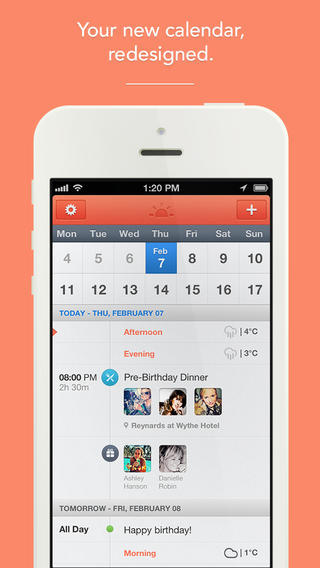
Sunrise Calendar

I have to admit that I didn’t find this one. My husband did, and it was surprising to me that he was “cheating on” Fantastical, the most recent calendar app we’d fallen in love with. However, Sunrise is even more beautiful than Fantastical. It easily brings together all of your disparate calendars into one interface, and adding events is a breeze. It analyzes the words used in your event titles, and uses appropriate icons (anything with “party” in it triggers a balloon). Did I mention that it’s free?

Sunrise Calendar

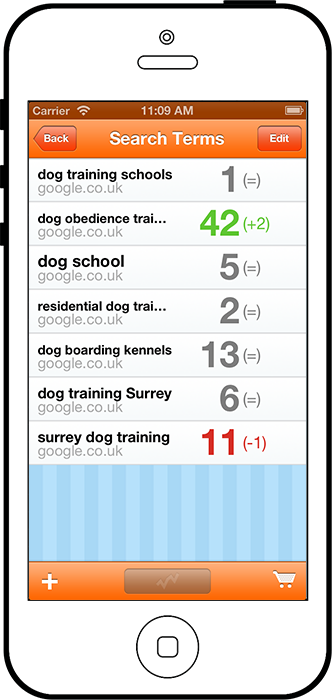
Yodelay

This cool app does one thing–it helps you stay on top of your search engine rankings. You tell Yodelay which search terms you’re trying to rank for, and it will keep running data on where your site falls in the list. This is useful because it’s difficult to get “pure” unpersonalized information by searching yourself. This one is also free.

Yodelay SEO App

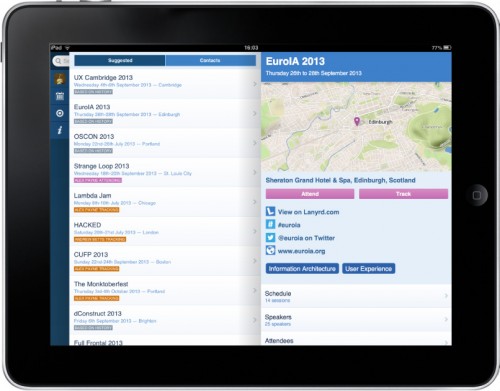
Lanyrd

Lanyrd on the desktop is pretty awesome, with conference/event speakers, schedules, attendee lists, and a million ways to connect with them. The mobile app is also extremely useful. Open it up during a conference, and have instant access to your fellow attendees, that conference agenda you left at breakfast, official hashtag, and more. Set up a “want to meet” alert so you never miss out on meeting those important contacts again. It’s free, and available on both iPhone and Android, as well as iPad.

Lanyrd on iPad

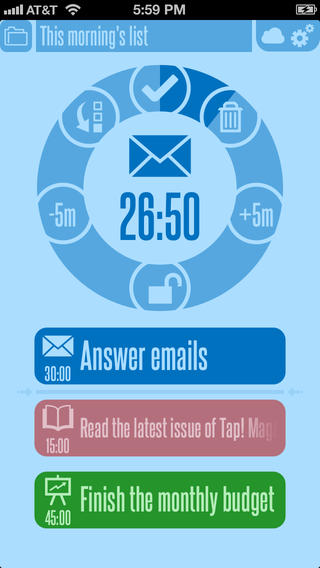
30/30 Task Manager

The 30/30 app is for anyone who needs extra help staying on task. Use it to set up a series of tasks, with estimated completion times, and it will alert you when it’s time to move on to the next task. The interface is easy and fun to use, and knowing there’s a clock ticking down will either spark your competitive juices, or drive you crazy. After some trial and error, I’ve decided that it’s used best for a series of recurring tasks (for example, your wake-up routine).

30/30 Task Management

vSnap

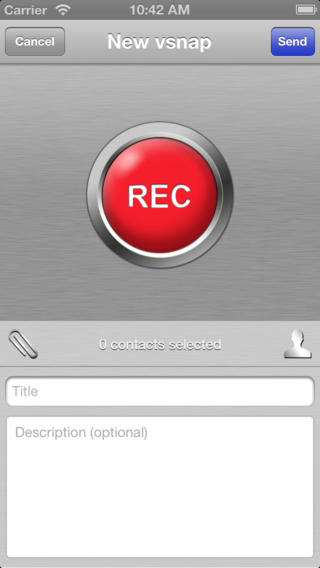
Another handy app is vSnap, a single-purpose app that just makes it crazy easy to send a quick (less than 60 seconds) personal video to your contacts. It differs from Vine or Instagram videos in that it’s meant to be a one-to-one communication. Contacts who receive the videos don’t have to have an account or login, and they simply click a link to see your video. Great for adding a personal touch to your business communications, without having to send a huge file. This one has a free version, but paid upgrades available.

vSnap video app
Author’s Bio: Rosemary O’Neill is an insightful spirit who works for social strata — a top ten company to work for on the Internet . Check out the Social Strata blog. You can find Rosemary on Google+ and on Twitter as @rhogroupee

Filed Under: Productivity Tagged With: apps, bc, Productivity, tools

6 Advantages “BYOD” Brings to a Business

August 30, 2013 by Rosemary

By Miles Young

One major trend in business now is BYOD, or “bring your own device.” This basically means that employees are responsible for buying and choosing their mobile device. It allows businesses to save money, while keeping employees happy at the same time.

There are also several other business advantages, such as fewer headaches for the IT department, more employee choice and freedom in their devices and a better connection with today’s consumers. Businesses that are newly introducing BYOD do face some roadblocks, but it is worth the effort once the transition is complete. Take a closer look at the advantages to BYOD and what it could mean for your business.

#1: Your Business Saves Money with BYOD

Successful businesses always look for ways to save money. Reducing monthly spend on employee mobile devices is one of the best and easiest ways to do this. In a true BYOD business environment, employees cover the full cost of their devices, including minutes and data usage. This saves businesses thousands of dollars each year. However, most companies offer incentives to employees through discounts or usage stipends, especially at the beginning of the transition.

Only a few short years ago, employees would have complained a lot about BYOD. However, a recent Good Technology State Report shows that 50% of employees are more than happy to cover the costs. This is for several reasons, but the biggest is that it gives them more freedom to choose their own device and upgrade as desired. Many people are dedicated fans to specific platforms, so this allows them to remain loyal to their favorite brand of device. As more businesses turn to BYOD environments for its cost savings, employees will get more used to the idea.

#2: Employees Can Choose the Device They Like

People get very attached to their mobile phones. As a matter of fact, one Mobile Mindset study showed that 73% of mobile phone users admit they would go into a panic if their phone went missing. This obsession is one reason most employees prefer to choose their own mobile device — they have an intimate relationship with it. Everyone has a different preference over the brand of phone they like and what features are must-haves. Businesses can keep their employees happy by allowing them to choose their own mobile device with a BYOD policy.

#3: Businesses Stay on the Cutting-Edge of Technology

Typical smartphone users want to have the latest and greatest technology. This is a major advantage to businesses because employees usually upgrade to the newest phone as soon as they are eligible for an upgrade. This is especially true if you have a younger workforce. Having technology-savvy employees translates to more efficiency for your business, which is why giving your employees more freedom with BYOD is such a good idea.

Additionally, many businesses have spent a lot of money on creating a mobile infrastructure, such as putting business information in the Cloud so it’s easier for employees to get access to. By allowing employees to choose their own mobile device and other gadgets, it encourages them to use the infrastructure your business has spent so much money to create.

#4: Employees Only Have to Manage One Device

With BYOD initiatives, employees no longer have to worry about carrying separate phones for business and personal use. This was a major hassle for employees in the past, and it often meant missed calls because employees only carried their business phones during business hours. With a BYOD environment, your business will have fewer missed calls because your employees will have fewer gadgets to juggle. Plus, the phone will be with them whether they are working or not.

Managing only one device also increases employee productivity, because they only have to get used to one phone. Every mobile phone works a little differently and there is a learning curve, even for technology savvy employees. If your employees are allowed to choose their own device, they will be more motivated to learn how to use it effectively, which has all sorts of advantages to your business. Increased productivity means more profits for your business.

#5: Your IT Department Has Fewer Headaches

If you don’t have a BYOD policy, your IT department probably spends a lot of time fixing mobile phones and plan issues. With BYOD, employees have to seek help about their phones from their cell phone carriers. This means fewer headaches for your IT department and less wasted time. Of course, your IT department still has to find a way to make sure everyone has good security to protect your business information.

All smartphones today have the basic features businesses need, such as access to the Internet and email alerts. So, there’s no reason a business should have to require all of their employees to use the same device, except for security purposes. Your business can make BYOD recommendations about security, such as requiring all employees to use the RIM platform, but there are also other ways to make sure employees have the proper security on their phones. This includes things like requiring two layers of passwords and encrypting all business information. Security is a major issue for IT departments, but policies can be put in place to protect your business.

#6: Employees Care More for Their Device

Another advantage to BYOD is that employees will take better care of their devices if they are responsible for the costs. Your business won’t have to worry about replacing phones or paying for insurance policies related to gadget use and ownership. This saves money and it also means that your business information will be protected with more care.

According to an ARCchart report, 65% of business owners have already transitioned to a BYOD environment or have a plan to transition in the near future, while only 11% have no plans. There are obvious advantages to BYOD if you can successfully get your employees on board with the idea.

Has your business already made the BYOD transition? Do you have any advice for others that want to follow suit? Leave a comment below.

Author’s Bio: Miles Young is a tech geek, business blogger and all around cool person. Follow him on Twitter @mrmilesyoung.

Filed Under: Business Life, Idea Bank, Productivity, SOB Business, Successful Blog, Trends Tagged With: bc, BYOD, cost savings, devices, IT

The Ron Popeil Method of Problem-Solving

August 1, 2013 by Rosemary

My favorite Ron Popeil commercial was always the rotisserie chicken machine. “Set it and forget it!” Who doesn’t want to have delicious, juicy chicken roasting in their kitchen, being basted by a machine?

Showtime rotisserie machine

Stay with me a minute while I equate your brain to that self-basting rotisserie machine.

Your unconscious mind is capable of doing a lot of heavy lifting while you’re going about your daily tasks. According to a University of Alberta study, it’s constantly evaluating whether objects in your environment are helping you move toward your goals or away from them.

Your unconscious can be creative, even while you’re vacuuming or playing golf or filling out timesheets.

So if you’re trying to come up with a new idea, a blog topic, a cartoon, a product design, it pays to “set it and forget it.”

This mechanism is the basis for Think and Grow Rich, The Secret, Oprah’s dream boards, and enough self-help books to fill the Grand Canyon.

But wait, there’s more!

You can try this in your very own home for the low, low price of….nothing!

Step One – What’s Your Problem?

Think very vividly and in detail about the parameters of your problem. Say it out loud to yourself, write it down, describe it to someone else. Just define what you’re trying to solve (perhaps you’re just looking for a great blog topic).

Step Two – Go About Your Business

That’s it. Totally forget about your issue, and concentrate on another task that’s unrelated. Do the laundry, file your taxes, finish that re-branding project, anything that distracts you from the problem.

That’s when the magic happens. Delicious, juicy, rotisserie chicken, just for you.

Author’s Bio: Rosemary O’Neill is an insightful spirit who works for social strata — a top ten company to work for on the Internet . Check out the Social Strata blog. You can find Rosemary on Google+ and on Twitter as @rhogroupee

Filed Under: Content, Inside-Out Thinking, Motivation, Productivity, Successful Blog, Writing Tagged With: bc, creativity, ideas, unconscious, Writing

  • « Previous Page
  • 1
  • …
  • 7
  • 8
  • 9
  • 10
  • 11
  • …
  • 32
  • Next Page »

Recently Updated Posts

Is Your Brand Fan Friendly?

How to Improve Your Freelancing Productivity

How to Leverage Live Streaming for Content Marketing

10 Key Customer Experience Design Factors to Consider

How to Use a Lead Generation Item on Facebook

How to Become a Better Storyteller


From Liz Strauss & GeniusShared Press

  • What IS an SOB?!
  • SOB A-Z Directory
  • Letting Liz Be

© 2025 ME Strauss & GeniusShared