Successful Blog

  • Home
  • Community
  • About
  • Author Guidelines
  • Liz’s Book
  • Stay Tuned

Great Find: Diigo

March 23, 2008 by Guest Author

A New Kind of Social Networking?
Guest Post by Phil Butler

Diingo

Diigo is one of my favorite startups of what we have termed “Web 2.0”. Whether Web 2.0 actually ever existed is irrelevant, for one thing it has brought us all is innovation for Web users – and plenty of it. A question I always ask myself and my readers is: “But does the innovation actually do anything for us?” I think I have tested and reviewed over 300 startups in the last couple of years, and I can honestly say that most of this innovation has been directed at entertainment or rather useless “cuteness”. Diigo is one innovation that does not fall into these categories. Diigo has continually adapted and developed into what is effectively the Web’s best research tool. Now, with their launch of Version 3, Diigo has refined a social annotation and collaboration service into an even more effective “personal and group oriented tool”.

The Vision

The Diigo platform was developed around a utility (the Diigo browser add on) that enables people to actually highlight and perform functions on sections of or whole Web pages. The vision was and is to help people grab relevant content and effectively aggregate, save and/or store this data. Diigo has transformed the bookmark into a more usable and effective data collection tool and has also enabled a very unique and positive community aspect with V3. Diigo basically enables people to study and research as one would in a library – by taking pertinent pieces of the knowledge puzzle and putting them where they are accessible, functional and more easily utilized.

Version 3 – Beyond Bookmarks, Way Beyond!

Diigo has been erroneously classified as a social bookmarking community by TechCrunch and others. Calling this deep and diverse research and annotation tool a bookmarking service is really ridiculous – akin to comparing putting a cardboard placeholder in a book with actually understanding what is in the book. Being able to grab, store, manipulate and organize data and knowledge and the abilty to work on it in collaboration has nothing to do with bookmarking. Judge for yourself, here are some of the features of Diigo’s Version 3 upgrade.

Diigo’s Personal, Collaborative Research Platform – This is the premise on which Diigo was built, a platform for gathering, using and sharing information. Not just any information, but highly filtered and relevant information beyond the weightiness of full Web pages and extraneous data. Diigo allows users to add, gather or extract from pages of information and then share or work with others to further refine knowledge. Users can define their content on a group, community and ultimatly on a personal level via this even more enhanced UI.

Social Content Site – The aggregate gathered annotated data on Diigo provides a collective repository quite unlike any other. Data becomes knowledge refined at Diigo because of the human filtering aspect inherent in the way people can “slice” or refine their annotations and bookmarks. Essentially everything gathered on to the Diigo platform becomes either a personal or communicative volume in the Diigo library. In this was Diigo content is perhaps more social than on any other site. Searchability and the host of Diigo user tools make endless the possibilities in utilizing this storehouse of information.

The Power of Suggestion

Version 3 has more than 100 refinements to help users more efficiently interact with knowledge and data. Perhaps the best of all these tools is the new sidebar that makes it simple to see your annotations, links, notes and even the suggested or similar data of other users. The sidebar interface is much more visible and interactive than even Diigo’s previous interface and light years ahead of the closest competitor. Combined with the Diigo toolbar makes Diigo an even more powerful collaborative tool. Users now have the ability to search and select suggested data from other users as well as suggesting relevant knowledge to their friends. Suggestion, when presented by like minded users, can effectively act as a knowledge filter which narrows search to a fine point. This is what Diigo can be best at, presenting relevant knowledge in a much more filtered and refined way.

I have succumbed to using bookmarking sites out of the necessity of networking needs myself. None of them have anywhere near the capacity Diigo has. Diigo is a complicated tool however, and new users will need to familiarize themsleves with the interface and tools there. However, this is the case with any powerful Web application, the difference is that Diigo can actually help you get something important done, while others simply help us play at doing important stuff. It is always a pleasure to work with such tools once we get used to them. It is my pleasure to be able to present just one of my favorite applications to Liz’s great readers. Liz has always been about putting people together in the most positive way, and innovations like Diigo aim towards people as well. Check this cool tool out when you get the chance and let us and Diigo know what you think.

For screenshots and more see Phil Butler Unplugged.

Thanks, Phil!

–ME “Liz” Strauss
Knowing what to do when you get to a network the trick. Work with Liz!!
SOBCon08 is May 2,3,4 in Chicago. Hear Muhammad Saleem speak on which social networks are right for you! Register now!


Filed Under: Successful Blog, Tools Tagged With: bc, Diigo, Phil Butler

Do You ooVoo?

February 9, 2008 by Liz

My ooVoo Day: Feb 10 – 21

ooVoo

New on the web is ooVoo.com . . . and to let you know they’re here, ooVoo has invited some cool people to host video chats for small groups.

ooVoo is calling this introduction

a first-of-its-kind web event called “My ooVoo Day With…” in which 23 bloggers and podcasters from a variety of different industries and interest groups will host their communities in multi-user online video chats.

The list of hosts includes:

  • Mitch Joel/Six Pixels of Separation
  • Steve Hall/AdRants
  • Bob Garfield/AdAge & On the Media
  • Joseph Jaffe/JaffeJuice
  • John Wall & Christopher Penn/Marketing Over Coffee
  • iJustine
  • Marshall Kirkpatrick/ReadWriteWeb
  • Irina Slutsky/GeekEntertainment.tv
  • Connie Reece & Susan Reynolds Every Dot Connects / Boobs on Ice
  • Chris Thilk/Movie Marketing Madness
  • Erin Kotecki Vest/Queen of Spain
  • Dave Delaney/Two Boobs and a Baby +
  • Jack Myers & Friends/Media Village
  • David Meerman Scott/The New Rules of Marketing & PR
  • Geoff Livingston/Now Is Gone
  • Allan Cox/Your Inner CEO
  • George Parker/Madscam
  • Scott Sigler
  • Chris Brogan
  • C.C. Chapman
  • Susan Reynolds/Boobs on Ice
  • Laura “Pistachio” Fitton

You can find more details at the page My ooVoo Day.

–ME “Liz” Strauss
Work with Liz!!
SOBCon08 is May 2,3,4 in Chicago. Register now!

Filed Under: Successful Blog, Tools Tagged With: bc, Great-Find, ooVoo

TalkShoe and Ning Together — Even Better

January 26, 2008 by Liz

If You Haven’t Been There . . .

The Living Web

Two of my favorite places on the web just got better. TalkShoe and Ning have announced an even closer partnership. If you don’t know both of these services, you’re missing two great finds.

Talkshoe logo

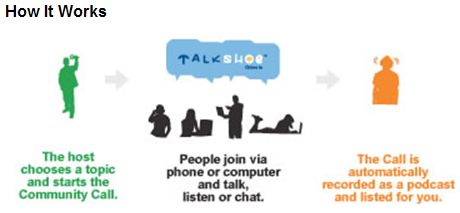
TalkShoe is a community interactive site that allows people to gather via phone or computer for conversations, discussion, talk shows, and podcasts. Visitors can listen or chat. Recorded Community Calls can be joined live, downloaded, or followed by RSS.

This image from the TalkShoe site explains how it works. Click the image to visit TalkShoe and learn more about it.

TalkShoe - How it works

Ning Logo

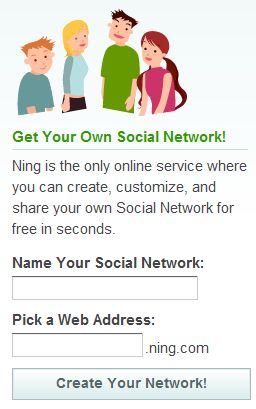
Ning calls itself, “Your own social network for anything.” On the front page it says, “Ning is the only online service where you can create, customize and share your own Social Network for free in seconds.” That’s a promise that Ning keeps. Even better, what you end up with is something that is easy on the eyes that doesn’t feel like too much like it came from a cookie cutter. Click the image to visit Ning and learn more about it.

Get Your Own Social Network

January 23rd TalkShoe and Ning announced a deeper integration partnership. Now you can embed the voice power of TalkShoe directly into a Ning Community — It’s the next best thing to being there!

Seriously. This is something special.

–ME “Liz” Strauss
Work with Liz!!

Filed Under: Community, Successful Blog, Tools Tagged With: bc, Great Finds

MWSnap

December 29, 2007 by Liz

Capture Screenshots with MWSnap

Great Find: MWSnap

Permalink: http://www.mirekw.com/winfreeware/mwsnap.html

Target Audience: Anyone who wants a screen snapshot

Content:

I’ve been looking for a low-cost, reliable tool to capture screenshots. You know, make an image out of selected parts of the screen. For example, when I write blog posts I often use a screenshot to explain something or display a product logo.

MWSnap is a nifty utility that’s freeware, although they do take donations. You can capture the entire desktop, a window, or a rectangular part of the screen. I really like that you can select the size of the rectangle first. You can choose from five popular formats to save your graphic and it’s available in several languages.

It also boasts a ruler and a color picker.

MWSnap

Be sure to check this one out!
See you next time!

–Sandy, Purple Wren

Related
Great Find: PictureTrail
Sandy’s Great Graphic Find: CoolText
Sandy’s Great Graphic Find: Pixel Ruler

Filed Under: Successful Blog, Tools Tagged With: bc, Great-Find, MWSnap, PurpleWren, Sandy-Renshaw

Sandy’s Great Graphic Find: Textorizer

December 22, 2007 by Liz

Create an Image with Textorizer

Great Find: Textorizer

Permalink: http://lapin-bleu.net/software/textorizer/

Target Audience: Anyone with a photo!

Content:

Here’s a fun tool – actually two tools. They each produce a different look. For this sample I used Textorizer 2. Just locate a photo that you want to “textorize,” select the text to use, and the program creates a textorized image. That’s right – the image is created out of the text you submit.

What could be easier? There are a few parameters you can select to tweak the results. Be sure to choose an image with good contrast.

This is the original photo and the textorized image. I used an image of Oprah and some of her favorite words, “Be grateful every day! Transform your life! Help others! Stay positive!” I think it turned out well. What do you think?

oprah1.jpg
oprah.jpg

This tool is on my favorites list because:

  • It’s easy-to-use
  • It’s fun
  • It’s free

Check out the tool yourself. How can you use a textorized image?

See you next time!

–Sandy, Purple Wren

Related
Great Find: PictureTrail
Sandy’s Great Graphic Find: CoolText
Sandy’s Great Graphic Find: Pixel Ruler

Filed Under: Successful Blog, Tools Tagged With: bc, Great-Find, PurpleWren, Sandy-Renshaw, textorizer

Pro Data Doctor

December 15, 2007 by Liz

Pro Data Doctor to the Rescue!

Great Find: Pro Data Doctor

Permalink: http://www.datadoctor.biz/

Target Audience: Anyone who has lost data from a memory card!

Content:

Have you ever lost pictures from your camera’s memory card? We were vacationing in August and after two days with the grandkids, I lost all my photos. That’s crushing! The photos just seemed to disappear from the memory card.

So I put in my second memory card. I could only take 5-6 pictures and then the camera thought the disk was was full. I really enjoy taking photos, so it was quite a disappointing trip from that perspective. When I returned home, I took my camera in for repair at our local big-box store. To make a long story short, the manager at the technical repair counter looked at the memory card and suggested that there was nothing on it and to go ahead and reformat the card. I wasn’t ready to give up. After all, if CSI and the FBI can recover files, there must be a solution.

This weekend I started looking online for a program or company that could help me recover my photos.

Memory Card Data Recovery Software

I found Pro Data Doctor and they make a product called Memory Card Data Recovery Software. I downloaded the demo version and it found a lot of files. So I purchased the program. It was successful! Yeah! I was able to recover all the photos of the grandkids and our adventures. Who wouldn’t want this photo?

inpool.jpg

This company makes a lot of other recovery programs. Check them out if you have lost data. It’s worth a try!

This tool is on my favorites list because:

  • It’s easy-to-use
  • It works!
  • It’s reasonably priced

Check it out yourself.

See you next time!

–Sandy, Purple Wren

Related
Great Find: PictureTrail
Sandy’s Great Graphic Find: CoolText
Sandy’s Great Graphic Find: Pixel Ruler

Filed Under: Successful Blog, Tools Tagged With: bc, Great-Find, Pro-Data-Doctor, PurpleWren, Sandy-Renshaw

  • « Previous Page
  • 1
  • …
  • 15
  • 16
  • 17
  • 18
  • 19
  • …
  • 30
  • Next Page »

Recently Updated Posts

Is Your Brand Fan Friendly?

How to Improve Your Freelancing Productivity

How to Leverage Live Streaming for Content Marketing

10 Key Customer Experience Design Factors to Consider

How to Use a Lead Generation Item on Facebook

How to Become a Better Storyteller


From Liz Strauss & GeniusShared Press

  • What IS an SOB?!
  • SOB A-Z Directory
  • Letting Liz Be

© 2025 ME Strauss & GeniusShared