Successful Blog

  • Home
  • Community
  • About
  • Author Guidelines
  • Liz’s Book
  • Stay Tuned

Guidelines for WordPress Security

December 17, 2013 by Rosemary

By Charles Mburugu

With the increase of hacking incidences, security has become a major concern for most website owners. Fortunately, there are several precautions one can take to lower the risk of attack. Here are some tips which will help enhance the security of your WordPress site.

1. Avoid free themes

WordPress offers numerous free themes that you can choose from. However, using such themes is generally not advisable since many have been found to contain malicious code which would make your site vulnerable to all kinds of attacks. If you must use a free theme, make sure you select one which has been developed by a well-established company. This also applies to WordPress plugins.

2. Choose a secure host

Web hosting plays a major role when it comes to security matters. Therefore, when selecting a web host, don’t make the mistake of settling for the cheapest option available. Instead, take time to do your research and identify a provider that is well known for secure hosting. Though it might cost you a little extra, you won’t have to worry about your website’s security.

3. Update regularly

In an effort to enhance security, WordPress releases regular updates which are aimed at dealing with potential or real threats. Therefore, it is very important to keep your site updated with the latest WordPress version. Failing to do so will leave your site vulnerable to hackers who target outdated WordPress versions. Always be on the look-out for ‘Update now’ messages on your dashboard. Plug-ins and themes should also be updated immediately a new version is released.

4. Use a strong password

Using a weak and predictable password such as ‘123abc’, ‘wordpress’ or ‘password’ will make your WordPress site more vulnerable to attack. Therefore, you need to find a more complex password, but one which is easy to remember. Combine symbols, numbers and letters to make it harder to crack. However, avoid using the same password across different accounts.

5. Don’t use the default ‘admin’ username

Many people have ‘admin’ as the default username on their WordPress sites. Having such a username, combined with a weak password, will expose your site to all kinds of security risks. It is therefore very important to alter your username to something which is more unique. In addition, you need to ensure that the username is hidden from author archive URL.

6. Limit login attempts

Hackers and bots try to access your site by making repeated login attempts using different variations of usernames and passwords. WordPress offers great plugins which can help you limit the number of login attempts on your site. In addition, you can choose how long the specific IP address will be locked out before they can make another attempt.

7. Use security plugins

WordPress offers a wide range of plugins which can help enhance the security of your site. Some of the most popular include Bulletproof Security, Better WP Security, Wordfence, Sucuri Scanner and Website Defender. Most of these plugins are free and can easily be downloaded and installed on a site.

8. Backup frequently

Backing up frequently is something that should not be overlooked. Even when you have taken all the above security measures, your site might still fall victim to a malicious attack. If your content is backed up properly, it will be easy to recover your files and restore your site. There are several WordPress plugins which can help you schedule frequent automatic backups.

Author’s Bio: Charles Mburugu is a HubSpot-certified content writer/marketer for B2B, B2C and SaaS companies. He has worked with brands such as GetResponse, Neil Patel, Shopify, 99 Designs, Oberlo, Salesforce and Condor. Check out his portfolio and connect on LinkedIn.

Filed Under: Design Basics Tagged With: bc, hackers, security, WordPress

Make Your Work Area Your Own

December 13, 2013 by Rosemary

By Chris Long

There are times when staying focused and being productive can be difficult, especially for people who work by themselves. If your office is in your house or even in a lonely cubicle, and interaction with other human beings is mostly through phone calls, texts and emails, you should make your work space as inviting as possible. When you wake up in the morning, you should look forward to spending most of the day at your desk, rather than dreaming up excuses not to roll up your sleeves, dig in and get to work.

office environment

Use Your Imagination

There are some simple and inexpensive things you can do to make your work space a more inviting place to do your job.

  • Maybe your desk is facing in the wrong direction. Most people would rather look out a window than stare at a wall. You can move your furniture around so you’ll have a better view, though you might be limited by the location of your electrical outlets and your phone and cable connections.
  • Invest some money in a solid, comfortable chair. You might need an extra chair if clients or co-workers ever visit your office.
  • Bookcases come in a variety of sizes. They are useful for storing books, of course, but you also can use some of the shelves for framed photos or for items that otherwise would be cluttering your desk.
  • The color of your walls can make a difference. Paint them a bright hue, or make your work space even more interesting by painting one wall a dark color and the other three a lighter shade.
  • Use your imagination when it comes to finding a place to store your office supplies. You can put paper clips in old coffee jars, pencils and pens in decorative glasses and bills and letters on small shelves on the wall behind you. Flea markets are a great place to find unusual items that will work well.
  • Surround yourself with stuff that makes you feel good, whether it’s photos of your family or of a vacation you especially enjoyed or a trash can emblazoned with the midnight green logo of the Philadelphia Eagles.

Low-Maintenance Plants

One or more plants can make a big difference in your office. They help clear the air by soaking up pollutants, and they also give off oxygen. The following plants are all low-maintenance options that can make your office a better and more interesting place to work.

  • Aloe;
  • Chrysanthemum;
  • Golden pothos;
  • Red-edged dracaena;
  • Spider plant;
  • Weeping fig

Give the Walls Some Pizazz

You’re probably spending at least 40 hours a week in your office, so you should do something to make the walls a little less boring. You have some options in addition to simply painting them.

  • Make a fake window – You can enlarge a photo you love and frame it with lightweight window molding. Then, when you’re not busy, you can pretend you’re gazing at the Pacific Ocean, the Rocky Mountains or the coast of Maine.
  • Lighting makes a difference – If you are currently bringing light to your office with harsh fluorescent lighting, a small table lamp with a natural-light bulb will help.
  • Decorate your walls – In addition to photos and other artwork, you can decorate dull walls with wallpaper ñ or with craft paper and colorful fabric attached to the walls with Velcro.
  • Don’t forget the floor – An area rug can help define your work space, especially if your office area doesn’t take up an entire room. If you are working from home, your office might be part of the dining room or a corner of your bedroom. An attractive chair mat will work as well.
  • Define your space – Room dividers can be useful if your office is taking up only part of a room in your house. They are generally between 5-and-a-half and 7 feet tall, and they come in a wide range of styles, from simple bamboo slats to those imprinted with photos depicting the life of Elvis Presley or the antics of popular comic book heroes.
  • Your office should be inviting, for you and for others – If you have guests in your office, make them feel welcome with an espresso machine or a dish of mints or chocolate. If you never have visitors, the coffee and candy will give you a good reason to hang out in your office.

Whether your work space is at home or in an office building, you should look forward to spending time there. It should be a fun, cheerful place that brings you comfort rather than stress. Most of all, it should reflect your personality and the unique way you do your job.

Author’s Bio: Chris Long has been helping homeowners on DIY projects since 2000. He is an “on-the-floor” sales associate at a Home Depot in the Chicago suburbs. Chris is also a regular contributor to Home Depot’s Home Decorators.com website, where his range of interests includes providing tips on home office design, floor coverings and furniture for the home.

Filed Under: Productivity Tagged With: bc, environment, ergonomics, office, Productivity

The How & Why of Adding to Other People’s Twitter Lists

December 12, 2013 by Rosemary

By Nick Kellet

Until now first person curation has been the name of the game when it comes to Twitter Lists.

Making lists on Twitter has been a solo task.

If anyone wanted to be suggest omissions to your lists it meant asking. Asking always causes friction. The need to ask stops people from acting.

No longer. Enter Listly. Friction free crowdsourced Twitter Lists.

Now you can make a list on Twitter and manage it from Listly.

You get the best of both worlds:

  • Curate on Listly
  • Subscribe on Twitter

What that means is:

  • Anyone can add suggested omissions directly to the list
  • You can seed your lists from any number of other lists
  • Duplicates will be ignored.
  • You can auto accept suggestions or moderate suggestions via the Listly list queue
  • Items accepted to the list are added to your Twitter list (and the person added is notified via Twitter as normal)
  • Items removed from list or sent to the queue will be removed from your Twitter list.

People can get discovered for being on your list as you can embed the list on your blog (as can anyone).

If your blog is on WordPress (self-hosted), you can use the Listly plugin.

If not you can use the Javascript version, which works on just about every blogging platform except WordPress.com.

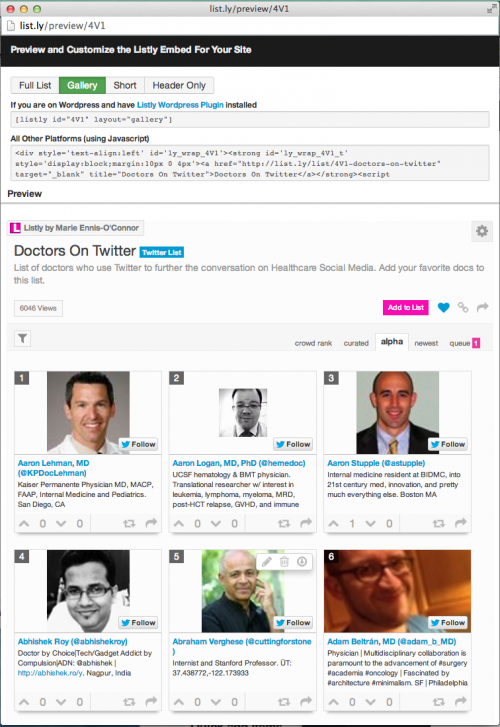
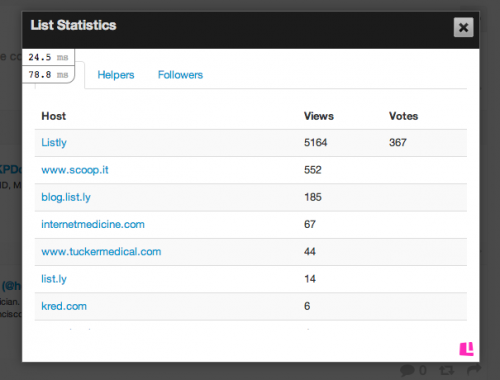
Here’e an example of a list of Doctors on Twitter – 600+ and growing fat – it’s been viewed 6k+ time and embedded on multiple blogs.

150+ people have helped to create this list.

List.ly list example

You can choose the layout you’d like to use to embed the list on your blog. Here’s a preview of this list in “Gallery” mode.

List.ly Example

Your Twitter lists become embeddable content that helps everyone on the list get found and in so doing, drives traffic to your blog.

As people can suggest omissions to your list over time your blog post will keep changing. People can also vote to change the ranking and order of the list. This keeps your content fresh in the eyes of search engines.

As your content evolves over time, new people will discover your lists and potentially share, vote and contribute. It’s a process that extends the lifecycle and value of your content.

With Listly, lists get better over time.

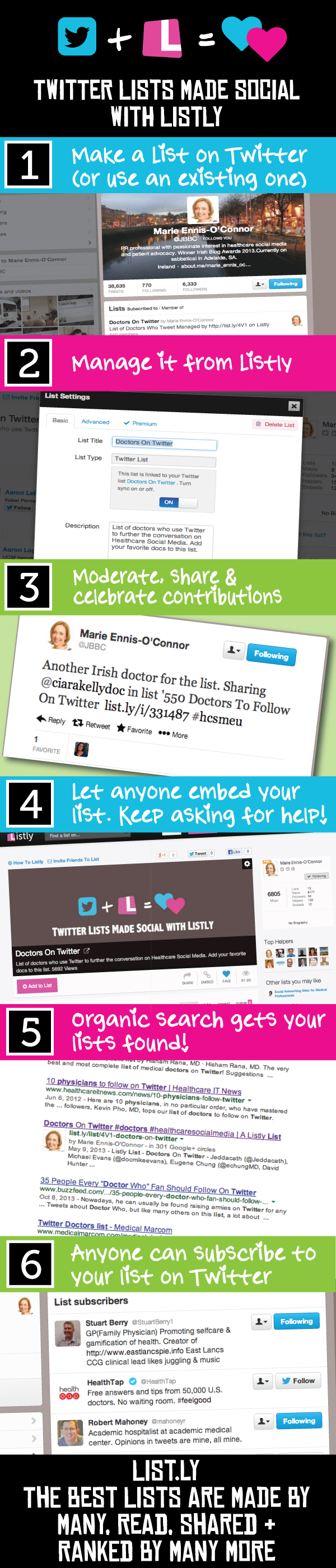
Here’s the workflow.

List.ly Twitter Infographic

Are you using Twitter Lists today?

Lists let you be more focused in the way you listen and engage. Lists are a segmentation tool. Smart marketing folk stay focused and segment their markets into targeted niches.

Segmenting on Twitter on your own is hard. It’s also a never ending task if you need to do all the work.

The Internet & The 1% Rule

Today we expect to be able to create, contribute or consume.

Regular Twitter Lists don’t follow this rule (no contribution) and that’s the issue Listly’s Twitter integration addresses.

Modern internet users expect to be able to participate.

Now, because anyone any can contribute Twitter Lists can follow the 1% rule

  • Create (1%)
  • Contribute (9%)
  • Consume (90%)

This means List become valuable resource where many people can help and consume what others have created. These lists get more valuable over time. People gravitate to trusted resources. Better lists get more subscribers.

These could be your lists.

You could be providing utility to your audience.

The real magic happens when you choose to collaborate and work with others.

Will you create resource for your local community?

Will you serve a global niche and help surface everyone in that niche?

This is how real communities form.

People connect around a passion.

Where will you begin?

Author’s Bio: Nick Kellet is Co-founder of Listly. Founder @Gifttrap & @AnswerSets. He creates & curates ideas, loves software & games, and is a master community builder. Connect with Nick on Google+ or LinkedIn.

Filed Under: Marketing /Sales / Social Media Tagged With: bc, curation, lists, Twitter

Educating Your Employees to Succeed

December 11, 2013 by Thomas

What have you done for your employees’ education of late? Perhaps it’s not a topic you think about a lot.

According to the Bureau of Labor Statistics, only 34% of smaller companies offer their employees tuition reimbursement. It’s easy to understand why. In the current economic climate, many small businesses are struggling to make ends meet, and tuition doesn’t come cheap.

But if you’d like a more engaged, more productive, and more loyal workforce, educational reimbursement just might be a smart move for your business.

Here are five reasons why:

1. Your Employees Will Gain Skills You Need

When you need a more skilled workforce, where do you look? Do you turn to temps, or start recruiting?

By offering tuition reimbursement for courses relevant to your industry, you can find the skilled workforce you need among your existing employees. You can offer anything from a full degree in a relevant field, to enhanced training on new technology or business related courses.

Not only will you save on the expensive recruitment process, you’ll find many employee educational fees attract tax breaks.

Instead of putting yourself through the stress and uncertainty of finding new employees, why not make the most of your existing workforce by helping them to gain the skills you need?

2. You’ll Gain a More Productive Workforce

Further education increases productivity in two ways.

First, your employees will learn relevant skills that will help them to get even better at their jobs. But there is another bonus too – further education teaches a range of “soft skills”. These are skills that aren’t directly related to your company’s daily business, such as:

  • Better time management;
  • Increased confidence in public speaking;
  • A more active and engaged mind;
  • Enhanced teamwork skills.

The skills learned while studying are transferable skills that can be great assets to your company overall.

3. Staff Morale Will Go Up

Who doesn’t want a happier work force?

Increased staff morale means good things for both you and your employees:

  • A better working environment for your employees;
  • Less stress for you;
  • Less time spent dealing with interpersonal problems and despondent employees;
  • Tasks getting done and done well as employees approach their work in an upbeat frame of mind.

Offering tuition reimbursement can help to increase staff morale by showing your employees that you care about their future. By offering education and the chance to progress in their roles, you’re giving your employees something to aim for.

In fact, a study by the ROI institute showed that an impressive 64% of employers who offered tuition reimbursement noticed a significant increase in how engaged their employees were.

4. Company Loyalty Will Increase

“But if I offer my employees education, won’t they take the skills and go elsewhere?”

It’s easy to worry that if you pay for your employees more education, they’ll take those skills to your competitor and you’ll be left out of pocket.

In fact, the same study that found offering educational reimbursement increased loyalty, also found a 64% increase in company loyalty. Employees feel they have a future with a company that cares enough to invest in them.

You can safeguard against losing your newly trained employees by offering reimbursement as part of a contract that specifies how long your employees will need to stay with your company to get their fees paid.

And of course, you can make sure the programs you are offering are relevant to your company and to career advancement within it.

5. You’ll Have a Competitive Edge During Recruiting

Offering educational reimbursement can help to increase employee retention, but of course there will come a time when you need to recruit, whether that’s due to expansion or an employee taking extended leave.

As a small business, it can be hard to compete against bigger employers who can offer flashier recruitment packages. A good educational reimbursement package is another string to your recruiting bow.

As well as showing you care about your employees and want to invest in them, it’s a signal to new recruits that there are opportunities for growth within your company. You’re offering them more than a job; you’re offering them a career.

A well-planned tuition reimbursement program is a smart investment in your business, leading to happier, more skilled and more engaged employees.

If you offer relevant education in return for a certain period of loyalty, both you and your employees will benefit.

Photo credit: cmm.com.au

About the Author:  Tristan Anwyn is an author who writes on subjects as diverse as health, marketing, Education via Yahoo, and SEO.

Filed Under: Business Life Tagged With: bc, degrees, education, employees, skills

Site Crash: What’s Your Response Plan?

December 10, 2013 by Rosemary

By Michelle Rebecca

Website crashes can be detrimental to a company’s operation. If your host goes down, your software fails or your internet provider encounters a problem, it is your business that suffers. When these situations occur you are no longer able to conduct e-business or to monitor your site’s feedback.

In order to decrease the impact of site crashes it is important to have an emergency response plan. Below is a list of tips for helping your organization navigate a site malfunction.

Investigate the Issue

Once you have been alerted to an issue with your website, the first step is to look for yourself. While a customer or employee may have encountered a problem with your website, this issue could be related to their network connection or a number of other external causes.

Accessing your website and attempting to navigate the pages will determine whether or not this is an actual issue with the website or simply a problem on someone else’s end. For instance, if you were to check your site’s XML management page and find that it was down, then you would know you have an internal problem to manage.

Once you’ve established that there is a real problem, you need to find out exactly what the issue is. This issue may be related to your website’s host, a programming error or a network problem. Identifying the cause for the site crash will allow you to make a plan for contacting the necessary individuals and getting your site back up as soon as possible.

Programming Error

You can determine whether or not a site has a programming error by checking the status bar at the bottom of the page as suggested by Smashing Magazine. If this bar reads “loaded” or “done” then you can be sure that the issue is not related to the site’s software or server.

On the other hand, the terms “waiting” or “connecting” designate that the problem is in fact a programming error. Having identified this problem, you now know to alert your tech team in order to locate the error in the coding for your site.

Web Server Software

If programming is not an issue, then web server software may be the culprit. By logging onto your website’s server you can determine whether the server has run out of space, run out of memory or whether there is another situation of that nature.

Also, when you log in, many servers take you to a control panel that may indicate the problem for you. As for disk space and memory concerns, there are a series of commands you can utilize while logged into your server to view available space as noted in Smashing Magazine’s article.

Hard Disk Space

By inputing “admin@server$ df” in the command line of your server its disk space allocation will be displayed. This will display your site’s file systems and the percentage to which they are currently being used. If this percentage is 100 percent then you’ve found your issue and need to free up some space.

Memory

Considering the small likelihood that your server’s hard disk space is taken up, you should proceed to check the memory. Utilizing the “free” command will allow you to view how much memory is currently in use. From there you can determine whether a particular piece of software is slowing down your server and proceed to solve the issue accordingly.

Getting to the bottom of a website issue can be a time consuming and stressful situation. Use the aforementioned steps and tips to help identify website problems and to determine how to solve them.

Author’s Bio: Michelle is a blogger and freelancer with a passion for social media and blogging. She loves how social media connects people across the globe, and appreciates that blogging gives her the opportunity to voice her thoughts and share advice with an unlimited audience. Follow her on Twitter and Google+.

Filed Under: Blog Basics, Successful Blog, Tech/Stats Tagged With: bc, crash, server, technology

Marketing Your Blog in the Real World

December 6, 2013 by Rosemary

By Kelly Edwards

Blogging is not limited to cyberspace, and neither is promoting your blog to boost its recognition. In fact, marketing at events is an opportunity to access a whole range of readers and contributors that you might not have otherwise interacted with. But how do you assess if an event is worthwhile for your blog? Traveling to a networking event, paying for a ticket to a convention and even renting a stand to promote your blog are all factors that can make event marketing a more expensive choice, so how do you track if it’s the best choice to make?

Define Your Goals

While calculating the profit made from an event isn’t as simple as counting receipts for a blog, there are still ways you can attribute success to your event marketing. Tracking how many business cards you give out or flyers taken is a good start. You can also take a list of names interested in joining your mailing list (if you have one) or offer entry to a competition. These are all goals that you can measure throughout an event, however any positive effects in traffic or subscriptions may take a few days, perhaps even weeks to be felt.

Choosing the Right Event

Not every event is going to bring in the correct audience for your website. You may be tempted to attend a very large blogger event but will you be finding an audience that will actively want to engage with your blog? If you’re a niche site then it can be more effective to look into more specific blogging events, especially those in tune with your blog’s ethos. If you talk a lot about your local area then have a look into local tourism events which you could attend. If you post on a specific hobby or interest then look into events or exhibitions around these topics. This will lead you to a large group of attendees who are also a relevant part of your demographic.

Combining Real World and Online Marketing

Event marketing can still be supported by your online fans by promoting your attendance in advance. This can be on your own channel as well as outreach into other areas. If you’re attending a local event then would they appreciate some content on their website from upcoming attendees? Get in contact now and promote yourself and the event you’ll be spending time at. You can continue this after the event as well, offering posts on how you found the event and your experiences.

If you met people and exchanged business details then get in contact ASAP whilst you’re still fresh in their mind. You invested in networking and now it’s time to be proactive about all the new contacts you may have made.

Promoting at the Event

There are many ways you can promote your blog at an event and nothing is easier than wearing a branded t shirt. You can also give away branded goodies to those who show an interest in your subject of interest as well as cards and flyers. Ensure that your logo and brand colours are proudly on display and mesh with the blog itself to make the transition for the attendee as smooth as possible.

If you’re attending an exhibition or event with a stand then your promotional displays should be choreographed and also include the URL of your blog. A large and attractive banner will also grab more attention. If you’re promoting your blog at an event or exhibition that is traditionally more focused around sales or crafts then try to get a spot near a refreshment area so that attendees are more likely to slow down and look at your blog. Having an optimised mobile site will also mean that attendees that look up your blog on their phone will be able to quickly access your site.

Improving Your Approach

After your first event you will most likely realise where you can make improvements. Perhaps you were somewhat shy about approaching so many people so quickly. Perhaps you don’t feel as though you explained your blog succinctly enough and people lost interest. Perhaps you regret spending too much or not enough setting up an attractive exhibition for your blog. Whatever ideas enter your head for how you can improve next time, ensure you write them down now! You can also start mapping ways that you can approach these challenges and improve your marketing strategy.

Combining these elements will lead to excellent promotion of your blog at an event and hopefully some greater recognition for your brand.

Author’s Bio: Kelly Edwards writes about promotional display materials and helping businesses at http://www.marlerhaley.co.uk. You can find her on Twitter as @MarlerHaley.

Filed Under: Marketing /Sales / Social Media, Successful Blog Tagged With: bc, events, marketing

  • « Previous Page
  • 1
  • …
  • 46
  • 47
  • 48
  • 49
  • 50
  • …
  • 959
  • Next Page »

Recently Updated Posts

Is Your Brand Fan Friendly?

How to Improve Your Freelancing Productivity

How to Leverage Live Streaming for Content Marketing

10 Key Customer Experience Design Factors to Consider

How to Use a Lead Generation Item on Facebook

How to Become a Better Storyteller


From Liz Strauss & GeniusShared Press

  • What IS an SOB?!
  • SOB A-Z Directory
  • Letting Liz Be

© 2025 ME Strauss & GeniusShared