Successful Blog

  • Home
  • Community
  • About
  • Author Guidelines
  • Liz’s Book
  • Stay Tuned

7 Content Marketing Mistakes to Avoid

November 14, 2019 by Jessy Troy

content-marketing-mistakesContent is the bread and butter of any good marketing strategy. While it should never be used alone, it should be one of the primary focuses for any style of business of website.

This is a lesson that most businesses learn quickly, and so they will immediately set out to offer a content-heavy extension of their primary brand.

Despite this fact, many don’t use the technique effectively. In fact, some use it improperly for years before turning to a marketing expert in exaggeration.

I can tell you from experience that clients don’t appreciate being told they have been doing things wrong. But many businesses fail in this regard from the very beginning, and so lose a real opportunity at initial growth.

Here are some common mistakes businesses make in the category of content marketing:

1. Not Knowing The Difference Between Content and Advertising

Obviously, you want to talk up your product at any opportunity given. No one is going to blame you for doing so in your own content. However, there is a difference between mentioning your brand in relation to a genuine topic, and advertising.

You should not be writing up long winded posts that equal to sales copy. Save that for your advertising, and think of your content as a chance too create a larger conversation with customers.

2. Not Knowing The Difference Between Social Media Interaction and Content

Not long ago I was speaking to someone I know who recently opened a small business (in the last year), and was talking about how useless he had found content marketing. It didn’t take long before I got the whole picture: he believed he was generating content by writing daily Facebook posts.

I was flabbergasted, and explained to him that he was thinking of social media marketing… a Facebook status does not equal content. Think of social media as a chance to gain visibility for your content, not generate it.

3. Lack of Consistency

If you have a blog, you should be updating it regularly. Period. It drives me crazy when I see businesses selling things like apps, and even though there have been changes to the product there has been nothing published to the blog for as much as a year.

Don’t make this mistake, and don’t merely update when you have something that could sell your product. You are supposed to be regularly providing something relevant to the user within your industry, not upselling them.

Here are a few examples of companies being consistent with their content marketing efforts.

4. Failure to Update Information

Again, updates are important. If you have some change coming to your product, company, site or just the industry, you should at least comment on it. Things in every genre change and grown and adapt over time.

You should be taking old posts and writing something to follow up on them on a regular basis. Maybe this is a whole new post, maybe it is an update with reference to the old one. In any case, make sure all information provided on your site is up to date.

Depending on the blogging platform you chose, there are various plugins and modules that make it easier to monitor and fix broken links and keep your content updated.

5. Being Too Technical

Some of the people who hop on over to your blog are going to be experts. Most of them are probably not. You should be trying to break everything down for an easier understanding by the average reader.

There is a time and a place for technical jargon, which you can provide separately. But assume that for the bulk of the post you are explaining it to someone new to the concept.

6. Not Being Technical Enough

While the above rule is true, not being technical enough can also be an issue. I have heard people say that anything published for the purpose of content marketing should be “presented as if to a five-year-old”.

I don’t believe this, at all. There is no need to talk down to the reader, so you can feel free to present the data you need to. Going too far in either direction is a mistake.

UXCeclipse is the perfect example of the right balance: Check out this article.

7. Lack of Engagement With Readers

Content doesn’t stop at the content. I cannot stress this enough. You are not just plopping down some information and bolting. You are starting a dialogue with the people who read it, and as such, you should be encouraging the conversation.

That means responding to questions and comments on the post, as well as on social media sites where you link to it.

Do you know of a common content marketing mistake made by businesses? Let us know in the comments.

Filed Under: Content

How to Relieve Stress and Learn to Enjoy Life

September 18, 2019 by Jessy Troy

The modern world is a lot of hard work. Money troubles, family issues, work problems are just some of the issues people have to face all of the time.
No matter if you’re a stay at home parent or a complete workaholic, the common pitfalls of everyday life can leave you feeling angry, worn down and frustrated. And don’t get me started on the feeling of guilt that never leaves a mom’s brain.

Long term stress can be seriously detrimental to personal well-being. It can be the cause of regular migraines, muscle tension, heart disease, insomnia, ulcers as well as major contributor to a host of psychological illnesses.

Dealing with anxiety and stress doesn’t have to be difficult. Some of my favorite ways of combating stress are:

Pick up a Pen

It’s been said that writing in a journal can help free your mind from the tangle of constant thoughts, as well as helping to naturally organize them. If analog pen and paper aren’t your style, there are a few great journaling applications out there. Day 1 has a seamless interface but is only available for IOS. Journey is a great alternative for Android.

You can also set up a blog to keep your journal there. It gives you a great feeling of accomplishment. Here are best blogging platforms for you to choose from.

Whatever your method, the act of putting your thoughts on paper will leave you feeling freer and lighter as the days wear on. And if the thought of journaling is too much to bear, for even a few minutes a day, try an adult coloring book.

Get in Your Cardio

Or really, any exercise, as long as it gets you moving. Your body functions in such a way that exercise helps to release dopamine into your system, stabilizing mood and increasing focus.

You don’t need a gym membership to get this going, a quick turn around the neighborhood for a half hour is enough to help boost. This has more long-term effects than immediate benefits, but the longer you persevere, the greater the effects.

Find Some Hobbies

Everybody needs to have interests outside of the work and family. Making sure some parts of your life are totally separate from other parts will help in those times when you need a refuge from the outside world. If your time is only spent thinking about the things which (can) cause you stress, then you are far more likely to remain stressed all of the time.

I like to read a lot of fantasy novels and then argue about them online. Hobbies don’t have to be physical activities, they should just be something you are really passionate about.

Try Meditation

Meditation for stress relief is available in many different forms. Guided meditations, hypnotherapy, mantra meditations, silent meditations and whole host of things that come somewhere in between. With all of them the main point is to find thirty minutes to an hour each day, where you can just sit back, let go of all your worries and just relax.

Daily meditation rituals help your body and mind remember what it is like to be content and relax. In time you will be able to use that feeling to help overcome stressful situations as they occur throughout the day, just by closing your eyes, taking a deep breath and remembering what it is like to be calm and relaxed.

Setting aside time to relax is very important, as if you don’t you’ll run the risk of getting physically, mentally and emotionally burnt out, which will only result in misery and failure. So allow yourself personal time, but make sure you plan out when that time will be, so that for the rest of the day you’re focused on your  work.

Remember you can remain productive even when you are bored and tired. It’s not about doing work all the time: Being productive is all about spending every minute of your life with purpose, even if that purpose is to relax and de-stress.

Those are the ways I like to relieve stress and anxiety on a daily basis, if you’ve got any good tips I’d love to hear what you’ve got to say.

Image source: Pixabay

Filed Under: Business Life

Four Essential SEO Plugins for Bloggers

July 22, 2019 by Jessy Troy

Search engine traffic is the most reliable and in many cases top-converting traffic for many websites. That’s the reason most people ask for tips and plugins that can help them boost SEO of their WordPress websites.

If you are looking to increase your search engine rankings, you will need to use some of the best WordPress SEO plugins. Fortunately, there are a plethora of SEO plugins to help you get that higher search traffic that you are dying to achieve. In this guide, we shall share with you some of the best SEO plugins that will improve SEO of your WordPress website.

1. WordPress SEO by Yoast

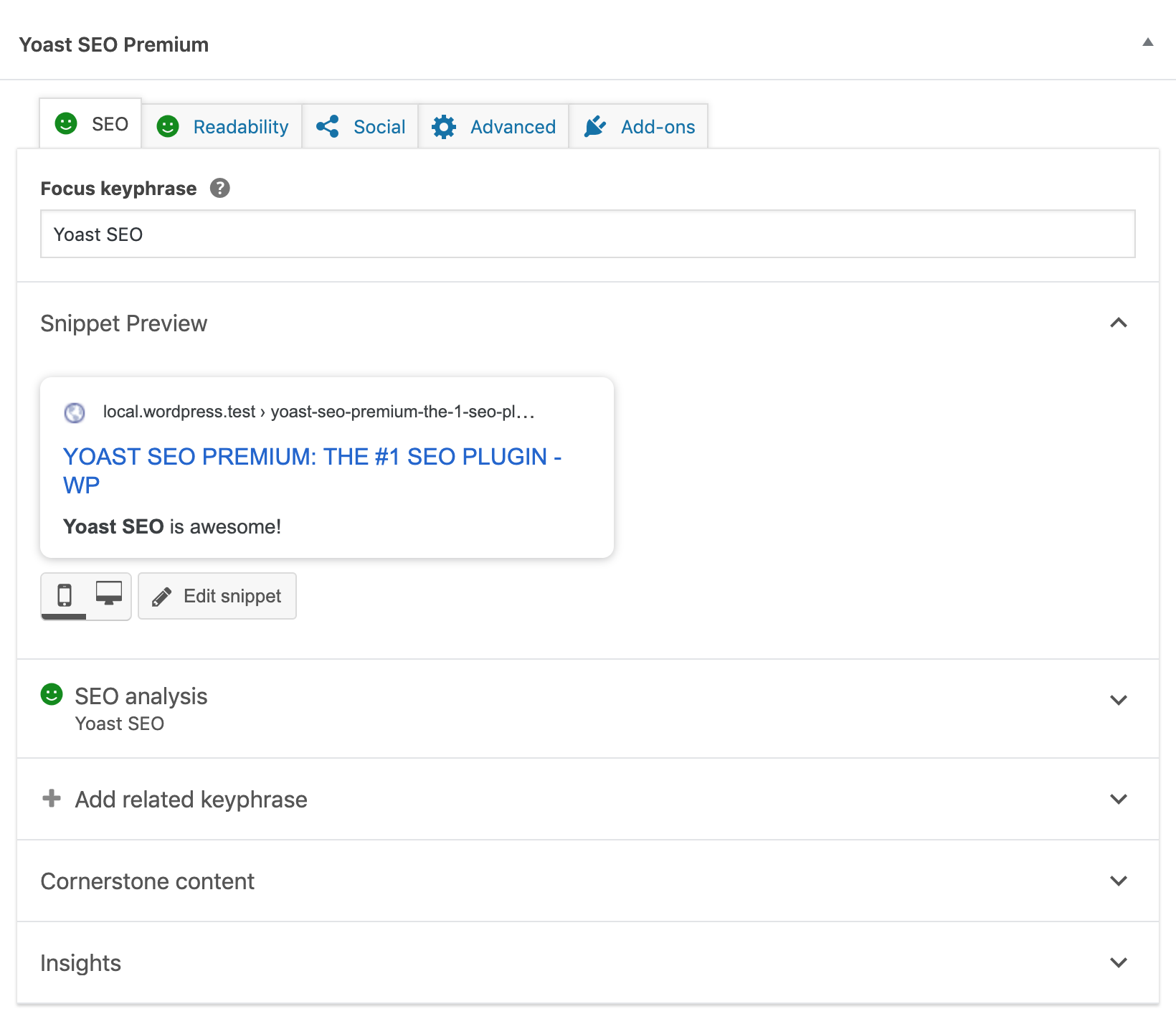
WordPress SEO by Yoast

Yoast SEO is the most popular and holistic SEO plugin on WordPress. To date, it has more than 4.5 million downloads with an average rating of 4.7-star over five from 1,418 users. Developed by SEO specialist Joost de Valk, this plugin has features that ensure optimal success for your site when it comes to SEO. The plugin is used by some of the most famous online magazines and websites such as the next web, Mashable, and others.

WordPress SEO by Yoast plugin can assign keywords to a blog post so that the user can focus on using it in the entire content. It also has a snippet view where users can see how their post will look like in search results.

Another important feature of this plugin is the Page Analysis. Powered by Linkdex, this feature allows users to check whether all the keywords, meta description, images and post title or subheadings are in place. The list of features for Yoast SEO is extremely long, check out others here. This is a great productivity-boosting plugin for writers.

2. Text Optimizer

Text Optimizer

Text Optimizer is one of the most advanced SEO plugins built for online business, eCommerce, bloggers, and magazines. This plugin offers you an easy way to use Text Optimizer to get your content rank higher in Google.

It is perfect for everyone with little knowledge of SEO or rarely cares to perform on-page optimization. It uses semantic analysis to generate related concepts and terms and helps you include those in your content in the most meaningful way.

The best thing about Text Optimizer plugin is that it lets you optimize your site for search engine while improving your content quality. In other words, the default installation is good enough to serve. But as you interact more with the plugin, you can play with the settings as per your requirements.

3. Broken Link Checker

A broken link is a horrible nightmare for bloggers or SEO enthusiasts. Having broken links will earn your site a bad reputation with Google. Eventually, that reputation will degrade your search engine rankings to the point that you may no longer be regarded an authority in your industry. Google is trying so hard to better web experience for everyone. So they will not direct users to websites with broken pages.

This is where tools, such as the Broken Link Checker come in. The name speaks for itself; this plugin allows you to check for any broken links and missing images. If there is any, it will alert you and give you the option to customize the link(s) either by deleting it completely or by placing the correct one.

Here is a summary of its features:

  • Ability to detect links that don’t work
  • Option to deter search engines from following broken links
  • Monitors links in pages, comments, posts and even custom fields
  • Option to change broken links

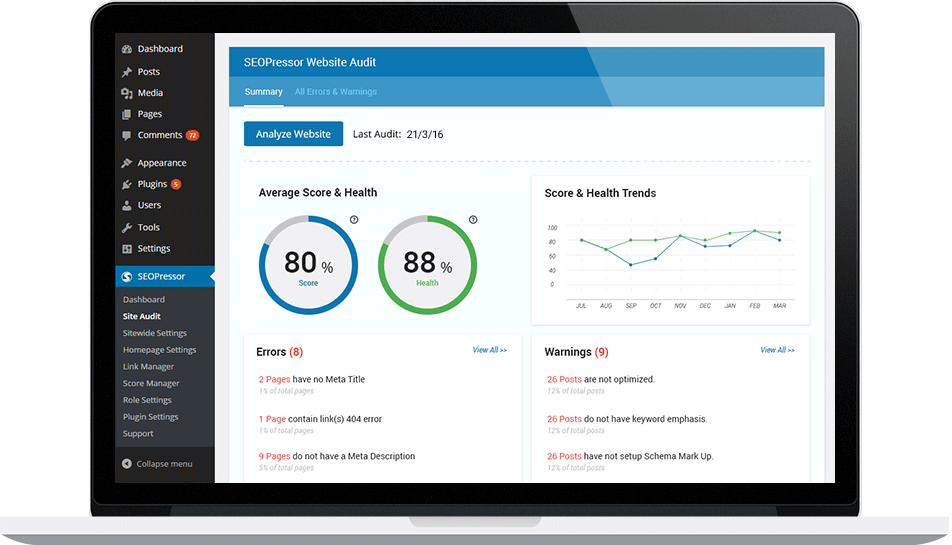
4. SEOPressor

SEOPressor

SEOPressor covers every possible aspect of SEO and puts the same attention to all of it. It offers you a number of useful features which help you optimize your images, blog posts and your site for social media.

It also allows you to use its drag and drop function allowing you to easily use your chosen keywords in your content. With this feature, you won’t have to spend so much time conducting keyword research on other tools or services.

After posting your content, this plugin goes ahead to analyze your post and give you a score based on the analysis. In the analysis, it checks your subheadings. SEOPressor also comes with a reliable internal linking feature. This feature makes your work easier since each time you re-publish content the phrases you linked on the first content will be hyper-linked automatically.

Wrapping up

These are some of the top WordPress SEO plugins. Tell us which one is your favorite among the ones discussed here. If there is any plugin that you feel we should include in this guide, please let us know in the comments section.

Outside of SEO, there are more useful SEO plugins for you to try… Let me know your pick!

Filed Under: SEO

How I Achieved a Tenfold Increase in Organic Traffic with Text Optimizer

June 26, 2019 by Jessy Troy

I have been in the blogging / marketing / freelancing business long enough to lose trust in any “get rich quick” or “triple your traffic in a week” headlines. I would never even click those unless I see them on a trusted resource.

Therefore when I came across this article, I was skeptical but being an avid reader of the blog, I decided to give it a read. I admit it all sounded a bit overwhelming: “semantic search”, “related concepts”, etc. But I still went ahead and gave the featured tool a try.

Text Optimizer does what it says: Helps you optimize your text. In essence, it shows all kinds of words and phrases that somehow relate to your main keyword, i.e. the one that you’d want rank for in Google search.

The idea is, if you cover more concepts that constitute your topic, you have more chances to meet your readers’ expectations, and thus will achieve both better engagement and higher rankings. You can get a better idea of this by playing with the tools’ demo here.

The tool is based on semantic analysis which is what I decided to start researching.

What is Semantic Search?

According to Wikipedia:

Semantic search seeks to improve search accuracy by understanding the searcher’s intent and the contextual meaning of terms as they appear in the searchable dataspace, whether on the Web or within a closed system, to generate more relevant results. Semantic search systems consider various points including context of search, location, intent, variation of words, synonyms, generalized and specialized queries, concept matching and natural language queries to provide relevant search results

What I could understand from this definition is the following:

  • Semantic search tries to understand the context (versus an isolated query)
  • Semantic search tries to understand intent (i.e. what searchers expect to find when performing a search)

Both sounded very good to me, so I decided to give the tool a try.

How to Use Text Optimizer

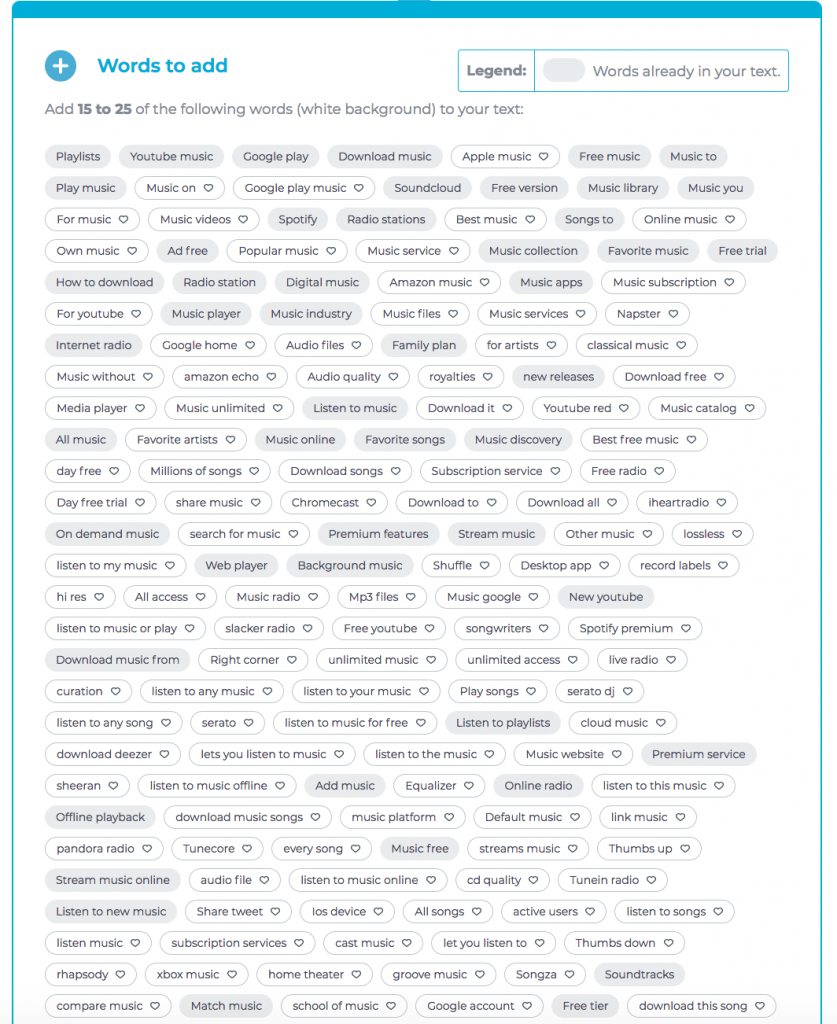
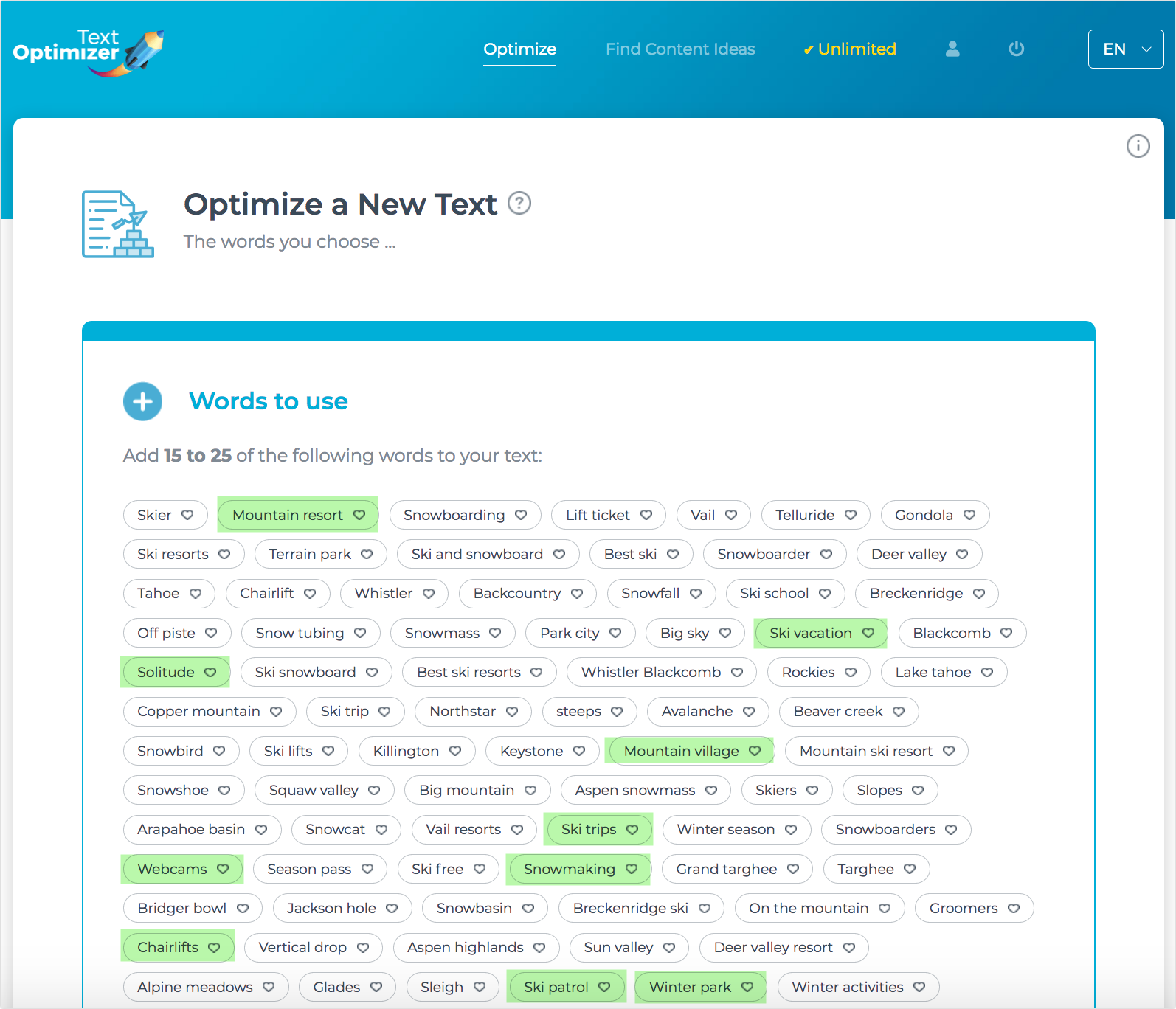
The first step is registering for free trial. Once you are there, simply provide your target query, choose Google, and then copy-paste your URL you want to rank for that query. The tool will grab Google’s search snippets for that query, applies semantic analysis to them to better understand context and then identify which terms are missing from your text:

Your job is to pick 15-20 of listed concepts and naturally include into your content to optimize it better. Don’t overdo: You don’t your article to sound weird or artificial. If you need to write more content to cover those concepts, go ahead and do that. After all, this makes your content better, which is a beauty of using this tool.

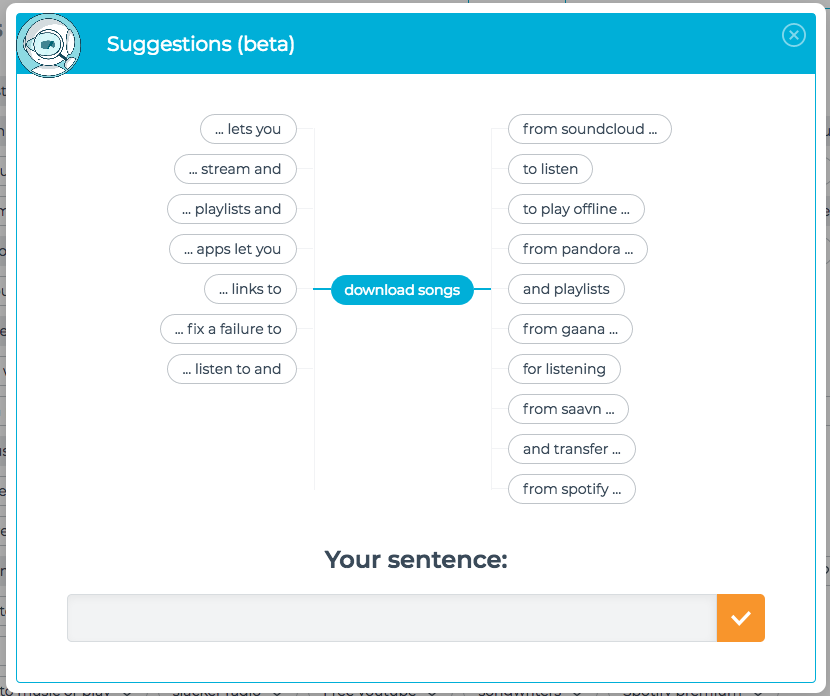
Text Optimizer also helps you build sentences:

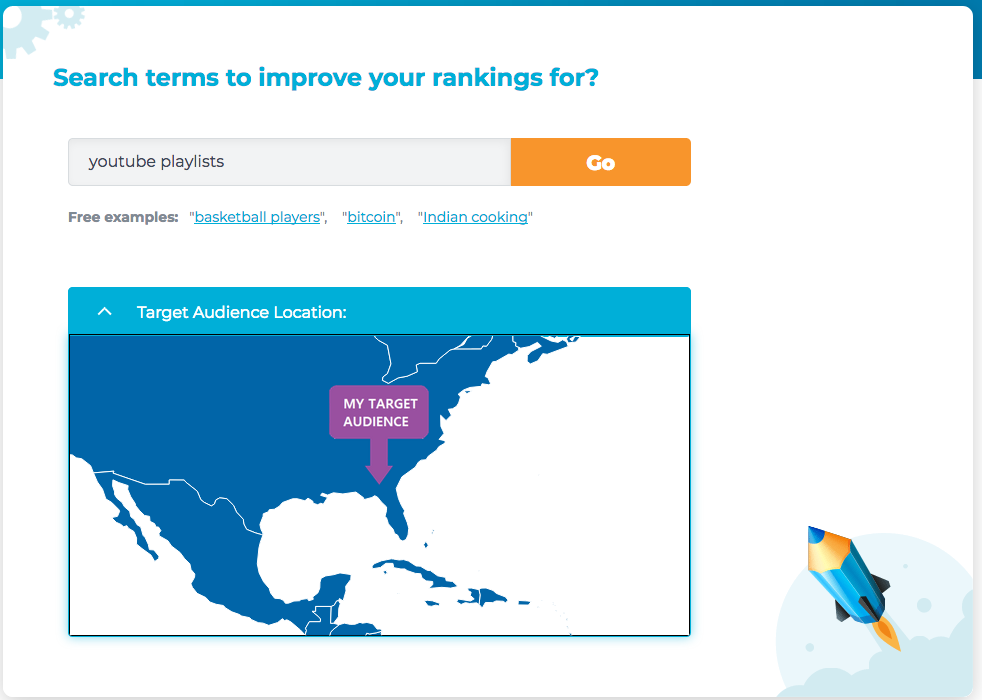
As well as target your audience to certain territory:

Text Optimizer and My Process

I started going through my old content, article by article and optimizing them to achieve minimum score of 70

Luckily, I ddidn’t have to much client work, so I was able to delve into the tool almost full time. I actually enjoyed using it because I liked what it did to my content: I felt like my blog was becoming much better.

This took me about two works of work.

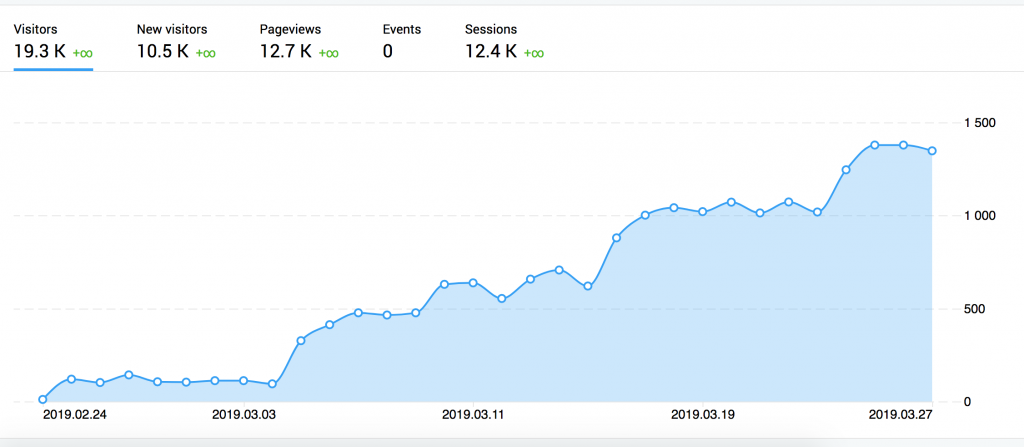
Now, looking back at my organic traffic, I was excited to see my time wasn’t wasted. I went from ~100 users a day to ~1000 users a day and growing! Whether it’s semantic SEO or simply making my content better (longer, more in-depth, etc.) but Text Optimizer definitely worked:

Now, it’s not a magic button! Optimizing content using Text Optimizer takes lots of time: You need to run the tool, write content and then re-run the tool, then rinse and repeat. But if you can dedicate at least an hour a day to this, you may have great results over time!

Good luck!

Filed Under: Featured, SEO

Six Examples of Solid Facebook Marketing

January 27, 2019 by Jessy Troy

Facebook is a very powerful, extremely viral social networking and micro-blogging platform that has catapulted many businesses to new levels. It has enjoyed a famously popular online exposure and an ever-increasing appeal to corporations, social networkers, and online entrepreneurs.

Some companies who recognize the Facebook effect experience enormous brand recognition and success that accompanies their marketing efforts. These six companies are currently enjoying successful social networking, high traffic to their sites, and a branding experience that they credit to Facebook.

1. Pringles

The famous potato chip snack company is quite popular on Facebook – something to the tune of over 3 million fans! The site’s attraction is more than the snack lover’s interest in their wares, but for their comedic and crafty use of their product videos.

The videos are a mixture of professional, commercial-style shoots and others that were taped possibly using personal video recorders. All of the videos are entertaining and funny, but without fail in each video, Pringles brands themselves very effectively through visual marketing.

2. Dell

If Facebook fans ever needed a reason to love a computer manufacturer, Dell has given them one – if not several. With over 100,000 fans and several niche Facebook pages, Dell is the company who proudly embraces a green campaign and makes a conservation commitment to their Facebook followers.

Each time one of Dell’s fan’s picks a friend, Dell plants a tree on their behalf. This effort is a part of their commitment to creating a healthier planet, additionally making a donation to The Conservation Fund to plant up to 150,000 trees. How’s that for social interaction?

3. LawListings

LawListings Facebook

LawListings has a very engaging Facebook page that is a good example of visual quoting: They put together well-branded visual quotes and engage their Facebook audience with that content.

This Facebook Page is a great example of effective Facebook marketing even in tough niches.

4. Pizza Hut

The pizza chain giant has over one million fans on their page. What makes their site so viral? Their generous interaction with the pizza community. They tag other users on Facebook, make it fun and very sociable by allowing fans to upload various pictures, images, photos and artistry depicting their brand in various ways.

Some of the fan photos are with family, creating a visual imagery of unity, while other photos that are incorporated onto their page are snapshots of different Pizza Hut restaurants or paraphernalia.

5. Harley-Davidson

The motorcycle giant has over 700,000 fans on their Facebook page and use several marketing methods to attract and retain those fans. Much of the information on their site consists of photos and videos, but there is a heavier focus on information and updates about their product and the motor bike industry at large.

Fans flock to their pages to sneak a hopeful peek at what the upcoming bikes will look like and to read about any changes in their current bike line. Harely-Davidson is definitely an industry leader with a proven track record. Facebook has helped their online marketing efforts by reaching a technical aspect of their customer pool.

6. Starbuck’s

With one of the highest number of fans on Facebook, Starbuck’s remains at the top because of their frequent and engaging interaction with coffee lovers everywhere!

They are very involved in the local communities and abroad, and use videos, blog posts, surveys, and coffee giveaways to appeal to their customer base. Starbuck’s takes the time to carefully groom their social networking page to be sure that they effectively reach their customers, making them an outstanding industry leader.

Further reading and resources:

  • Social Media Promotion Guide
  • Persistence is Key to Success
  • Social Media: The Free Beginner’s Guide from Moz
  • My Personal Productivity Guide

Any other great Facebook marketing case studies? Please let us know!

Filed Under: Marketing, Marketing /Sales / Social Media

How to Add a Contact-Us Form to Your Site

September 4, 2018 by Jessy Troy

The last three times I have gone to contact someone through a website, there has been no contact page. I am not joking or exaggerating, there was no contact page at all. One of the three had a little, tiny blurb mixed into too much text providing an email address, which was a very strange choice in design. But otherwise I would have had to go through their social media accounts to speak to them.

I was very disappointed with this turn of events, because at least one of the blogs I contacted barely used their Twitter and I never got a response, and another still hasn’t read their Facebook message. Why wouldn’t they be more concerned with connecting to their readers? And why wouldn’t they take the five minutes it requires to install a plugin (these were all WordPress sites), and create a Contact Page?

After all, implementing ways to hear back from your site users is one of the most important elements of any landing page.

Create an Awesome Contact Page Fast

I don’t want anyone else to make this very pointless mistake. Not when it can be rectified so easily.

First of all, the Internet is full of free tempates and tutorials for you to handle almost everything at home. If you are looking for beautiful forms, here’s a great selection of free HTML5 and CSS3 contact form templates for you to choose from. There’s also a great tutorial on how to edit those here.

If your site is not on WordPress, here’s a good selection of other available content management systems and useful resources to learn using them.

Here are six WordPress plugins for making a contact page that is fast, easy and effective.

1. WP Forms (or WP Forms Lite)

When someone who has no website building experience first gets the more advanced version of WordPress, they can feel a bit intimidated. Getting the plugins down can be hard, and there is a learning curve associated with any new software. WP Forms was made to cater to those beginners, and is probably the easiest form builder around.

You can use one of their many contact page templates with drag and drop functionality, and fully customize it to fit your needs. It is compatible with responsive websites, and they offer instant notifications of contact so you never miss a message. There is a free version also available, if you don’t mind skipping some of the advanced features.

2. Formidable Pro

If in addition to your contact form you want to be able to display data, you may prefer Formidable. It is a great tool for extendable forms and information that will be posted across your website.

I have seen it used to great effect on joint Contact and About pages that sim to show the person why they should contact them. Something that I personally like very much. They are a bit more costly, but effective.

3. Ninja Forms

Looking for something totally free that just creates great looking forms for you to use? Then Ninja Forms is your best bet. It provides easily adjustable settings that customize the form, and leads you through every step of the way.

They provide widgets and shortcodes to integrate into WP seamlessly. Plus, they are translation ready.

4. Contact Forms 7

This is an oldie but a goodie, and one that is still being supported by the developer in spite of its age. It is very basic, just a fill out form from the plugin’s dashboard.

There are no bells or whistles at all, which can be considered a good thing. The results are a very clean, functional contact form.

5. Pirate Forms

Want to make your contact form more feedback based? You may like Pirate Forms, then. It gives you full control over customization, and has the option of sending emails via SMTP.

It has a recaptcha generator, so you can try and limit spam.

Manage Your Leads Like a Pro

Putting up a form is just the first step. Don’t forget that as your site is going to become more popular, you’ll be receiving hundreds of email requests and pitches. You need to manage and organize those properly.

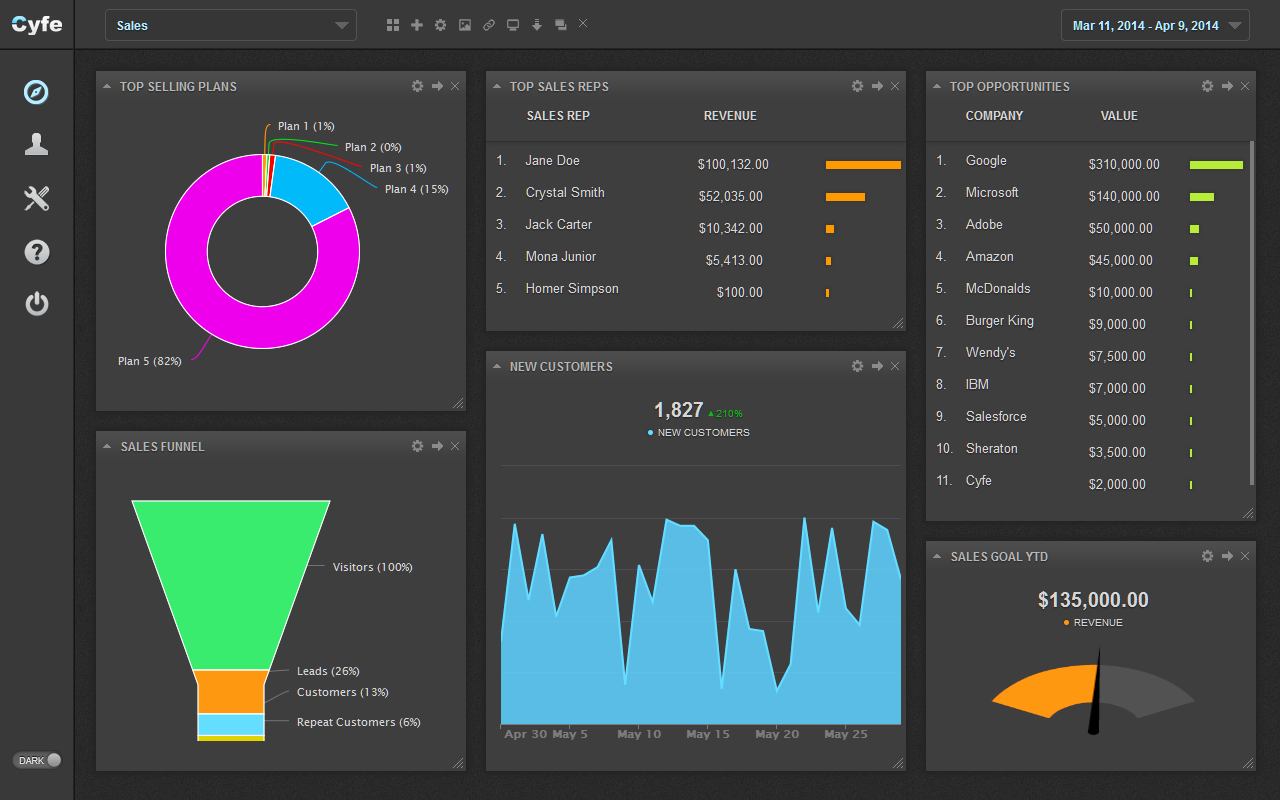
One good way to keep an eye on your mail is Cyfe. It connects to Gmail, your CRM or anything else under the sun. Put simply, Cyfe lets you keep a lot of pieces of your marketing under one roof.

Cyfe leads

Different Forms for Different Purposes

I am a firm believer in cold contacts for guest blogging. I have sent out my fair share of unsolicited offers and while they don’t all work, about a third of the time they do. The ones that almost always succeed? Those that come from sites with a Write For Us page.

To attract guest bloggers, some of them quite well established, put up a Write For Us page yourself with a set policy on posts. You should get some interesting pitches and offers from people of varying talent and influence.

Filed Under: Blogging Tips

  • « Previous Page
  • 1
  • …
  • 10
  • 11
  • 12
  • 13
  • 14
  • 15
  • Next Page »

Recently Updated Posts

Is Your Brand Fan Friendly?

How to Improve Your Freelancing Productivity

How to Leverage Live Streaming for Content Marketing

10 Key Customer Experience Design Factors to Consider

How to Use a Lead Generation Item on Facebook

How to Become a Better Storyteller


From Liz Strauss & GeniusShared Press

  • What IS an SOB?!
  • SOB A-Z Directory
  • Letting Liz Be

© 2025 ME Strauss & GeniusShared