Successful Blog

  • Home
  • Community
  • About
  • Author Guidelines
  • Liz’s Book
  • Stay Tuned

4 Fundamental Workplace Changes of the Last 20 Years

April 25, 2014 by Rosemary

By Teddy Hunt

Renovated, repurposed, and re-engineered. Today’s workplace has clearly changed over the past two decades. As people and politics evolve, it’s important to remember that, for better or worse, change happens. Here are four fundamental workplace changes that transpired over the last 20 years.

Baby Boomers, Gen X and Gen Y

Baby Boomers, born roughly between the years of 1947-1966, still play an active role in today’s work force. Two younger generations now share center stage with them in the world of gainful employment: Generation X and Generation Y.

Gen X members were born roughly between 1965-1983; Gen Y members hail from the years 1984-2002. Although the two cohorts might share a workplace, they don’t necessarily share the same attitude toward work itself. Maureen Hoch of the Harvard Business Review reports that Gen X employees tend to focus more on their home life, shirking work responsibilities in favor of family time more often than their Gen Y counterparts. Gen Y folks tend to “merge their work and home lives” more than any other age group.

Members of Gen Y, sometimes labeled the “Me Generation,” are also more prone to “job hop” than members of Gen X. While this might be an inconvenience for HR departments, fickle Gen Y folks are more likely to settle down in the long run with a job that truly fulfills them.

Education: Higher and Higher

Graduation rates
Image via Flickr by Thirty30 Photography

Now more than ever, society views high school graduation as an essential step toward employment. Approximately 83 percent of Americans age 25 and up have graduated from high school. College grads account for nearly 25 percent of all people.

A person’s education directly impacts the amount of money they can expect to earn. According to the U.S. Department of Labor, a person with a doctoral degree brings home a weekly income of $1,600 or more. A person with a Bachelor’s degree earns around $1,000 per week, while a person with a high school diploma receives a check for about $600 per week.

The demographics of employment landscape are making a shift in the recent years due to technological advancements in most work fields. Analysts predict the slow decline of manufacturing jobs and the rise of the service-oriented careers, including IT and finance jobs, but with all change comes evolution as well. New career fields are popping up, and whether you’re wanting to invest in a financial career or looking for a brand new career field, the time for change is now.

Policy Changes: FMLA

The Family Medical Leave Act of 1993 brought job security to new mothers, people with long-term illnesses, and family members of those deployed by the military. Employers must continue a person’s health coverage during job-protected medical leave, according to FMLA law. The benefits last for up to 12 weeks.

A caveat: The law applies only to companies that employ 50 people or more. According to a 2012 Labor Department survey, 17 percent of all workplaces in the U.S. fall into this category.

More than half of all FMLA leaves occur for personal health reasons, while about 20 percent result from maternity leave. Military FMLA is rare, accounting for only about 2 percent of all FMLA absences.

Lean Enterprise

In the late 1980s, Toyota unveiled a concept of business efficiency called “Lean Enterprise.” Today, the quest for efficiency, or “lean thinking,” drives business operations like never before.

In a nutshell, a lean enterprise strives to simultaneously maximize customer satisfaction and minimize waste.

A lean enterprise asks itself the following questions:

• How can we help customers in a way that grows our business?

• How can we streamline and optimize all processes used by our organization?

• How can we engage our employees for maximum product quality and efficiency?

• How can we work as a team to buoy our company to a higher level?

The surge in “lean thinking” over recent years is attributed, at least in part, to increased competition and fickle customer demand. Consumers today want a low-cost, high-quality product that provides immediate gratification. Companies seek to supply that product so their customers stay satisfied in today’s highly competitive business world.

The face of the modern workplace is changing. Employees hail from younger, more educated generations. They expect more from their employers, and their employers expect more from them. As education and innovation continue to blossom, more interesting changes surely await today’s working population.

Staying abreast of shifts and trends in the workplace, generational differences (and similarities), and regulatory changes is just one crucial component of being an informed leader.

Author’s Bio: Teddy Hunt is a freelance content writer with a focus on technology. When not behind a computer, Teddy spends the majority of his free time outdoors and resides in Tampa, Florida.

Filed Under: management, Successful Blog, Trends Tagged With: bc, management, Trends, workplace

Break the Grip of the Rip

April 24, 2014 by Rosemary

This little stretch of beach occasionally has dangerous rip currents.

The sandbars strung along our part of the coast create strong, narrow currents that run perpendicular to the shore. Unsuspecting swimmers can quickly get pulled far from the beach. If they don’t know what to do, they require emergency rescue to avoid drowning.

avoid the rip current

Marketers can get sucked into the grip of a rip current too.

“You need to post 20x per day on Twitter.”
“You have to have 50,000 Facebook fans.”
“The audience will only read short posts.”
“The audience will only read long posts.”
“We need to strip every link out of our blog posts because Google might blacklist us.”

These rip currents pop up, suck lots of unsuspecting swimmers out to sea, and then dissipate.

How to Break Free of a Marketing Rip Current

Keep your feet planted on the ocean floor

  • Find resources and publications that aren’t trendy. That means more reading Harvard Business Review blogs and less Buzzfeed.
  • Be sure you have someone on your team who will help you focus on your mission when you’re tempted to chase after the latest shiny object.

Remain calm if you get caught

  • If you notice that you’ve gotten sidetracked and sucked into a marketing rip current, don’t just start trashing everything. Go back to your marketing plan, your goals, and your strategy, and remove anything that’s not feeding into them.
  • If you need to take corrective action, do it systematically once you’ve figured out how to proceed.
  • Sometimes it’s hard to remain calm in the face of danger. If you suddenly lose half of your website traffic, or a major client decides to leave, be sure you have a trusted advisor or mentor who can help you navigate the issue. Don’t try to go it alone.

Try to regain your footing and call for help immediately

  • Come up with a plan of action for recovery. If the rip current meant that you suddenly found yourself on page 10 of Google search results, put together a detailed strategy to regain your position.
  • You can iterate and test. Your strategy doesn’t have to be “all or nothing.” Learn about how to do simple A/B testing.
  • Use your data. Numbers don’t panic; use the analytical tools at your disposal to help you sort things out.
  • Don’t try to “wing it,” if you’ve got a problem that needs professional assistance. Consider hiring a consultant or contractor who specializes in the issue (an SEO, a digital marketer, a web designer, a PR pro).

Swim parallel to shore to escape the current

  • When you realize you’ve been pulled out to sea, it’s tempting to swim like crazy, straight for shore. Instead, try a path that makes the most sense for your situation. Rip currents aren’t very wide, so if you swim sideways for a bit, you can return to shore safely.
Author’s Bio: Rosemary O’Neill is an insightful spirit who works for social strata — a top ten company to work for on the Internet . Check out the Social Strata blog. You can find Rosemary on Google+ and on Twitter as @rhogroupee

Filed Under: Marketing /Sales / Social Media, Successful Blog Tagged With: bc, marketing, strategy

Infographics: More Than Just a Pretty Face

April 22, 2014 by Rosemary

By Lisa D. Jenkins

Aesthetically appealing, colorful collages of text and imagery that combine to quickly share complex information in bite-sized quips of stats. They drive shares, visibility and clickthroughs at an accelerated rate. They’re infographics, and they’re everywhere.

If you’re ready to add info graphics to your own online content strategy, here are some basics to get you started.

What’s Your Message?

To build a coherent visual representation, you need a focused story line. You have to know what you want to say. What data will you use? Do you want to:

  • Tell the story of your brand?
  • Segment industry stats?
  • Generate product visibility?

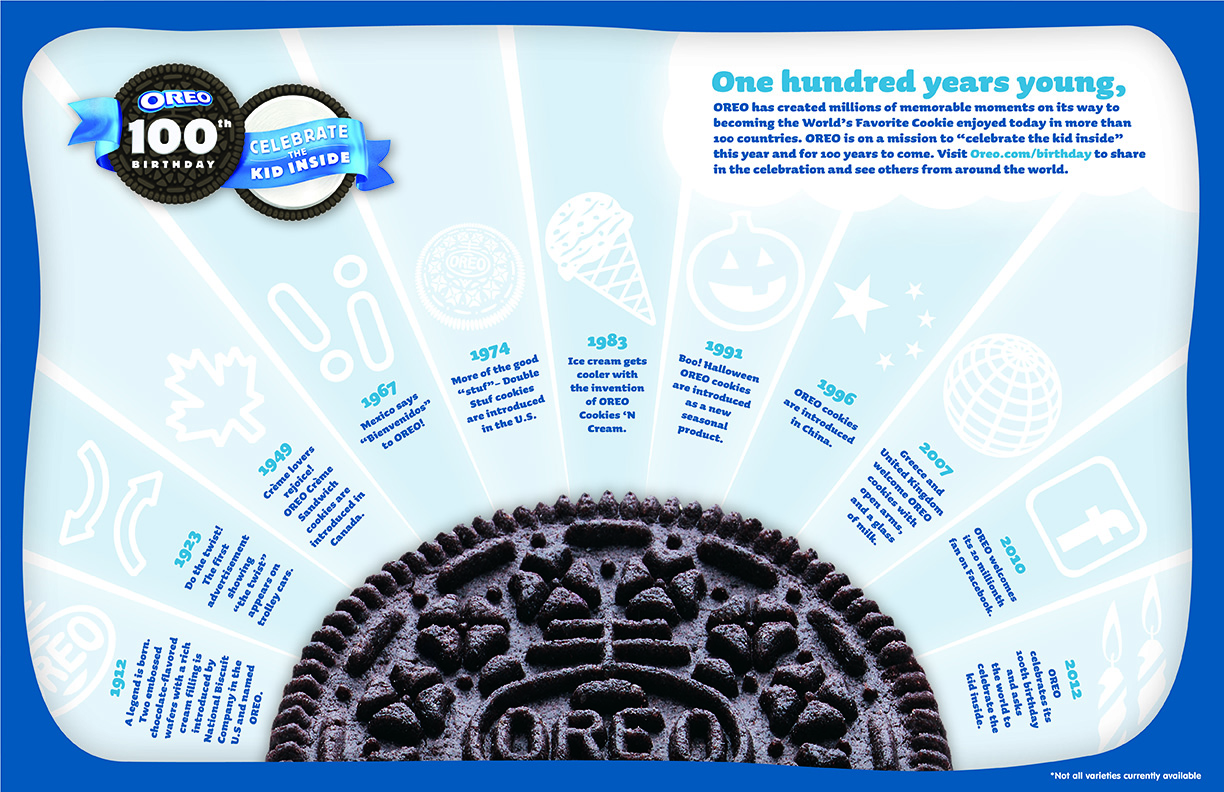
Kraft used the occasion of the Oreo’s 100th birthday to demonstrate the cookie’s history with an infographic.

Oreo 100th Birthday infographic

Why Are You Sharing Your Message?

The answer to this question is not, “Everyone has an infographic so we need one, too.” As with any marketing endeavor, there has to be a goal for investing resources into creating your content. Aside from driving traffic, will your infographic:

  • Create brand affinity or loyalty?
  • Educate stakeholders on trends?
  • Ask viewers to self-segment so you can refine marketing campaigns?
  • Convert prospects to customers?

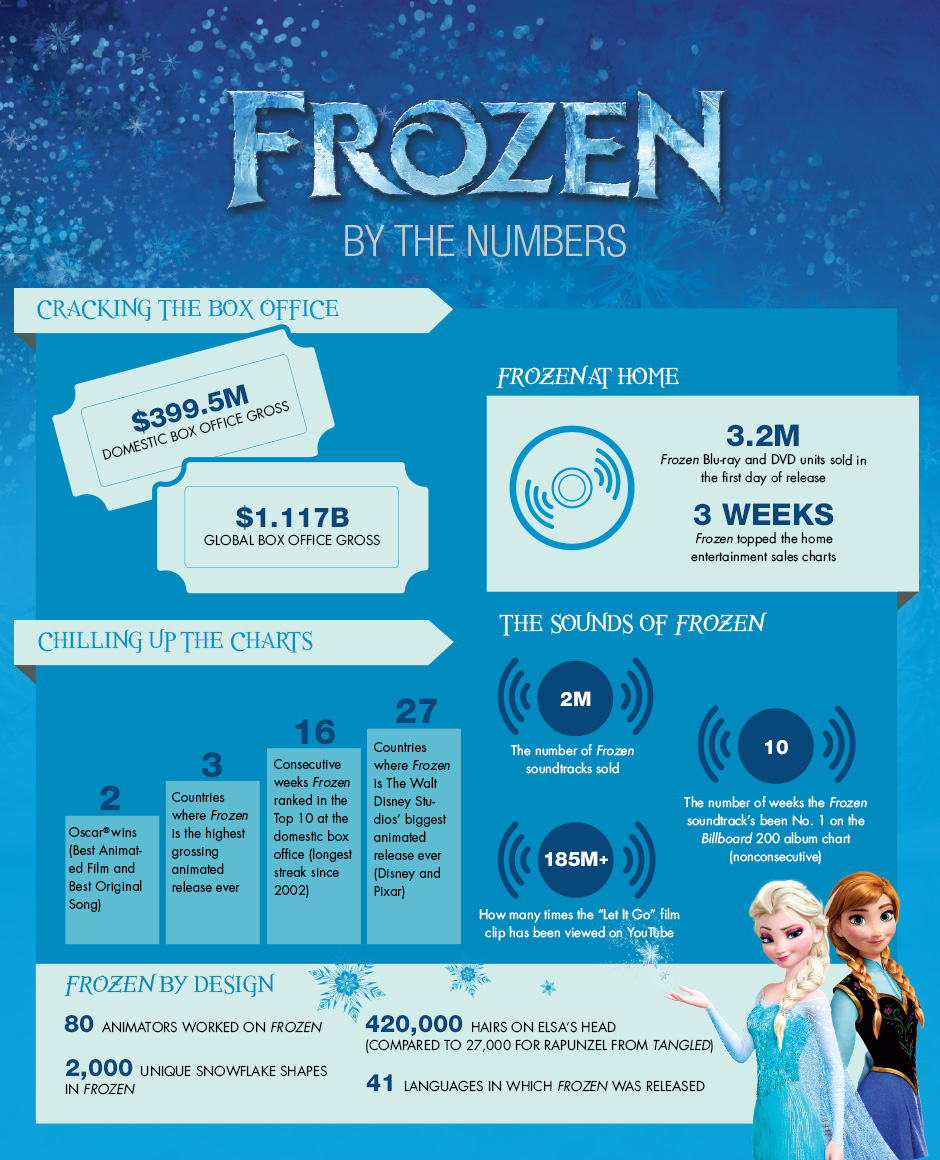
The Walt Disney Company used this infographic to illustrate the success of Frozen.

Frozen movie infographic

How Will You Share Your Message?

Seriously. What do you want this to look like? All the things that go into creating a successful visual apply here. Take some time and align your design with your goal. Think about:

  • Color palette
  • Font choice and size
  • Graphic elements
  • Layout

Where Will You Share Your Message?

You’ve got your infographic published to your site, now what? As with any owned content, you’ve got to promote it. Make sure it’s branded so people can find you and help you meet your goal, then:

  • Publish it to your social channels and remember to include the right size image preview for each platform.
  • Submit it to infographic galleries; don’t forget Flickr.
  • Allow people to embed your infographic.

Create Your Own Infographics

When you’re ready to tell your story with an infographic, here’s a list of DIY tools you can use.

  • visual.ly
  • easel.ly
  • Picktochart
  • Infogr.am

The appeal and importance of visual content, and infographics in particular, are undeniable. That said, I urge caution. The written word still holds value and as the use of infographics becomes more prevalent, I’m beginning to miss the days when people could connect their thoughts, ideas and data together with words.

I understand the attraction, but I fear a return to communicating solely with images and losing the nuance of language.

Author’s Bio: Lisa D. Jenkins is a Public Relations professional specializing in Social and Digital Communications for businesses. She has over a decade of experience and work most often with destination organizations or businesses in the travel and tourism industry in the Pacific Northwest. Connect with her on Google+

Filed Under: Content, Successful Blog Tagged With: bc, Content, infographics

Community in Conversation: The Give-Back Challenge

April 18, 2014 by Rosemary

I’ve heard Liz refer to Successful Blog as “community in conversation.” A place where we share tips, war stories, and lessons learned from a life of entrepreneurship and leadership.

With that in mind, I’m excited to announce that we’ll be introducing a new regular feature on the site that will highlight both the community and the conversation.

Give-Back Challenge

With each SOBCon event, Sunday was a special day. In the morning, a few passionate non-profits would present their mission and ask for help with a particular challenge they were facing. It was called the Give-Back Challenge.

After the non-profits presented, the entire SOBCon group would break into smaller teams to brainstorm solutions for the challenges described. The emphasis was always on actionable, real-world advice that would have an immediate impact for the non-profit involved.

On this blog, we’ll be adding the Give-Back Challenge as a recurring feature. It will follow the basic format of the real-life SOBCon event, in which the non-Profit will be invited to present their mission (via a video, images, and text), and pose a particular challenge they are facing.

Our community will then be invited to brainstorm ideas in the comments section (and reach out directly via email if followup is necessary). The goal is to devote some of our incredible brainpower to lifting up some of our non-profit friends and colleagues. We can start to become the “people who won’t let you fail.”

This series will require fearlessness on the part of our non-profits, and a willingness to be vulnerable in order to make an even greater impact.

Stay tuned for the first Give-Back Challenge in the next week or so. If you’re interested in nominating a non-profit, feel free to post the name of the organization here in the comments or reach out to me directly.

What do you say? Are you in?

Author’s Bio: Rosemary O’Neill is an insightful spirit who works for social strata — a top ten company to work for on the Internet . Check out the Social Strata blog. You can find Rosemary on Google+ and on Twitter as @rhogroupee

Photo Credit: h.koppdelaney via Compfight cc

Filed Under: Successful Blog, teamwork Tagged With: bc, non-profit

How to Handle Recent LinkedIn Company Page Changes

April 17, 2014 by Rosemary

On April 14, 2014, LinkedIn removed the separate Products & Services page associated with all Company Pages.

zen garden

If you had been trying to build a credible presence on LinkedIn, this change may have removed some valuable information from your Company Page. You’ll need to remain calm, and take some action in order to rebuild your corporate profile.

According to HubSpot, LinkedIn is the best social network for lead generation, so you should definitely have an active Company Page.

Recover Your Product Recommendations

This LinkedIn update had the effect of “disappearing” all accumulated product and service recommendations across the board. But don’t freak out yet. Until May 30, 2014, you can still request the contents of any recommendations that were on the site as of March 4, 2014.

If you plan to repurpose any of those old recommendations (in other web pages or in print), be sure to get permission from the person who wrote it.

Rebuild Your Product Information

The good news is that LinkedIn now has Showcase pages, where you can highlight individual products or services within your company page.

To add a Showcase page:

  • Go to your company page and click the down arrow next to the blue Edit button.
  • Select Create a Showcase Page.
  • Enter a page name and assign administrators for the Showcase Page.
  • Click Create.

Showcase pages contain a single large image across the top, and can include specific status update content. LinkedIn users can follow Showcase pages specifically, if they choose. LinkedIn also provides separate analytics data for Showcase pages, which makes it easier for you to find out which campaigns or products are stirring up interest.

What to Do Now

Now that the LinkedIn Company Page is more tightly focused, all of the attention is on status updates. Make sure that your LinkedIn company updates include a variety of content, including text and links to a website, image, SlideShare presentation, or YouTube/Vimeo video. Make sure your content is valuable to your existing customers and prospects.

Consider sharing or commenting on your customers’ status updates as your Company Page. Remember to reciprocate when they follow your page as well.

It’s also a good idea to commit to a routine of updates, so that your company shows up in the news feed on a regular basis.

The upshot is that you can no longer get away with a “set it and forget it” mentality on LinkedIn (or any other social network). You need to maintain and update your corporate profiles, and stay on top of platform changes.

Have you responded to the LinkedIn changes already? Have you done anything creative with your Company Page on LinkedIn?

Author’s Bio: Rosemary O’Neill is an insightful spirit who works for social strata — a top ten company to work for on the Internet . Check out the Social Strata blog. You can find Rosemary on Google+ and on Twitter as @rhogroupee

Photo Credit: melolou via Compfight cc

Filed Under: Marketing /Sales / Social Media Tagged With: bc, LinkedIn, social-media

You Should be Using HTML5, and Here Are 7 Reasons Why

April 11, 2014 by Rosemary

By Teddy Hunt

Web development has gradually become easier over time. Gone are the days of messing around on Geocities and creating eye-sore websites. The best new thing in web development is HTML5. If you’re not using it, you’re really missing out. Here are a few reasons you should be using HTML5 (any code used in the text was changed to brackets to avoid formatting issues).

HTML code

Image via Flickr by Sebastian Fuss

Neater Code

If you’ve dealt with anything other than HTML5, you know exactly how messy code can get. With HTML5, though, you can create clear, descriptive semantic code. You’ll be able to easily separate function from style. Before, you’d have to use [div] for each individual block of content. HTML5 has [article], [header], [footer], and [nav] tags, as well as a few other ones that make it much more organized.

Mobile Support

You want your site to be accessible across all platforms, regardless of device, right? Then it’s time to adopt HTML5. HTML5 is fully supported by mobile browsers, so you won’t have any issues with people on mobile devices unable to see your content. With Flash support being officially off the radar for mobile support, HTML5 is the next best option. HTML5 will let your users view your content in full screen. You can also define width and zoom settings.

Full Audio and Video Support

Remember the pains of trying to embed a video or a piece of audio onto your site? It usually involved a lot of tags and troubleshooting when it inevitably wouldn’t work. You’d end up with code to embed a video that would sprawl across ten or more lines! Thanks to HTML5, those days are long gone.

HTML5 treats video and audio similar to image tags, using instead of anything else. You’ll probably need to add a bit of extra code to get the video working for older browsers that don’t support HTML5, but even then that’s only five or six lines of extra code. Now you can finally enhance your content without a ton of confusing code.

Location Support

Taking a step from mobile devices, HTML5 fully supports geolocation. This can help in many ways. For example, if the customer is trying to figure out how much they’ll pay for shipping to get an item shipped to them, it’ll skip the multiple menus asking for location that they’d have to sit through otherwise. HTML5 will utilize whatever it can to get a user’s location — your wireless network connection, the GPS on your phone, your IP address, etc. You can, of course, allow the user to disable this feature should they want to do so.

The Storage of Content

The way content is cached for later viewing is unique with HTML5. It’s sort of like the older cookies method, combined with cloud storage. The data will still be there even after the browser is closed. You don’t have to worry about deleting cookies. Storing data in the browser means you can cache data and load previous data, which will reduce overall load times.

Games!

Developing games for HTML5 is a breeze thanks to the [canvas] tag. It’ll be a lot easier to troubleshoot any issues you have thanks to HTML5’s way of displaying code. There are quite a few tutorials about how to develop games in HTML5, using examples that make use of CSS and jQuery.

Everything Supports It

HTML5 was designed with everyone in mind and it shows — it’s supported by Safari, Chrome, Firefox, and even Internet Explorer. Even though older browsers support it, some won’t be able to display certain aspects of HTML5. Fortunately, you can just add a Javascript shiv to allow those items to be displayed on older browsers.

When it comes to developing your website, there are a ton of directions you can go. HTML5 should be the first thing that you consider. Not only does it work across all desktop browsers, but most mobile browsers support it as well. Stop alienating your audience and clean up your code by adopting HTML5.

Have you seen an increase in traffic since using HTML5? Leave a comment and let us know!

Author’s Bio: Teddy Hunt is a freelance content writer with a focus on technology. When not behind a computer, Teddy spends the majority of his free time outdoors and resides in Tampa, Florida.

Filed Under: Successful Blog, Web Design Tagged With: bc, HTML5, web design

  • « Previous Page
  • 1
  • …
  • 34
  • 35
  • 36
  • 37
  • 38
  • …
  • 84
  • Next Page »

Recently Updated Posts

Is Your Brand Fan Friendly?

How to Improve Your Freelancing Productivity

How to Leverage Live Streaming for Content Marketing

10 Key Customer Experience Design Factors to Consider

How to Use a Lead Generation Item on Facebook

How to Become a Better Storyteller


From Liz Strauss & GeniusShared Press

  • What IS an SOB?!
  • SOB A-Z Directory
  • Letting Liz Be

© 2025 ME Strauss & GeniusShared