Successful Blog

  • Home
  • Community
  • About
  • Author Guidelines
  • Liz’s Book
  • Stay Tuned

Cool Tool Review: Google Alerts

May 27, 2010 by Guest Author

Todd Hoskins Reviews Tools for Business

cooltext451585442_tools

Todd Hoskins chooses and uses tools and products that could belong in an entrepreneurial business toolkit. He’ll be checking out how useful they are to folks who would be their customers in a form that’s consistent and relevant.

Cool Tool Review: Google Alerts
A Review by Todd Hoskins

Do you know the people, posts, and sites that are influencing your brand and industry?
Are you engaging in the most relevant conversations?

Google Alerts is one of the most valuable free services on the web. With Google’s indexing power, you get immediate or regular notification in your inbox or reader on topics or keywords of interest.

With the advent of the real-time web, you no longer need to wait a few days or even a week to learn that you’ve been praised or defamed on some obscure site. Alerts represent an early advancement from search-based tools to discovery on the web. Alerts is rather infantile in this sense – you have to tell Google exactly what you’re looking for. So, the key is determining:

What’s important to YOU and YOUR business?

Here’s a simple way to think about what alerts you should create:

1) Companies
2) People
3) Products
4) Issues

The first alert someone sets up (other than their own name), is usually your company. Make sure to also add alerts for competitors. Google lets you determine the frequency at which you get alerts. So, for a primary competitor, you may want immediate alerts. For others, daily or weekly may be fine. As the notifications are sent to your inbox or reader, you want to manage how much volume you get on an ongoing basis.

For the people category, monitoring executives, analysts, and industry luminaries allows you to stay up to date on what is being said about whom. Whether or not you choose to set up alerts for your employees is up to you. I would question anyone who spends a good portion of their week monitoring what their people are saying. If alerts are set up for the other three categories, you should get any post that is relevant without playing big brother to your employees.

Products is a no-brainer. My only caution here is, if you are setting up alerts for more than a dozen products, you may want to consider a social media monitoring solution. Nathan Gilliat watches the industry closely. There is value in getting the additional analysis and tracking, but you pay for what you get.

Finally, the category that most people miss: issues. Too many companies are jumping into blog and Twitter conversations only when their company is mentioned. Consider the values, objectives, and challenges your company is pursuing and facing. Listening and participating in conversations about “financial transparency,” “deregulation,” “surfing,” or “single payer health insurance” will both enliven your content creation and allow you to highlight what is important to you as an individual or a company.

Setting up Google Alerts takes less than five minutes. But thinking about the keywords and themes you want to monitor should be an ongoing process.

Summing Up – Is it worth it?

Enterprise Value: 2/5 – more sophisticated tools with graphs, charts, and sentiment analysis exist for a cost

Entrepreneur Value: 5/5 – if you know of a more simple way to quickly get the info you need, please let me know

Personal Value: 4/5 – tracking your favorite band, athlete, or ex-boyfriend provides some balance to the more professional alerts


Filed Under: Successful Blog, Tools Tagged With: bc, Google_Alerts, LinkedIn, social media montioring, Todd Hoskins

Cool Tool Review: Aquent & crowdSPRING

May 20, 2010 by Guest Author

Todd Hoskins Reviews Tools for Small Business

cooltext451585442_tools

Todd Hoskins chooses and uses tools and products that could belong in a small business toolkit. He’ll be checking out how useful they are to folks who would be their customers in a form that’s consistent and relevant.

Cool Tool Review: Aquent & crowdSPRING
A Review by Todd Hoskins


(Disclosure: I currently work with Aquent)

The free agent revolution predicted by Fast Company more than a dozen years ago never fully happened. The rising costs of healthcare, along with our collective drive for security as a result of war and economic turmoil made many people choose employment rather than a life of freelancing.

For reasons of choice or necessity, there are still a lot of independent workers looking for the right gig. Large businesses often will use contractors to provide flexibility, cost savings, or to rent skill sets they do not have. Small businesses should use freelancers more often.

I recommend a couple companies that match talented people with organizations in need of help: Aquent and crowdSPRING.

Aquent has been in business for 24 years. With offices around the globe, and specialized practices in online marketing, interactive design, user experience, traditional marketing, and graphic design, they find the best people either offsite or locally to fit your culture and need.

picture-8

It works this way. You have a project, or perhaps someone is taking a one month vacation. You contact Aquent. They assign an agent who will select some candidates from their talent pool based on budget, skill set, and working environment. You interview one or a few, and make a choice. Aquent pays the talent and bills you. The whole process can take less than a week.

For a small business, this gives you access to the most talented designers and marketers for a time period and cost that you dictate, without needing to screen a bunch of people or take on a full-time employee.

crowdSPRING offers logo, graphic design, and writing services, with a much different approach. You post the project on their site, including deadline and a price. Then you wait for the creatives to submit their entries. In addition, crowdSPRING has one of the best small business blogs out there. They are smart people, now with a network of over 60,000 freelancers.

picture-9

Summing Up – Is it worth it?

Enterprise Value: 4/5 – Revive the Free Agent Revolution. There is great talent ready to help. Compelling alternative to paying agencies to do execution work.

Entrepreneur Value: 5/5 – A 2 week SEO engagement, site redesign, or copy rewrite can make a big difference

Personal Value: 2/5 – if you’re a freelancer, these companies can help you

Filed Under: Successful Blog, Tools Tagged With: Aquent, bc, crowdspring, freelancing, LinkedIn, Todd Hoskins

Cool Tool Review: Dabbleboard

May 13, 2010 by Guest Author

Todd Hoskins Reviews Tools for Small Business

cooltext451585442_tools

Todd Hoskins chooses and uses tools and products that could belong in a small business toolkit. He’ll be checking out how useful they are to folks who would be their customers in a form that’s consistent and relevant.

Cool Tool Review: Dabbleboard
A Review by Todd Hoskins

The dreaded dial in . . .

I had a colleague who referred to virtual meetings as “pajama business.” It is only within the last few years that we have gained the luxury of clipping toenails during a CEO update, or making egg salad during a development team scrum. The gain in freedom has often been offset by a loss in engagement. When I can’t see your smirk, or feel your trepidation, or witness your enthusiasm, I am less connected to you, my client or co-worker.

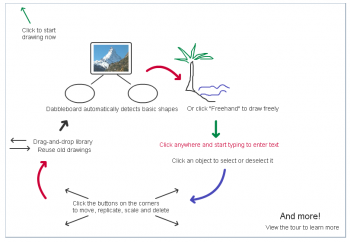
A few weeks ago I reviewed Prezi, my favorite tool for visualizing a presentation. There are plenty of collaboration tools out there for bridging the visual divide in virtual meetings, from screen sharing to video conferencing. This week I want to highlight a simple digital whiteboard called Dabbleboard that can encourage participation, and aide the visual learners and thinkers among us (like me).

The visual component of any meeting is important. Dan Roam received considerable attention a couple years ago for solving problems and selling ideas in pictures in his book The Back of the Napkin. Dabbleboard provides the necessary functionality to place a blackboard or napkin in front of anyone with whom you want to share.

For a sales pitch, a site redesign, a strategy meeting, even reviewing financials – all of these situations improve with pictures and shapes. A different part of our brain gets activated and you’ll keep the attention of your people or prospects.

picture-7

I have also tried Scriblink, which worked fairly well. Both tools offer chat, real-time sharing, and phone conferencing. I like Dabbleboard’s personal image library – you can reuse graphics you’ve made. I also like their commitment to their users, evidenced in their blog and the creation of a toolkit.

A Pro (paid) version is available that includes customization, permissions, data portability, and security. If you’re going to create highly confidential drawings, you may want to pay the monthly fee. Discounts are also available for not-for-profits and educators.

Summing Up – Is it worth it?

Enterprise Value: 3/5 – Adobe and Microsoft lack the whimsy of Dabbleboard

Entrepreneur Value: 4/5 – excellent, though the UI could be better. AlmostMeet in beta (Please, please change the name).

Personal Value: 2/5 – great for school projects

Filed Under: Business Life, Successful Blog, Tools Tagged With: bc, Dan Roam, LinkedIn, Scriblink, Todd Hoskins

Cool Tool Review: GiveForward & ChipIn

May 6, 2010 by Guest Author

Todd Hoskins Reviews Tools for Small Business

cooltext451585442_tools

Todd Hoskins chooses and uses tools and products that could belong in a small business toolkit. He’ll be checking out how useful they are to folks who would be their customers in a form that’s consistent and relevant.

Cool Tool Review: GiveForward & ChipIn
A Review by Todd Hoskins

It’s difficult to ask for money. Whether it’s making a pitch to an investor, raising funds for a cause, or getting through a personal financial crisis, it’s uncomfortable and humbling to look someone in the eye with open hands and say, “Please.”

I missed out on a class trip to England years ago because I couldn’t sell enough pizza discount cards. Door-to-door pleading was not as effective as I hoped, so I went to school while my schoolmates went to Buckingham Palace. Lesson learned. Money is more easily earned.

Thank you, Tim Berners-Lee for the Internet, which in addition to providing knowledge, community, and a living for many of us, the WWW makes fundraising a whole lot simpler.

There are two primary reasons a business would want to raise funds online. First, as an alternative to sourcing angel investments. Grandpa and your rich friend Gretchen could indeed be angels, giving you the head start to get a business up and running, or reach the next phase of growth. In the world of peer-to-peer financing, Prosper has been democratizing business investments for over four years now. If you have friends and family who support your initiative, why not avoid the cost and hassle of interest rates and term sheets?

The second reason a business would get into fundraising is to bring awareness and money to a cause. It’s a good business practice (and human practice) to be charitable. Donating time and/or funds to a community development project, for example, ties a business to the community. It’s also appropriate to announce, “We care about this. Want to help?”

There are two tools I recommend that can help you ask for help. GiveForward and ChipIn are both simple and inexpensive, serving slightly different purposes.

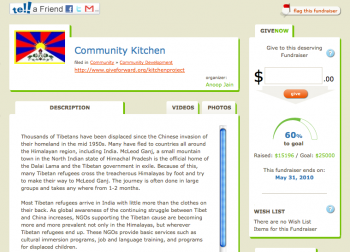
GiveForward features a page. ChipIn features a widget. If you need to tell a story, make a case, provide some background, and allow comments, then GiveForward is the right choice. If you’re hoping to receive single donations in the hundreds or thousands of dollars, GiveForward is going to provide more peace of mind to the donor.

picture-42
ChipIn is better used for “crowdfunding,” encouraging your reader base or network to chip in a few dollars. It works with PayPal. The widget is not pretty, but it’s very visible on your blog or site.

Summing Up – Is it worth it?

Enterprise Value: 2/5 – some custom development would be appropriate for larger businesses

Entrepreneur Value: 3/5 – show your passion, whether it’s for your business or a cause

Personal Value: 4/5 – for soliciting or researching donations, sites like GlobalGiving and GiveForward are important

Filed Under: Tools Tagged With: bc, ChipIn, GiveForward, LinkedIn, Todd Hoskins

Cool Tool Review: Expensify

April 29, 2010 by Guest Author

Todd Hoskins Reviews Tools for Small Business

cooltext451585442_tools

Todd Hoskins chooses and uses tools and products that could belong in a small business toolkit. He’ll be checking out how useful they are to folks who would be their customers in a form that’s consistent and relevant.

Cool Tool Review: Expensify
A Review by Todd Hoskins

I have a shoebox of receipts, and a file folder for business expenses. How often do I spend time rummaging through the box for lost receipts? I’m embarrassed to admit.

Pain and expense reporting go hand in hand. The scanning, the spreadsheets, the documentation, the mileage log . . . you get the idea. Expensify completely changes this experience from painful to painless (and paperless to boot).

Imagine this . . . you get an email receipt from a hotel or airline and you forward it to an address that automatically uploads a copy awaiting your categorization (think TripIt). Or, you take a client to dinner and while emptying your pocket the next morning you simply take a photo with your phone and send it on its way (think NeatReceipts). You can also log a cash expense via SMS (think taxicabs). Finally, directly import your business credit card account and your reporting is being updated as you incur expenses (think Mint). These are just a few of the many features and services offered by Expensify. The days of the shoebox are numbered.

expensify1

They have done their research. As someone who has submitted, approved, and paid expenses in the past, I can’t find any holes. Better yet, it’s free if you are having expenses submitted by two or less people. More than two, it’s $5/month per person.

The beancounters and procedural police are taken care of as well. Expensify also provides additional support for the entire expense reporting workflow on their site – after submitting a report, the boss can approve the expenses online and the finance person can provide reimbursement electronically via direct deposit. Additionally, Expensify offers tight integrations with QuickBooks™, FreshBooks, Google Apps, and Salesforce.

Summing Up – Is it worth it?

Enterprise Value: 5/5 – currency conversion + customized policy mgmt

Entrepreneur Value: 5/5 – saves money and time

Personal Value: 0/5 – do your mileage log elsewhere, use Mint

Filed Under: Successful Blog, Tools Tagged With: bc, LinkedIn, Todd Hoskins

Hate PowerPoint? Try Prezi!

April 22, 2010 by Guest Author

Todd Hoskins Reviews Tools for Small Business

cooltext451585442_tools

Todd Hoskins chooses and uses tools and products that could belong in a small business toolkit. He’ll be checking out how useful they are to folks who would be their customers in a form that’s consistent and relevant.

Refresh Your Presentation Skills (and Tool)
A Review by Todd Hoskins

I hate PowerPoint.

The tool itself is not the primary problem – it’s all the bad habits that have proliferated in business including too much text, too many slides, and the worst of all, reading a deck verbatim to an audience.

But, sometimes PowerPoint is necessary. If you must use it, I recommend absorbing Garr Reynolds‘ work at Presentation Zen.

For the rest of us who are free to be creative and experiment with new tools, I enthusiastically encourage you to check out Prezi. It’s well designed, simple, and will make any presentation not only more tolerable, but more memorable and enjoyable.

With PowerPoint, you use a template and create slides. Then you proceed through the slides (often with snazzy or annoying effects) in a linear fashion. With Prezi, you create a map populated with words, images, charts, video, etc. Don’t let that intimidate you. Really, you take all the stuff that you may want to use, get it out there, and then create groupings and a path.

Once you figure out the “zebra” navigation, it’s very easy. The flash technology animates the path you create within the map. Here’s an example:

About perspective… on Prezi

Prezi highlights its “zoom” for good reason. The spatial relationships and animation allow the presenter to capture the big picture, drill into details, and show the connections between concepts. It’s not just theater, it’s effective.

It’s free, as long as you don’t mind the Prezi watermark and keeping your presentations public. Premium subscriptions start at $59/year and allow you to work offline and have increased storage capacity.

Summing Up – Is it worth it?

Enterprise Value: 5/5 – worth the 15 minute investment to learn

Entrepreneur Value: 5/5 – look sharper, break the bad habits

Personal Value: 1/5 – make a movie, not a presentation

Filed Under: Successful Blog, Tools Tagged With: bc, LinkedIn, Prezi, Todd Hoskins

  • « Previous Page
  • 1
  • …
  • 9
  • 10
  • 11
  • 12
  • 13
  • …
  • 30
  • Next Page »

Recently Updated Posts

Is Your Brand Fan Friendly?

How to Improve Your Freelancing Productivity

How to Leverage Live Streaming for Content Marketing

10 Key Customer Experience Design Factors to Consider

How to Use a Lead Generation Item on Facebook

How to Become a Better Storyteller


From Liz Strauss & GeniusShared Press

  • What IS an SOB?!
  • SOB A-Z Directory
  • Letting Liz Be

© 2025 ME Strauss & GeniusShared