Successful Blog

  • Home
  • Community
  • About
  • Author Guidelines
  • Liz’s Book
  • Stay Tuned

Time to Save Time When You’re Browsing

August 13, 2008 by Liz

Working Plans logo

This week Chris Hebert has dropped share a blog post. You might know her blog WebDazzling, if you don’t yet this will give you a reason to check it. Great writing and great information.

Make Your Browser Save You Time
by Chris Hebert

Do you have a routine? Most everyone does. I am like most nuclear physicsts (got your attention didn’t I, just kidding) with several customary websites I visit each morning. Wouldn’t it be nice if we could have our browser do the work for us instead of opening several browser windows or tabs each morning? If you use Internet Explorer or FireFox/Mozilla than I have just the trick for you!

What is a Browser Tab?

IE tab 300x 21

What is a browser tab anyway? In Internet Explorer 6 & 7, or Firefox/Mozilla you have the ability to open a new tab each time you explore a new site or start a new search. For those of you who do not know what a tab is within your browser, complete this quick experiment for me. Select “File -> New Tab” and you should now be the proud owner of a new tab.

Why Use Tabs?

The benefit of tab view in a browser is the simplicity of working with one browser window and benefiting from the ability to jump between tabs, as opposed to having several windows open and try to fumble through your task bar and possibly click the wrong link. Come on, we all have did this once or twice. In addition to jumping from tab to tab, the ability to re-order tabs allows the user to prioritize their viewing experience. Merely select the desired tab to move and drag the tab into your order preference.

How To Start Browsing with Multi-tabs

Internet Explorer 6 & 7
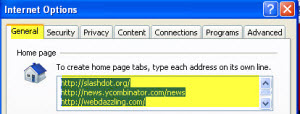
Internet Explorer 6 and 7

1. Select “Tools” (depending on your tool bar, it may be on the upper right or lower left)
2. Select “Internet Options”
3. Make sure the “General Tab” is selected (should default to this tab)
4. Your current website home page should be highlighted in blue. We are going to leave it. (If you wish to erase it and change your current home page – press “Backspace” or “Delete” to erase it)
5. Place your cursor at the end of your current home page and “Enter/Return” to the next line (your original site should still be in tact)
6. Type or paste the new URL (website address) name you want to use, then “Enter/Return” to the next line
7. Repeat #4 as many times as necessary (here is an example of what it should start looking like)

http://www.yourfavoritewebsitehere.com
http://www.yourotherwebsitehere.com
http://www.webdazzling.com
http://www.google.com

8. Select “OK” to exit from the “General Tab”
9. Close and Restart your browser to see them all open

Firefox/Mozilla
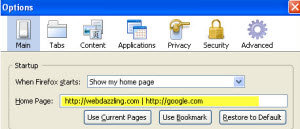
FireFox / Mozilla

1. Select “Tools -> Options” (MAC USERS select “Firefox -> Preferences”)
2. Make sure the “MainTab” is selected (should default to this tab)
3. In the “Home Page:” field, enter the addresses you want to use and separate them with a pipe symbol (shift + ) between each URL. With or without spaces between each URL, it didn’t seem to mind (here is an example of what it should start looking like)

http://www.myfavoritewebsite.com | http://www.webdazzling.com

4. Select “OK” (MAC USERS close the “preferences box”)

Let’s Get Colorful & Organized
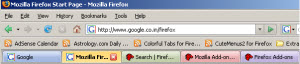
FireFox colortabs

One last trick I would like to share with you, now that you are a tab owner. The ability to have tabs is a great feature, but what if you could color the tabs different colors? If your default browser is Firefox/Mozilla there is a addon https://addons.mozilla.org/en-US/firefox/addon/1368. (I am not aware of a color tab option for Internet Explorer at this time.)

Want to Work Like an Expert?

Shortcuts with Tabs

Open New Tab = Ctrl + T (MAC USERS command + T)
Close Current Tab = Ctrl + W (MAC USERS command + W)

By utilizing these handy web browsing tips, anyone can go from being a novice web surfer to an expert in quick fashion. Don’t be afraid to explore, some of my best work has happened by accident! Go on, save yourself a click with these handy web browsing tricks.

Chris Hebert is a web designer with a passion for learning computer skills and passiong that information in a clear and simple format. You’ll find more of herarticles at WebDazzling.com

Thanks Chris!

–ME “Liz” Strauss
Work with Liz!!
Buy the ebook and find out the secret.

Filed Under: Successful Blog, Tools Tagged With: bc, Chris Hebert, Tabbed Browsing, WebDazzling

Great Find: YUDU!

August 3, 2008 by Liz


Document Elegance

YUDU Media

I’ve been having a conversation about working with a digital publishing company in the UK. So naturally one of the first things I did was try their product. It was of particular interest because of my recent eBook experience and also because I’m always looking for new ways to share information with readers, clients, and friends. After years in publishing, I like to stay current on digital publication tools.

YUDU Freedom is elegant.

Great Find: YUDU
Permalink: http://www.yudu.com/
Target Audience: Anyone who shares digital documents
Content:
YUDU Freedom allows you to publish any document online for free. I did myself and can speak from experience. I uploaded two documents — both .pdfs, 24 pages and 68 pages, both with photos. The upload took seconds. I was able to title and tag my file. The email with the link to my file arrived far faster than I expected, maybe within 90 seconds. The links inside are private unless I choose to share them.

But what impressed me most was the beauty of the result. In particular, the document below was designed to showcase light and space . . . the YUDU enhances the design far more than any other document reader. I hadn’t prepared or edited the document here — for example the Table of Contents isn’t true and I haven’t spent time considering the type font — still YUDU show this work in progress beautifully. Click the screenshot and stretch your browser to full screen to see the entire 24-page document online inside YUDU.

Walking on Water by Liz Strauss - (YUDU Freedom — Unedited Version)

Notice how you can turn pages like a book using the lower corners or like a .pdf using the arrow above. Nice touch. Options allow you to remove the sound or the page turn, if you don’t want to be distracted by them. YUDU has more features rolling out soon. Watch this product.

Updated to take to you to yudu.com

–ME “Liz” Strauss
If you’d like an hour of Liz’s consulting time, see the Work with Liz!! page for details.

Classic Related articles
Sandy’s Great Graphic Find: ImageChef
Blog Promotion Basics [for Everyone]
Think Before You Link
Blog Basics 1: Comments and Comment Policies

Filed Under: Successful Blog, Tools Tagged With: bc, Slide Show, That Brand New Blogging Feeling Event, Tim Sanders, YUDU

August 1-2, 2008 — Site Meter Code Crashes Thousands of Blogs

August 2, 2008 by Liz

This Blog Was One of Them

The Living Web

Apologies to anyone who tried to visit this blog using IE6 or IE7 last night. Site meter code was bring down this site whenever it was loaded by those browsers.

Thousands of sites including b5media sites and Consumerist.com use site meter code as part of their tracking an analytics.

What to do if this is happening on your blog?

Remove the site meter code and paste it into a notepad document. It’s usually placed in the header or the fooler and is bookmarked with

Then visit www.sitemeter.com using Internet Explorer. Makes sense that when their error is gone, yours will also be.

Thanks to Darren Paul, Consumer/Lifestyle Publicist for the email this morning about this.
Hat tip to oneprojectcloser for the verification.

–ME “Liz” Strauss
Work with Liz!!

Like the Blog? Buy my eBook!

Filed Under: Successful Blog, Tools Tagged With: bc, Crashes., Internet Explorer, Site Meter

JS-Kit Acquires HaloScan: Commenting Goes Multi-Media

July 8, 2008 by Liz


Check Out that Profile

JS-Kit logo

At noon CST, widget maker, JS-Kit, announced that they’ve acquire HaloScan — the largest hosted comment service on the web — and they’re building out some enticing new features to make the new product a full-service commenting engine. Key traits are that it allows embedding of YouTube and audio in comments and is completely removable — you won’t lose your comments should you decide to opt out at a later date.

Last night JS-Kit CEO, Khris Loux explained that his team is working feverishly on a build out that will offer commenters ever-increasing ways deepen their profiles and manage their information. He strongly emphasized his core beliefs that content belongs to the producer and that great customer relationships will be forged by serving that idea.

New features include:

Portable Visitor Profile

The new profile feature gives users access to their comments made across JS-Kit 550,000 publisher sites and encourages cross-domain traffic. When you mouseover a comment by a JS-Kit commenter you’ll see a profile that looks like this:

JS-Kit profile

Synchronization

You can add or remove JS-Kit Comments without risk of losing comment data. Import and update existing comments from Blogger or WordPress. The integration panel looks like this:

JS-Kit integration

100% SEO Support for Comment Data

I haven’t tried it yet, but it sure sounds promising. Khris encourages feedback so that the product offers you the most useful features and usability. You can find out more at JS-Kit Comments.

-ME “Liz” Strauss
Work with Liz!!

Buy the ebook and get your best voice in the conversation.

Filed Under: Blog Comments, Successful Blog, Tools Tagged With: bc, commenting., HaloScan, JS-Kit, Kris Loux

Wordle

July 5, 2008 by Liz

Make a Point with Wordle

Great Find: Wordle

Permalink: http://wordle.net/

Target Audience: Anyone who wants to present ideas graphically

Content:
Wordle makes tag clouds a presentation tool. It’s totally intuitive. They call it a toy, but it’s a tool as well. You can choose the type, choose the font, and choose the color scheme. Here are two I made in minutes this morning.

I made this one by typing in the url of this blog . . . click the image to see it full size.

And this includes terms essential to communication . . . click the image to see it full size.

NOTE: IF YOU COPY THEIR LINKS, you may need to delete the extra space at the line breaks for them to work.

Here are some ideas for using this tool.

  • Make presentation slides.
  • Collect terms during a meeting and wordle the result.
  • Make word portraits that describe people you know.
  • Make a Wordle greeting card.
  • Make a poster of your favorite words or sayings.

Check it out. I’m sure you’ll find even more ways to use it.

–ME “Liz” Strauss
Work with Liz!!

Buy the ebook and get your best voice in the conversation.

Related
Great Find: PictureTrail
Sandy’s Great Graphic Find: CoolText
Sandy’s Great Graphic Find: Pixel Ruler

Filed Under: Successful Blog, Tools Tagged With: bc, Great find: Wordle

Part 4: The Last Time with Matt Rissell of TSheets

June 26, 2008 by Liz

Part 4 in a 4-Part Interview with Matt Rissell

TSHEETS logo

Yesterday, Matt Rissell, CEO of TSheets explained how customers online and offline respond to TSheets. Today we’re finding about the guy who made his job tracking time for folks who work offline, mobile, and on the web.

So, Matt, did you dream about Time travel as a kid? Did you wish you had more time to play? How’d you end up in this business?

To be transparent, I remember hearing as a kid that God wasn’t bound by time. God had complete knowledge of what “I was going to do” but still gave me the freedom to choose whatever it was I wanted to create. That baffled my mind and actually still does. I think to some degree, every kid dreams about ‘Time Travel’. I even remember reading a book where a kid found a little shed that when he sat in it, ‘Time’ was normal for him but outside the box time would stop. In other words, when he was in the box, maybe 1 year would go by but when he went out of the shed, no time would have elapsed. This book inspired me to find my own “shed”. So in my 8 x 9ft bedroom- I used a secret closet behind my bed. Whenever I wanted to dream big, I could pull my bed out away from the closet door and squeeze into the closet where there was complete absence of light. And I would sit in darkness – a bit scary if I remember correctly. It was in that closet that I could shut my eyes and travel to any place or any time that I could image. As my favorite place in the world was on the Colorado Uncompahgre Plateau, where I went camping and hunting with my dad– that is where I would often imagine I was.

I ended up in this business not because I enjoyed imagining about time travel or that I liked movies like “Back to the Future”. I got into this business because Time Tracking is a real business challenge and I challenge that I experienced firsthand. One of the criteria that I use before I’ll engage in a business venture is, “will this opportunity create a win/win/win?” What I mean by that is,

Will the person that purchases my product/service truly be better off than without?
Will this have a positive impact on the environment?
Will this business provide a growth opportunity for me in every aspect of my life?

TSheets nails each one of these right on the head!

Why is Time valuable?

Why time is valuable? – I believe that everything becomes more valuable as it decreases in quantity. Simply put: time is valuable because from the second we are conceived, time starts running out. Further, to create financial wealth, we exchange our time for money. Thus, if time is worth more than money and we are willing to track our monetary investments, it seems foundational to track our time investments.

As I had mentioned earlier, Time Tracking isn’t sexy – until you turn it into making money. At TSheets, we are passionate about helping you understand where you invest their time.

Thanks, Matt. I’ve enjoyed every minute, . . . um, er . . . but I didn’t keep track.

–ME “Liz” Strauss
Work with Liz!!
Blogging well takes less time. Buy the ebook and find out the secret.

Related:
Part 1: A Timely Interview with Matt Rissell of TSheets
Part 2: More Time with Matt Rissell of TSheets
Part 3: Time Out with Matt Rissell of TSheets

Filed Under: Interviews, Successful Blog, Tools Tagged With: bc, Matt Rissell, mobile commmunications, T-Sheets, time-management

  • « Previous Page
  • 1
  • …
  • 13
  • 14
  • 15
  • 16
  • 17
  • …
  • 30
  • Next Page »

Recently Updated Posts

Is Your Brand Fan Friendly?

How to Improve Your Freelancing Productivity

How to Leverage Live Streaming for Content Marketing

10 Key Customer Experience Design Factors to Consider

How to Use a Lead Generation Item on Facebook

How to Become a Better Storyteller


From Liz Strauss & GeniusShared Press

  • What IS an SOB?!
  • SOB A-Z Directory
  • Letting Liz Be

© 2025 ME Strauss & GeniusShared