Successful Blog

  • Home
  • Community
  • About
  • Author Guidelines
  • Liz’s Book
  • Stay Tuned

QuickStudy Reference Charts

October 6, 2007 by Liz

QuickStudy Offers Great Reference Charts!

Great Find: QuickStudy by Bar Charts, Inc.

Permalink: http://www.barcharts.com/

Target Audience: Anyone who uses a computer!

Content:

Bar Charts, Inc. produces laminated QuickStudy guides for academic and computer topics. You may have seen them in book stores. But, did you know they also offer free guides in pdf format? My favorite is Computer Shortcuts & Special Characters.

e.jpg

For example, do you ever forget how to add the accent to an é? I use these special characters occasionally, but not enough to memorize them. So I often turn to this guide.

This tool is on my favorites list because it’s:

  • Free
  • Convenient

Check it out yourself. Maybe there’s something that you will find helpful. Look for the “Free Downloads” link conveniently located on the banner. Click this QuickStudy image to go there.

QuickStudy

See you next time!

–Sandy, Purple Wren

Related
Great Find: PictureTrail
Sandy’s Great Graphic Find: CoolText
Sandy’s Great Graphic Find: Pixel Ruler

Filed Under: Design, Successful Blog, Tools Tagged With: bc, Great-Find, PurpleWren, QuickStudy, Sandy-Renshaw

Zude Super Review: Internet Revolution? 6 Experts Weigh In and a Grownup-Kid Thinks

October 1, 2007 by Liz

A Super Review — What’s That?

Zude

Jim McNeil and I played around with Zude for almost 2 hours Friday afternoon. While we talked, I heard the teacher in me say, “Most folks won’t see how this has the potential to change the way we interact with information and each other. Communication is fun again.”

This weekend I’ve been reading the pre-launch reviews. I face my keys and realize that the most useful review is not one person’s reporting of features and facts. So, in the spirit of Zude, I’m building a super review by gathering the relevant insights and information from experts all over the Internet. I’ll throw my grown-up kid thoughts in along the way.

6 Experts Weigh In

I can’t help but begin with the way that Zude was introduced to me.
“Zude is a pretty cool tool that allows anyone—we like to say “grandmas to geeks, coders to kids”–to build a website, from scratch, just by dragging and dropping objects from anywhere on the web. Items like photos, text, videos, even widgets can be built into your page, even if you only know how to click a mouse.” said Matthew Kraft when he extended an invitation to talk with Jim McNiel (CEO) about the product.

zude dot

How cool Is THAT?!!

“McNiel, CEO, and Steve Repetti, CTO of Fifth Generation Systems, “dropped by my table at the Web 2.0 Expo to show off a very cool Web site tool called Zude. It was the coolest thing I saw at the Expo. —Robert Scoble, May 16, 2007 (check out the video

I’m right there with Robert and Robin. WAY Cool is my answer.

zude dot

So what makes it cool? Well . . .

“But what’s cool is that you can also import entire web pages, and by dragging the URL into your Zude page you are presented with a choice of how you would like to import the content – as an RSS feed, a full-page rendering of the website, an embedded version of the web-page or even a button linking directly back to the source page.

Zude gives you the chance to quickly and easily bring in all kinds of content (dealing with intellectual property issues falls on your own conscience) and quickly remix it into new pages. As such it serves as nice way to aggregate content whether for your own research or future reference, or to share with friends.” —Robin Good, Master New Media

Finally, life on the web is moving to seamless. (Intellectual property here is also an issue of conscience — or Kinkos saying they won’t make copies.)

zude dot

Who’s going to love it?

“Although it is unquestionably one of the most revolutionary services to hit the Web in a long time — one that, once out of beta, should prove to be equally usable and useful to Grandma as it is powerful to hackers, corporate developers, knowledge workers, and business analysts — once you’re done playing around with Fifth Generation System’s Zude.com, you’ll probably have as tough a time as I am putting your finger on how to categorize it.” —David Berlind, ZDNet

Why can’t it be a category of one? Cirque du Soleil is. People love what satisfies their needs, wants, and desires.

zude dot

How does it work?
“Essentially, you create a free Zude account and start with a blank canvas, where you can drag and drop anything from the rest of the Web. When logged in, you simply open a new browser window and grab any piece of content you would like – a photo, a video, a widget, or even an entire Web page – and drop it on your Zude page. From there, it can be manipulated, resized, or even given functions such as alt text or hyperlinks. Thus, Zude can serve as anything form a simple personal site, to a tribute to your favorite band, or become the “ultimate mashup” where you combine information from all of your social networking profiles, blogs, widgets, and favorite web sites.” —Adam Ostrow, Mashable

Ever been stuck in the code of a blog theme?

Zude is like playing in the backyard when we were kids. The focus is what and why — the how comes naturally.

Take a look. Here’s to places folks have already made — enlarge them to take a look. Here’s a link to the LizStrauss Zude page.

Zude Thumbnails

zude dot

How is Zude different from the rest?
“There are two main elements that separate Zude from Netvibes and Pageflakes. Zude is not simply a homepage where favorites are visited and utilized, it has an unlimited depth of possible pages and uses. Secondly, Zude uses a sophisticated and fast cross domain drag-and-drop aspect to simplify and dynamically change the way people add content to their pages.” —Phil Butler, Read, Write, Web

It’s fun to move things around (check out the Monty Python-like image library), and it’s deep enough to hold up to professional intent.

zude dot

What makes it work?
“Content modules are not widgets, but capsules that can hold any webpage code (HTML, Javascript, Embeds). Zude isn’t aiming to create its own widget standard, but simply allow people to host embedded widgets from other sites on their platform. At launch each of these modules will be taggable, ratable, and sharable, meaning if you see a module you like on another site, you can grab it for yourself (like WebJam). The release will also feature their first module with dynamic content, blogging.” —Nick Gonzales, Tech Crunch

All that and a wireless mouse coupled with an idea or two.

zude dot

What possible weaknesses do the big guys see?
“The interface is fairly painful to navigate at first, at least in Firefox (it’s supposedly better in Internet Explorer; it didn’t work at all in Safari), but with the end goal of putting together a custom webpage, it’s still easier to figure out than Dreamweaver.

It’s also easy to make a really ugly, graphic-heavy web site, replete with clashing colors. As we learned from MySpace, self-expression isn’t always pretty.” — Adena DeMonte, Giga Om

“My only concern is that the platform is too flexible and that users faced with too many choices will shy away from the service.” —Nick Gonzales, Tech Crunch

Kind of sounds like the first release of desktop publishing, doesn’t it? Look where we are with that idea now . . .

Conclusions of a Super Review from 1 Grownup Kid

Why did everyone fall in love with the iPod?
It wasn’t only the technology.

The IPod worked because it was fun. When folks used an iPod, it changed how they felt about themselves and how they experienced the world.

Where are the people in the tech reviews? The facts alone don’t tell the whole story. If they did, the Edsel would have been a hit and the VWBeetle would have been a bomb.
Customers choose what works by what works to make their lives easier and more enjoyable.

Work, play, who we are — surely not perfect and it takes a few minutes to find your feet — sounds like life to me.

Try Zude. I’d really like to know what you think.

–ME “Liz” Strauss
Work with Liz!!

Filed Under: Successful Blog, Tools, Trends Tagged With: bc, Robert-Scoble, Zude.-Jim-McNeil

The Key to Link Lists and 15 Focused Resource Link Lists

July 18, 2007 by Liz

About Mixing Love and Currency

Strategic Plans logo

Noticing the purpose of a list — who it serves — establishes who values it and for how much. Lists of blogs can be useful or empty. When we build one, it helps to be sure we we know our intent. Andy Sernovitz passes on a great message in his book World of Mouth Marketing, and he also said it at SOBCon07.

Mixing love and money is usually a bad idea.

The Key to Link Lists

Think about link lists. The key to offering a link list that adds value, not just noise is in its intent and usefulness to readers.

An outstanding link list offers readers

  • links the blogger has researched and visited
  • clear anchor text in the links
  • a description of each link
  • a reason for recommending the links, as appropriate
  • a compelling reasons for readers to care

Link lists that serve readers attract relationships as well as backlinks.

A Word about Link Trains Link trains and other meme lists can offer a quick jump in statistics. However, they do this by making forced links — links that didn’t happen through the natural passing on of content. Though the intent may be generous, such meme-lists often get extended without review. They can become a list of blogs compiled to gain rank and without regard to the quality of the list.

Some lists are meant to gain backlinks, page rank or authority may garnering more traffic. Yet the traffic that comes finds a content empty list. So the traffic doesn’t stay. A blogger can start building more lists to continue getting traffic. It’s about traffic not readers. Content has gone away.

15 Focused Resource Link Lists

Resource lists are organized to offer relevant and focused resources to readers. These lists require work beyond coding to exist. Most of these lists are generated by research, formed from the opinion of bloggers, result from a test or algorithm, or are the product of a group project.

Here are 15 examples organized by type.

Group Projects

  • The Metaphor Project
    Fifty ways to explain blogging to someone who doesn’t know.
  • Top 5 Group Writing Project at problogger.
    Over 800 lists of the five best of something.
  • The Ultimate Guide to Productivity Group Writing Project
    Submissions from over 129 blogs on ways to be more productive.
  • Group Writing Project Results: 37 Souces of Inspiration
  • Smart Ways to Use LinkedIn from Linked Intelligence
    37 posts on Ways to Use this tool — the list is organizaed into categories.

Awards and Subject Lists

  • Blogger’s Choice Awards
    This list nominated by fans and voted on by more fans has over 20 categoies of blog, each with countless entries.
  • Aaron Wall’s List of SEO Blogs and Search Engine Blogs
    The extensive list compiled by the guy who wrote THE book on SEL
  • Answers.com List of Blogs for Educators and Blogs with Tools for Teaching
    This list is well organized and ready for a teacher to start using.
  • Ross Mayfield’s List of Venture Capital Blogs
    (He has selected specific posts that tell a story together.)
  • Recruiters Network Employment and Career Blog Directory
    Part of a portal, this list is still handy for those looking for more job sources.

Top 5, 10, 25, etc. Lists

  • 100 Blogs We Love by PCWorld
    Here are our favorite stops in the blogosphere, covering everything from high tech to low comedy and all manner of pursuits in between.
  • Webware 100 – Top 100 Web Applications
    These are the best Web applications there are. We know because you told us.
  • Top 10 Most Practical Blogs for Entrepreneurs
    Scott Allen’s service is “To help you filter that infoglut down to a more manageable level, here is my list of the ten most practical blogs for entrepreneurs.”
  • Top 10 CEO Blogs
    Mario Sundar describes his list, “if you want to get a feel for some big-time thinkers espouse their company’s strategy a bit, then maybe the following ten may be worth a ride. Here goes, my Top 10 CEO blogs . . .”
  • The Top 10 Sports Blogs According to Me
    With all due respect to Ballhype and with full awareness that I’m going with my gut over, you know, actual data, I think my top-10 list holds up, even if it is just a subjective-yet-educated list based on perceived traffic, quality and notoriety.

A list of resource links with ancedotal information makes it easier for readers to find the useful bit and move on. Offering resources that make life easier is a service worth offering. Finding ways to organize the list to help readers save time is a sign of respect and service they’ll notice.

Have you seen a remarkable link post? What sort of link posts do you appreciate? Which ones get you to click away as soon as you see them?

— ME “Liz” Strauss
Can you list the reasons to Work with Liz? Too many. It’s such a good idea.

Filed Under: Successful Blog, Tools Tagged With: bc, blog-promotion, decision-making., Strategic-Plans, Strategy/Analysis

MemoKit Memory Manager

July 1, 2007 by Liz

No Kidding! Immediately!!

I’m a writer, not a gamer. I don’t need much from my computer. A few partitions to make feel safe when I wander the Internet blogging. Safety from nasty creatures that want to attack and room to move between multiple windows and social networks.

In the last few weeks, my computer has let me know that I’m asking too much of it. I stripped down the processes and even so, I was having to keep a watch on my memory. It was a pain. Things were slow.

It was serendipity that I came across this little darling that I have since shared with others who have had the same experience as I did.

Great Find: MemoKit by Software Benefits Inc.
Under US$30
Permalink: http://www.memokit4all.com
Target Audience: PC users
Content: I was having a problem with my virtual memory. I shut down all extraneous background processes, stripped my start up menu, and kept my cache clear. Yet I was still having memory problems that were slowing down my productivity and my sense of humor.

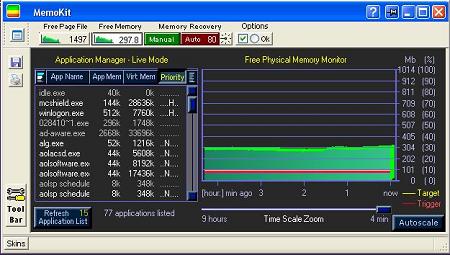
Enter a well-targeted program that does one thing well, MemoKit. I loaded it up and I was sailing again. This program’s basic function is to keep track of memory, give a view into memory leaks, manage them and allow me to it manually at a moment of severe memory shortage. It’s cool too. Just look.

MemoKit Main

What does it do? This from the easy read-me manual that is under that question mark in the nav bar.

Windows Page (Swap) – Basics

A virtual memory Page File (Swap File) is used by Windows whenever it is necessary to move (swap) some of the information from the Physical Memory (RAM) and store it temporarily on the hard disk. When the stored information is necessary, it is transferred back to the RAM again, and other information takes its place in the swap file. There is a permanent information exchange between RAM and swap file, which enables the PC user to work with more programs at a time than it is allowed by RAM only.

MemoKit Main with graphic demo

By moving the red line cursor across the graph to where the memory drops, I can see which applications are sucking resources, close them to see whether Windows lets go, or whether the resources hang in memory. (Programs that don’t release memory require that the machine be rebooted to get that memory back, but the culprits are identified.)

A trav icon keeps track of the resources and their state of us. A calculator can be used as a pullout. Lots of nifty details are fun to delve into.

If you’re having any such issues, get this program. I’ve had it for days and it’s lovely. I delighted with it.

–ME “Liz” Strauss

Related
Sandy’s Great Graphic Find: PictureTrail
Great Find: A Smart Banner to Boost Traffic
Sandy’s Great Graphic Find: IconArt

Filed Under: Successful Blog, Tools Tagged With: bc, Great-Find, MemoKit

Tabblo

May 6, 2007 by Liz

Create Books, Posters, Albums

Great Find: Tabblo

Permalink: http://www.tabblo.com/studio/

Target Audience: Anyone interested in sharing photos!

Content:

Tabblo logo

This site is another great way to share your photos and add words to make “tabblos” (web pages). There’s also a lively community. Here’s a Tabblo called Creation at its Best! (Click photo to see the page.) It’s easy to upload photos or import them from Flickr and Picasa. Click this screen shot or the next one to check it out.

Creation at its Best Tabblo

I’m not sure what I like better – the original Tabblo or the photo cube. You can select any five photos for your cube. There’s easy-to-follow directions. Then just print it out, make some cuts, and fold it up.

And, they have a printing service, so you can order a copy of your latest creation! Check it out yourself and let me know which is your favorite.

See you next time!

–Sandy, Purple Wren

Related
Sandy’s Great Graphic Find: CoolText
Sandy’s Great Graphic Find: Pixel Ruler
Great Find: PictureTrail

Filed Under: Design, Successful Blog, Tools Tagged With: bc, color-in-motion, Purple-Wren, Sandy-Renshaw, visuals

Imagini

April 29, 2007 by Liz


Pick a Picture, Any Picture

Imagini Notebook

Start with the face wall. Then find out what the visuals you choose say about you? Find our your Vidual DNA. Mine sure seems to have gotten me right down to the letter z.

Great Find: Imagini
Permalink: http://www.imagini.net/
Target Audience: Anyone
Content: From the face wall to your profile to your visual DNA and the notebook that explains this social networking site. The test can be taken without becoming a member. And you can get a widget with your Visual DNA as well. Just click the screen shot below.

Make your own profile

To explore the Social Site, click the shot below.

Imagini Friends

It’s just a little more fun for you.

The notebook is detailed and fun to read.

–ME “Liz” Strauss

Related
https://www.successful-blog.com/1/fun-find-whats-your-personal-dna/
A Silly Left Right Brain Test
The Road: A Simple 4-Part Psychological Survey of Attitudes

Filed Under: Successful Blog, Tools Tagged With: bc, Imagini, imagini-friends, Visual-DNA

  • « Previous Page
  • 1
  • …
  • 16
  • 17
  • 18
  • 19
  • 20
  • …
  • 30
  • Next Page »

Recently Updated Posts

Is Your Brand Fan Friendly?

How to Improve Your Freelancing Productivity

How to Leverage Live Streaming for Content Marketing

10 Key Customer Experience Design Factors to Consider

How to Use a Lead Generation Item on Facebook

How to Become a Better Storyteller


From Liz Strauss & GeniusShared Press

  • What IS an SOB?!
  • SOB A-Z Directory
  • Letting Liz Be

© 2025 ME Strauss & GeniusShared