Successful Blog

  • Home
  • Community
  • About
  • Author Guidelines
  • Liz’s Book
  • Stay Tuned

30 Twitter Apps We Actually Use and 140 After That

November 19, 2008 by Liz

At Open Comments this week, we talked about the Twitter Apps we find most useful and most fun to use. If you are a Twitter maven, you’ll see immediately that this is not a comprehensive list, but as a maven, you’d also know that many apps do the same things. At the end of the list I’ve included a reference to a longer list for you.

    Twitter

  • Twitter — the original web-based microblogging platform
  • TwitterSearch — find a tweet, a topic, or a person
  • Keeping Posted

  • TweetDeck — breaks down an abundance of twitter feeds into more manageable pieces.
  • Twhirl — a social software desktop client for Twitter delivery, based on the Adobe AIR platform.
  • Digsby — IMs, Email, and Social Networking in one
  • Twitterific — clean and simple twitter interface
  • iTweet another clean, simple Twitter interface
  • SocialToo — organizes Twitter, identi.ca and Facebook
  • Twitterfon — Simple, fast Twitter client for the iPhone and iPod Touch
  • Twitter Feed — get your blog (or any other RSS or Atom feed) twittering
  • Keeping Alert to Trends

  • TweetBeep Keep track of conversations that mention you, your products, your company, through email alerts
  • TweetScan Search what people are saying
  • TwitScoop — real-time tag cloud of Twitter topic trends
  • Monitter real-time search of mulitple keywords
  • Keeping Up

  • 12seconds.TV — just as its name implies and in Twitter-sized pieces Review
  • blippr — discuss, discover, and organize media
  • Crowd Status — visual interface to follow a group in real time
  • Dial2Do — phone it in

  • My Tweeple — see your followers in a new way
  • Qwitter — get an email when someone stops following you
  • Twellow — Twitter Yellow Pages – Good way to find people based on location or business/interest category.
  • Twinfluence — rates reach, velocity, centrality, and social capital
  • Twistori — tracking Twitter emotions, inspired by wefeelfine
  • Twitpic — for sharing photos Review
  • Twitter100 — track 100 followers in real-time
  • Twitter Grader — find out how your stats add up
  • TwitterLocal — find Twitters in your geographic area
  • TwitterSpy — see the location of every tweet on the public timeline
  • Twitt(url)y — see which urls are popular
  • Twubble recommends more people to follow
  • Three Articles Worth a Twit

  • Twitter FAQ for Newbies
  • Autoresponders: Good Marketing or Missing the Point?
  • Twittermania: 140+ More Twitter Tools! More tools than anyone needs — but fun to have.
  • UPDATE Matthew Ray also suggested this resource: TwitterWiki Go crazy with Twitter tools

It was a fast conversation that brought together the best Twitter Tools of the group. Hope they help you tweet in style.

Are your personal favorites on the list? Feel free to add the best in the comments if they’re not here.

–ME “Liz” Strauss
Work with Liz!!
Image: ADOdesign

Like the Blog? Buy my eBook!

Filed Under: Successful Blog, Tools Tagged With: bc, social media tools, Twitter apps

Who Cast a Spell on My Name?

September 26, 2008 by Liz

Check this out . . . it’s fun!

Click the title

WordCast 28: Liez Stross?

–ME “Liz” Strauss
Work with Liz!!

Get your best voice in the conversation. Buy my eBook.

Filed Under: Successful Blog, Tools Tagged With: bc, WordCast

Now YUDU It! to Win a YUDU PLUS Account or maybe a MacBook Air!

September 14, 2008 by Liz

ARE YOU READY TO KICK IT UP A NOTCH?

The slideshow of the Brand New Blog Feeling went up earlier this afternoon. It was a thrill making it, because as I worked with captions and photos it seemed as if I got know the people who sent them in.

What was also a thrill was explaining to the folks I work with at YUDU Digital Publishing how they might be a collaborative active part of what we’re doing on our blogs. They “get” it. That’s very cool.

And as a result, today I’m announcing how the contest that just ended has spurred another one.

YUDU It! to Win a YUDU PLUS ProAccount or a MacBook Air!

If you join in an make a simple slide show of 5-10 slides, your show will be judged by a team from YUDU.com and the top entry will receive a YUDU PLUS account. That’s a big deal, believe me. A YUDU Plus Account unlocks some even cooler features, that are coming to market just this week. YUDU PLUS includes these treats and more. You can

  • Do ecommerce. Put your documents, music and special photos up for Sale and name your Price.
  • Have automatic document protection that helps Prevent Copying and sharing with people who haven’t paid.
  • Make professional documents with mutlimedia embeds using YUDU Plus editing suite. Upload a New Cover; rearrange, Add or Delete pages, select different Language toolbars, change Backgrounds, add Page Links and link Photos and text to external websites.
  • Embed your library in your Website or blog, and when get collect 10% of the signup fee.

The YUDU contest for the MacBook Air requires signing up friends. BUT as part of this YUDU It! contest if you tag your entry Blogger 908, you’ll be automatically entered to for a chance to win without having to pull out that address book.

Here’s what you need to know . . .

Yudu Nav bar

I did it. I made two slideshows just this week. It’s your turn — will YUDU it now for a chance at:
YUDU PLUS account valued at US$180
and
A MacBook Air? Or maybe just to see how well you do with YUDU.

You know what I mean.

BTW, YUDU is looking for beta testers for this new launch. If you’re interested, please email me.

–ME “Liz” Strauss
See the Work with Liz!! for how to start some business rolling for yourself.

Filed Under: Tools Tagged With: bc, YUDU IT! Challenge

Web 2.0 Social Tools Starter List

September 10, 2008 by Liz

Web 2.0 Tools

The Living Web

This is a short list of Social Media tools organized by their most compelling feature.
It’s not meant to be comprehensive, but instead a starter set. If you’re looking for something more extensive, I suggest Top 100 Social Media Tools by Steve Dale online.

Great examples of online social media tools often used (and referred to in conversations) include these.

I’ve left room to add in more. Feel free to suggest links for each category. If you think it’s useful, I’ll compile them into a pdf when I return from BlogWorld Expo.

Monitoring and Listening

Search: Google and other search traditional engines, Google Blog Search, Technorati, and others . . .


Alerts: Google Alerts, Twitter Search, and others . . .


Online Presence

Online Professional Networks: LinkedIn, Xing, and others . . .

Social Networks: Facebook, MySpace, Ning, CollectiveX, and others . . .

Microblogging and Conversation:
Twitter, Pownce, Plurk, Identi.ca, and others . . .


Media Sharing Communities

Digital Publishing and SlideShows
SlideShare, YUDU, PictureTrail, Slideoo, Slide.com and others . . .

Video Sharing: YouTube, BlogTV, Vimeo, Viddler and others . . .

Photo Sharing: Flickr, Picasa, Photobucket, PlaceandTime, and others . . .

Content Sharing

Blogging Platforms
WordPress, Typepad, Blogspot, tumblr,and others . . .

Blog communities: MyBlogLog, FuelMyBlog, BlogCatalog and others . . .

Social Bookmarking
Digg, Delicious, StumbleUpon Sphinn, and others . . .

RSS and Email Syndication tools: Feedburner, Feedblitz, Zookoda, others . . .

Aggregation tools: Friendfeed, Second Brain, and others . . .

Blog readers: Google Reader, Bloglines, NetVibes and others . . .

As I said, it’s a starter list with plenty of room to edit and add your own. The more everyone contributes the more useful it will be for all of us.

–ME “Liz” Strauss
Work with Liz!!

Get your best voice in the conversation. Buy my eBook.

Filed Under: Successful Blog, Tools Tagged With: bc, social media tools starter set

From PlanetOZH — A Comment Counter Named LIZ!!!

August 25, 2008 by Liz

The WordPress Liz Comment Counter Plugin

If you haven’t heard about it . . . a very nice man by the name of Ozh did something even nicer — he made a plugin named after me. How beautiful is that?!! As Ozh says

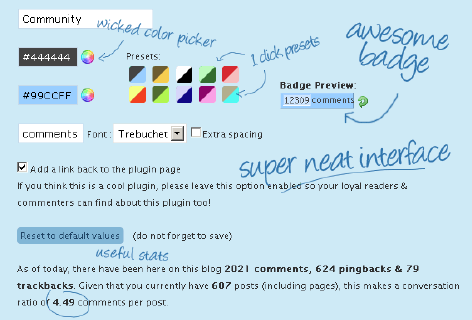
Liz Strauss Comment Counter is a highly configurable “internet badge” that shows the number of comments your WordPress blog has. Use it either to show off how social your blog is, as an incentive for commenters to be part of it, or just because it’s fun 🙂

See for yourself!!

The dashboard is cool.

Liz Comment Counter Preview

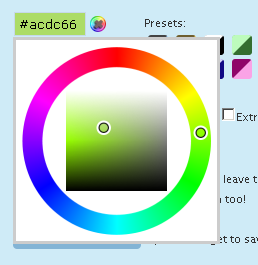
The colorwheel is fun!

color wheel

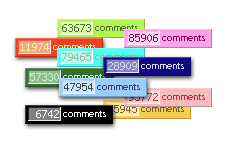
Of course, presets come with.

presets

I’ve got to get me one!

Find out all you need to know from Ozh!! Go check it out and do tell Ozh hello from me!

Thank you, Ozh! It’s almost too cool for comment!

–ME “Liz” Strauss

Filed Under: Blog Comments, Successful Blog, Tools Tagged With: bc, Liz Comment Counter Plugin, Liz-Strauss, Ozh, Successful-Blog

Great Find: Stargazer

August 24, 2008 by Liz

Back to School with Stargazer

All across the United States kids are going back to school. This year, thousands of kids will be a little safer, parents will have a little more information, and educators will be able to do a little more. . . . Their schools are becoming Stargazer Schools

Great Find: Stargazer

Permalink: http://www.stargazer.org/

Target Audience: Anyone who wants to use technology for social good

Content:
Stargazer is a new kind of public/private partnership to:
Get Organized Stay In Touch Be Informed Take Control

Possibly the most compelling Stargazer service is SAFETYLINK (80911)
SAFETYLINK (80911) was started in response to disasters such as 9/11.

Be Informed – Send a free public text message to 80911 to let people know you’re safe in an emergency. Then, anyone can go to Stargazer SafetyLink and enter your mobile phone number to read your message. Teach your children, and plan ahead with your friends and colleagues.

Check out Stargazer with your kids.

–ME “Liz” Strauss
Work with Liz!!

Buy the ebook and get your best voice in the conversation.

Related
Great Graphic Find: Wordle
Great Find: PictureTrail
Sandy’s Great Graphic Find: CoolText
Sandy’s Great Graphic Find: Pixel Ruler

Filed Under: Successful Blog, Tools Tagged With: bc, Great-Find, Stargazer

  • « Previous Page
  • 1
  • …
  • 12
  • 13
  • 14
  • 15
  • 16
  • …
  • 30
  • Next Page »

Recently Updated Posts

Is Your Brand Fan Friendly?

How to Improve Your Freelancing Productivity

How to Leverage Live Streaming for Content Marketing

10 Key Customer Experience Design Factors to Consider

How to Use a Lead Generation Item on Facebook

How to Become a Better Storyteller


From Liz Strauss & GeniusShared Press

  • What IS an SOB?!
  • SOB A-Z Directory
  • Letting Liz Be

© 2025 ME Strauss & GeniusShared