Successful Blog

  • Home
  • Community
  • About
  • Author Guidelines
  • Liz’s Book
  • Stay Tuned

How to Enhance the Usability of Your E-Commerce Site

July 2, 2013 by Guest Author

By Charles Mburugu

Usability is a very important factor for the success of any website. When designing your ecommerce site, your aim should not just be to have an online store which looks good on the eye. Instead, work at building a site that makes it easy for customers to find information and complete the checkout process. If visitors have a hard time finding what they are looking for, they will simply leave and go elsewhere.

Here are some tips that will help you make your ecommerce site more user-friendly.

1. Offer contact information

Besides enhancing sales, an ecommerce site can be a very powerful tool for attracting new leads and building new bonds with customers. It is therefore very important to have a dedicated page in your site that contains your contact information. In addition, these details should appear clearly on all your site’s pages. Besides the usual email address, include links to your social media profiles. This will enable visitors to reach you through the medium that suits them best. If possible, you could also offer telephone contacts.

2. Make your navigation clear

Most ecommerce sites have many pages with lots of information about a wide range of products. As a result, visitors are likely to lose their way. This is why a good navigation system is absolutely essential. At any one time, visitors should know exactly where they are, where they have come from and where they can go. A breadcrumb navigation system is very helpful. In addition, make sure your pages have clear headings and subheadings which show the subject of the page.

3. Add a search feature

A native search feature makes it possible for visitors to find what they are looking for without having to go through numerous pages. Make sure the search bar appears prominently on your pages in a place where visitors can easily find it. You could place it on the top of the page or on the right sidebar. Whatever the case, make sure it is ‘above the fold’ (can be viewed without scrolling). To make the search function more effective, you could break it down into filters such as color, size, price, availability and type. This search filter will offer your visitors a more pleasant user experience.

4. Show related products

When designing your product pages, place related products in a common group. When a customer purchases a particular product, you could suggest a different product in the same group. This enhances the likelihood of the customer buying another product, even if they had not planned to.

5. Add a Frequently Asked Questions (FAQ) section

When visitors land on your pages and read the content, they might still be left with a wide range of questions. It is therefore vital to have a dedicated FAQ page on your site which seeks to answer some of the concerns customers are likely to raise. However, allow your customers to contact you in case they need further clarification on anything.

6. Make registration optional

If you require visitors to sign up before accessing your site, they are likely to get put off and simply go away. Therefore, I recommend that you make registration optional. Allow customers to shop even if they are not registered. This will attract more people to your ecommerce site and ultimately enhance customer loyalty.

Author’s Bio: Charles Mburugu is a HubSpot-certified content writer/marketer for B2B, B2C and SaaS companies. He has worked with brands such as GetResponse, Neil Patel, Shopify, 99 Designs, Oberlo, Salesforce and Condor. Check out his portfolio and connect on LinkedIn.

Filed Under: Web Design Tagged With: bc, Design, e-commerce, usability, user experience

After Your Blog is Hacked: To-Do List

June 11, 2013 by Rosemary

By Ann Smarty

From the time my blog became a regular part of my life and started to gain popularity, I have had a reoccurring nightmare. One of the regular contributors to the site calls me in the middle of the night, waking me up.

They are noticeably upset as they tell me that the blog has been hacked, and the posts have disappeared. In their place is a very not-safe-for-work animation that is causing all my readers to flood my Facebook and Twitter profiles in shock and anger.
what to do after your blog is hacked
I usually wake up in a cold sweat and can’t get back to sleep until I have fired up the laptop and checked that everything is alright. Can you blame me for my fear? After all, this isn’t some random paranoia. Hacks happen all the time, and some are much worse than others. While I could take a DDoS attack in stride, having my blog actually taken over is terrifying enough to make me jittery just thinking about it.

The sad truth is that we will all have to deal with a hack of some description (or at least an attempt) at some point. When you become a more popular site your chances increase significantly. Prevention is good, but it isn’t enough. Here is a checklist of what to do when you have been hacked.

Before the Hack

First, make sure your hosting is secure. WP Beginner has an awesome resource of best WordPress hosting services. There’s also a good guide into choosing secure web hosting. Also, avoid free hosting unless you are using for personal branding.

Then, you should from this moment on make sure you are backing up your posts, files and data. Each platform will have its own way of doing this, so just check with the FAQ’s to find out how to do a proper backup.

You should also do regular system checks on your desktop. Viruses and malware can be introduced through your local files, then accidentally uploaded through things like photos onto your blog. Just run regular scans using your chosen protective software. I use a combinations of Microsoft Security Essentials and AVG.

Of course, there’s much more to talk about pro-active tactics for WordPress Security but if you landed here to find the answer to the main question (which is in the topic), the hack may have happened already, so let’s quickly list what to do.

After The Hack

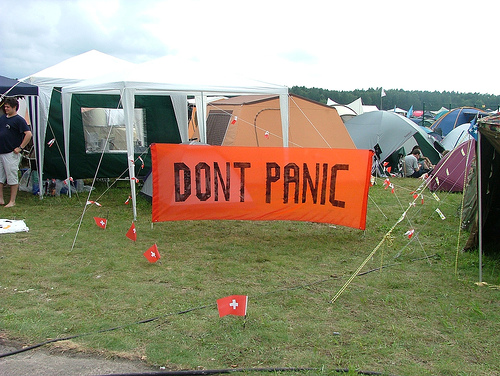
Don’t Panic

The first thing you should do is change your password. That way you know that there won’t be anyone working against your fix while you take care of the problems on the blog. Be sure it is a strong password that has nothing in common with the last one you were using (Tool: strong password generator).
dont panic if your wordpress site is hacked
If you are using WordPress, you also have to change your secret keys so they cannot remain logged into the account. Once you have all that done, log out, clear cache and cookies and log back in.

Next, put the site in maintenance mode. That way you won’t have visitors facing the problems you have encountered while you fix them. This is especially important if you are experiencing a redirect that takes readers to a third party site. Or if you have ads showing up that contain malware and users might accidentally click on.

Identify the backdoor. Backdoor is a method of bypassing normal WordPress authentication. Here’s an awesome guide on fixing a backdoor in a hacked WordPress site, again, courtesy of WP Beginner.

Finally, it is time to take care of the blog itself. Your best bet is to delete everything. Including the core files if you are using WordPress. Yes, this is a major hassle. But it is the only way to be absolutely certain that you get every bit of malicious code. Just going through all files manually will probably not take care of the problem. You may miss a bit of coding, fail to see a file that has been compromised, or a backdoor could still exist to allow the hacker (or hacking software) to slip back in.

If you don’t have a backup of your site, you are facing a dilemma. You could try to save as much as possible before deleting, but this could still run the risk of reinfection by malicious coding, or even infect your desktop. Not to mention the risk that exists to your readers if something goes wrong. I would recommend copy/pasting as many posts as you can into .doc files, then deleting everything on the actual blog and reposting the text fresh. Of course, you will have no choice but to find or reupload all photos.

Conclusion

Yes, this is all a huge hassle. But if you want to keep your site running, and it has experienced a hack, you have no choice. That is why it is so important to backup all files regularly, at the very least once a week. If you update often, then several times a week. This will allow you some peace of mind, as you know that you will only have to delete and then reinstate the data if a problem occurs.

Have you ever had a blog hack? Tell us about it in the comments.

Author’s Bio: Ann Smarty is the (guest) blogger who founded My Blog Guest, the free guest blogging and content sharing platform.

Image Credits: 1, 2.

Filed Under: Web Design Tagged With: bc, hacked, hosting, restore, WordPress

WordPress Plug-Ins to Make Your Website More User Friendly

March 6, 2013 by Rosemary

By Danny DeMichele

If you have built your website on WordPress you are lucky. There are so many plugins available to make your website more productive and fun for the users you are attracting. What’s more is these plugins change the way you can interact with your customer base in a way that grows loyalty. You will quickly find that certain plugins will draw people back as well as attract new users.

Here are some plug-in ideas for you to sample:

Slider Revolution

This WordPress plugin helps bring your website to life. You are no longer stuck with the same intro sliders that everyone else has. Instead you can build a slider that makes sense for presenting your content. It is also easy to change so you can make your website new and dynamic daily.

Breadcrumbs

You want to use SEO and drive traffic to your site. Often the search engine then takes the user to the exact page showing no relationship to your home page or anything else you have to offer. Breadcrumbs helps the visitor navigate your page and clearly shows the relationship.

Subscribe to Comments

When users surf the web, they might leave behind a comment, but depending on their involvement may never return to the discussion. Subscribe to comments allows the person to know when the discussion continues and gets them more involved with your page. It also encourages them to leave comments because they can easily follow up.

WP Super Cache

No one comes to pages that take forever to load. While they might be patient the first time, it is frustrating when someone returns and it takes a long time again. Super Cache allows for lightning fast loading for your returning users and improves your return numbers.

CloudFlare

Everyone hates comment spam. CloudFlare allows you to see exact IP addresses of comments and you can then block the user at the source. No more tricking the system; instead you have ultimate control over your WordPress site.

Akismet

Another spam filter, this one does not require you do anything. It filters all sorts of spam on an autopilot mode 24 hours a day. You can go through the items that have been filtered if you like. It is not quite as good at shutting down things at the IP level, but it can get spam removed more quickly.

Facebook Comments for WordPress

The world is username- and password-inundated and most people don’t have the patience to create new logins. This plugin allows them to use their Facebook account to leave comments. It gives them a way to follow through and it helps you navigate back to the person.

ShareThis

Using 50 different social networking sites, people can share your page via their preferred outlet. This helps you make the forum more open for all users and keeps you from having to run a million plugins. This is probably the most universal of all the ways to share content.

AJAX Contact Forms

The right contact form can help you build the best mailing list. People want a form that is easy to use and AJAX has provided just that. You can choose what data is required and it will utilize the auto-fill-in options for people who have saved their data. This saves them time and makes it more likely they will fill out your form. You can even use the direct Twitter messaging system to instantly confirm their note, making you timely, helping to stick in the user’s memory.

Whatever plugins you put on your WordPress page, you will want to follow how they affect traffic. A great analytics app will not only help you do this, but help you decide which plugins are the very best for your website. It is all about being flexible and WordPress plugins can help you make the right impression.

Author’s Bio: Danny DeMichele has been building and managing online businesses for the past 14 years. He recently sold his search engine marketing agency, eVisibility.com, to LSF Network, Inc., a top 20 private digital agency in the U.S. Danny is currently the CEO of Incubate.com, a digital marketing agency specializing in all things web.

Filed Under: Web Design Tagged With: bc, blog comments, plug-ins, tools, WordPress

Building An Anti-Fragile Website

December 26, 2012 by Guest Author

by James Ellis

What’s the opposite of fragile? Robust? Strong? Wrong. Those words imply the ability to survive change. Fragile means the inability to survive change, so the opposite would be something that actually gets better with change. It’s not robust, it’s antifragile.

Bend, Don’t Break

Based on an argument by Nassim Nicholas Taleb in his new book Antifragile, we should be looking for things, processes and ideas that are antifragile, things that actually get better the more you beat up on them. They learn to bend instead of break, and actually become stronger at the bend.

This twistedly simple idea sounds impossible. How can we build web sites and tools that actually get better the more they fail?

It seems impossible. The code structure that controls all of our web creations is very fragile, as anyone who forgot to include that trailing slash in a div tag can tell you. A single missed keystroke can be the difference between slick and useful and a mound of bit-based junk.

Create Antifragile Systems

So how do we build antifragile web sites? I propose that it’s not the sites that need to be antifragile, but the systems we place around them that we should focus on.

Here’s an example. You build a web site. Do you have some completed procedures to test your code before you launch? Is there a committee that looks at every word and every image and analyzes each page? These are processes that work to make sure that the site doesn’t break on launch. These processes are necessary, but they drag out the launch process, sometimes doubling or even tripling development times. And because of these processes, you and your business feel confident that anything you launch is pretty much bulletproof.

Until something changes. A new browser, new audience, new business requirements, unforeseen product launches, new digital channels, whatever it is, change is coming. You built a site designed to withstand 2012 pressures, but 2013 is right around the corner.

So instead of building a perfect site for the now, you build a great site for now, but you build a process that learns from the failures that always follow? Spend less of your resources on quality assurance, and more on post-launch testing and learning. Because you are anticipating and looking for failures, you will be the first to spot new trends and ideas. Because you are learning how to fix these new failures, you are becoming a smarter development house. Because you are not pretending that the future isn’t coming, you will be the first to succeed within it.

Your website is inherently fragile. It will break. No amount of thought, time, brains or energy can keep you from building a future-proof site. Can’t. Be. Done. Changing your process from 100% proactive-focused into something that can react to inevitable changes better completely revolutionizes your web development strategy and makes you better long term.

Because what have you made antifragile? Your entire web development business. The more failures you see, the faster you can address them and the better you become. You will get better the more you fail. And since failure is inevitable, this means you will inevitably become better at web development.

Author’s Bio: James Ellis is a digital strategist, mad scientist, lover, fighter, drummer and blogger living in Chicago. You can reach out to him or just argue with his premise at saltlab.com.

Filed Under: Successful Blog, Web Design Tagged With: bc, optimized website, small business

Top Rated Content Management Systems to Run Your Site

October 12, 2012 by Guest Author

by
Franklyn Stephen

cooltext443809602_strategy

Whether you’re planning to build a corporate website, a creative blog or just want to make your presence on the web, hand-coding HTML pages and CSS are becoming obsolete. Nowadays all it takes is to buy a hosting and install a content management system (CMS), add a theme and within minutes you can have a website that looks extremely stylish and displaying the very content that you like to share with the world.

Of course, there are lots of ways in which you may use your website, from displaying a gallery of images to advertising your business, running a technical support page or even an online magazine website. This is why; there are many content management systems available, each with their own strength.

The following are the Top 5 Content Management Systems that are rated by downloads and user experience.

WordPress

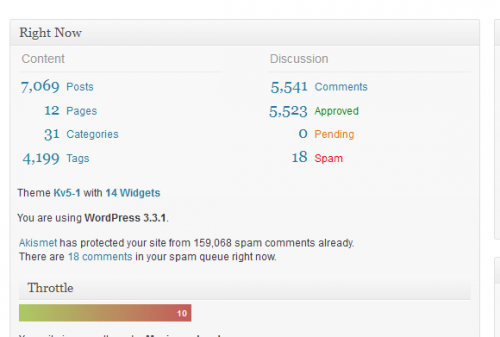
Without doubt the most accessible and commonly used is WordPress. The power of WordPress is in its fast installation, huge user, vast array of plugins and enhancement for the platform.

Throw in the extra bonus of a vast template library and easy to edit PHP and CSS file from admin screen, it becomes clear that why WordPress is used for the whole thing from personal blogs to business websites.

For setting up or customize your WordPress blog or Website, check out WordPress Customization service providers.

Joomla

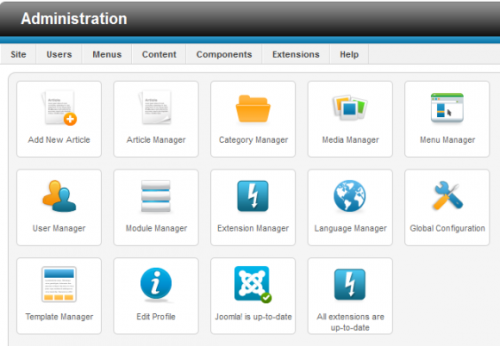
A quick view on Joomla website will make sure that plenty of websites are running on the software and the reason behind is easy to use, customizable and appropriate for pretty much any use.

This is why Joomla is frequently used by SME’s, big organizations, non-profits and individual organization. Joomla’s admin section is user friendly and with the vast collection of features from templates to adding pages and menus; at last you will come to know why Joomla is an accurate choice.

You can download latest version of Joomla and try it now it’s free.

Drupal

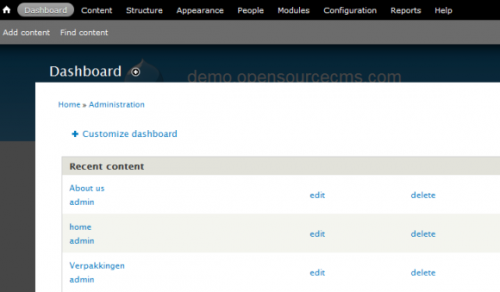
A famous free open source content management system is Drupal, It is one of the best choices while developing a new website. Like various tools listed here, Drupal can be used for personal blogs or huge websites and like WordPress there are millions of modules that can be added to enlarge functionality.

By Clicking on the image, it will redirect you to the home page where you will be able to take a look at the showcase of websites made with Drupal. It is significance noting that questions from the user group of people about apparent failings in latest versions are yet to be entirely addressed by developers; but Drupal remains as well-liked solution.

Concrete5

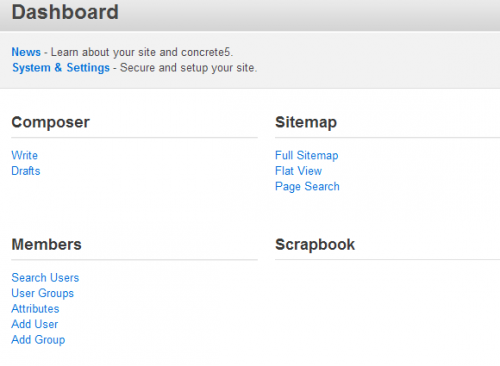
Plan to make it feasible for anybody to build and manage a website without investing a lot of time and cost then you need to go with Concrete5.It has been appears to be doing excellent job.

This content management system is eventual time saving solution to designers, developers and website owners alike, which almost certainly accounts for its reputation. User-friendly, with a well-built focus on the end user, web designer and developer, Finally Concrete5 is definitely worth a look.

You can find more details by visiting Concrete5 website. Check with experts to customize your Concrete5.

CMS Made Simple

CMS Made Simple has an attractive smart name. Its initials are represents CMS, which makes it recursive. CMS Made Simple was launched in 2009. Though, it is already downloaded by millions of people and become popular for many reasons.

CMS Made Simple aims to offer its users to easy to develop and customize a website without any technical knowledge. If you don’t be set to hack around with the essential code that powers your website, CMS Made Simple is best solution for you.

Conclusion

If you’re wondering to choose best CMS platform for your website or blog, then your best bet is to hit each of the links above and download the software and install it. There are different things you should consider while choosing a CMS and these are all knowledgeable only through your own potential, your objective and the purpose of the website or a blog. Just choosing one among them and using it without being aware of that particular CMS how you will use it, these things makes waste a lot of time for us. Be sure while choosing your best fit content management system. If you’re still wondering about the exact solution for your website always check with CMS customization experts.

Author’s Bio:
Franklyn Stephen Issac.J is a webmaster having substantial four years of experience in analytics, Search engine optimization, social media marketing, SEM and PPC. His company Actmedia.net customizes Content Management Systems and shares his great passion for analytics and ecommerce solutions. More than 50 keywords ranked prove his strong insight knowledge on keyword research and analysis.

Buy the Insider’s Guide to Online Conversation.

Filed Under: Web Design Tagged With: bc, CMS, Concrete5, Content Management Systems, ContentMadeSimple, Drupal, Joomla, LinkedIn, small business, WordPress

Five Ways Web Designers Can Help in Internet Marketing

September 20, 2012 by R. Mfar

Being a web designer, your responsibility doesn’t start and end with spectacular graphics and eye-catching designs. A web designer must take into account a lot more factors, other than the aesthetics. For example, you must contemplate the requisites like navigation, easy viewing, w3 standards, and the likes. More importantly, you need to keep the marketing and sales factors in mind, thanks to the recent flurry of Google updates and the fast changing trends in cyber world.

Keeping all these things in mind while designing a web page is what sets an ordinary web designer apart from a highly sought-after professional who gets away with the best available jobs.

Following are some important areas that you need to chew over as a web designer, a website with all these points taken care of will be of great help in terms of sales and marketing.

Bounce Rate:

Having a bounce rate on the higher side was never considered a good thing, but its significance has increased manifold after the Google Panda update. A website that doesn’t manage to hold its visitors for sufficient time is bound to slip down the ranks after some time. When it comes to retaining the visitors, it’s true that the content will play the most important role, but the first thing a visitor notices when he/she lands at a website is not the quality of the content, but the design and the overall look.

Even the most meaningful content will lose its worth when it is featured in the middle of unnecessary clutter. A good web designer should be able to come up with a design that gives the center stage to the main content and provides easy-viewing experience for the visitors, so that they will spend some time on the website.

Credibility:

Having a clean and professionally designed website will add to the trust and credibility, which is a big plus for businesses looking to sell online. This is why it is so important to have a highly responsive website, a website that doesn’t fell apart on different browsers (e.g. Firefox, IE, Chrome) or platforms (computers, smart phones, tablets, etc). Doesn’t matter how good is a design, but if it’s taking ages in loading, showing errors, or doesn’t respond in the desired way will fail to make an impression on the visitors.

Branding:

When you are designing website for a brand, you need to keep the brand in mind while choosing everything from colors to typography. Brand building requires a certain consistency in everything, including the logo, header, menu bar, headings, footer, social profiles, and the likes. Remember that brand is a lot more than just a logo and certain colors, every brand has its own character, a certain identity, and your web design should depict that character.

Social Media Integration:

There’s a lot to gain from having a good following at social networks for online businesses, and a web designer must keep the social factor in mind while designing website. Not only they should design customized Facebook or Twitter pages for businesses, but they should integrate social media buttons and icons in a way that will lure the users to click or have a look, instead of just fitting in a plug in with dozens of buttons that hardly get clicked.

Conversion:

For all kinds of websites, conversion is what really matters. And again, web designers can play an important role by designing the landing pages, or sales pages in a way that highlights the strong points of a website. The worst case is when a customer arrives with an intention to make a purchase, but gets irritated by poor navigation or any kind of clutter and leave. Being a web designer, you need to minimize the distractions and highlight the “call to action” in a way that entices customers instead of turning them off.

__

Rahil writes for treehouse, where you will find lots and lots of helpful material to learn web design or web development.

Filed Under: Web Design Tagged With: bc

  • « Previous Page
  • 1
  • 2
  • 3
  • 4

Recently Updated Posts

Is Your Brand Fan Friendly?

How to Improve Your Freelancing Productivity

How to Leverage Live Streaming for Content Marketing

10 Key Customer Experience Design Factors to Consider

How to Use a Lead Generation Item on Facebook

How to Become a Better Storyteller


From Liz Strauss & GeniusShared Press

  • What IS an SOB?!
  • SOB A-Z Directory
  • Letting Liz Be

© 2025 ME Strauss & GeniusShared