Successful Blog

  • Home
  • Community
  • About
  • Author Guidelines
  • Liz’s Book
  • Stay Tuned

How to Handle Recent LinkedIn Company Page Changes

April 17, 2014 by Rosemary

On April 14, 2014, LinkedIn removed the separate Products & Services page associated with all Company Pages.

zen garden

If you had been trying to build a credible presence on LinkedIn, this change may have removed some valuable information from your Company Page. You’ll need to remain calm, and take some action in order to rebuild your corporate profile.

According to HubSpot, LinkedIn is the best social network for lead generation, so you should definitely have an active Company Page.

Recover Your Product Recommendations

This LinkedIn update had the effect of “disappearing” all accumulated product and service recommendations across the board. But don’t freak out yet. Until May 30, 2014, you can still request the contents of any recommendations that were on the site as of March 4, 2014.

If you plan to repurpose any of those old recommendations (in other web pages or in print), be sure to get permission from the person who wrote it.

Rebuild Your Product Information

The good news is that LinkedIn now has Showcase pages, where you can highlight individual products or services within your company page.

To add a Showcase page:

  • Go to your company page and click the down arrow next to the blue Edit button.
  • Select Create a Showcase Page.
  • Enter a page name and assign administrators for the Showcase Page.
  • Click Create.

Showcase pages contain a single large image across the top, and can include specific status update content. LinkedIn users can follow Showcase pages specifically, if they choose. LinkedIn also provides separate analytics data for Showcase pages, which makes it easier for you to find out which campaigns or products are stirring up interest.

What to Do Now

Now that the LinkedIn Company Page is more tightly focused, all of the attention is on status updates. Make sure that your LinkedIn company updates include a variety of content, including text and links to a website, image, SlideShare presentation, or YouTube/Vimeo video. Make sure your content is valuable to your existing customers and prospects.

Consider sharing or commenting on your customers’ status updates as your Company Page. Remember to reciprocate when they follow your page as well.

It’s also a good idea to commit to a routine of updates, so that your company shows up in the news feed on a regular basis.

The upshot is that you can no longer get away with a “set it and forget it” mentality on LinkedIn (or any other social network). You need to maintain and update your corporate profiles, and stay on top of platform changes.

Have you responded to the LinkedIn changes already? Have you done anything creative with your Company Page on LinkedIn?

Author’s Bio: Rosemary O’Neill is an insightful spirit who works for social strata — a top ten company to work for on the Internet . Check out the Social Strata blog. You can find Rosemary on Google+ and on Twitter as @rhogroupee

Photo Credit: melolou via Compfight cc

Filed Under: Marketing /Sales / Social Media Tagged With: bc, LinkedIn, social-media

Beware the Social Media Cockroaches

February 20, 2014 by Rosemary

He came to the house every month on Wednesday. Armed with powerful chemicals, he made sure that no “Palmetto bugs” found their way inside. While he made the house safe for scaredy cats like me, we would banter about business.

social media cockroaches

His long-term plan was to go out on his own, and once he found out what I did for a living, he had a million questions.

“I already bought a ready-made website from XYZ hosting company, and I have business cards. How can I use Facebook to get more customers?” (Because when I use the word Internet in any conversation with a civilian, they immediately envision me as a Facebook expert.)

I struggled with my answer, mostly because you can’t answer that question in the 10 minute space of time it takes for pest control to occur in a two story home, but also because there is no easy answer.

Anyone who says, “just go get a Facebook page” is being short-sighted. And anyone who prescribes any “social media” solution without doing a lot of listening first is selling snake oil.

My take was that pest control is a highly referral-based business, and he needed to ensure that a) his customers have an easy way to spread the word to their friends, and b) he shows up when people who live in my local area search online for “pest control.”

Ultimately, my advice was to ignore social media until he defined who his target market was, where they lived, and how they shopped for pest control.

Could he use social media to help his business? Absolutely.

He could start regularly blogging to create a content resource that might move him up in the Google search results. He could make a series of funny Vine videos. He could use Twitter advanced search to find local people Tweeting about bug problems. There are hundreds of avenues he could take. Sure, he could even start a Facebook page.

But good marketing advice isn’t like a “hot stock tip” you overhear in the elevator. There’s no one-size-fits-all.

And if you’re working with someone who offers to “set up a Facebook page” as a first step, before learning your business, don’t walk away. Run.

Author’s Bio: Rosemary O’Neill is an insightful spirit who works for social strata — a top ten company to work for on the Internet . Check out the Social Strata blog. You can find Rosemary on Google+ and on Twitter as @rhogroupee

Photo Credit: James Niland via Compfight cc

Filed Under: Marketing, Marketing /Sales / Social Media Tagged With: bc, marketing, social-media

Pinterest Feature Hot TIp: Promoted Pins

November 1, 2013 by Rosemary

By James White

Pinterest explores the world of monetization with all new promoted pins.

Next time you log into Pinterest, you will notice promoted pins in your pin stream that are identical to those already in your stream. A “promoted pin” notation on the lower portion of the pin is the only differentiation and many people will have missed the small phrase unless they are analyzing the pin thoroughly.

So what is the point?

Promoted Pins will offer a much different dynamic to Pinterest since it will be the first allowed monetization within the company. Since its release, Pinterest never worried about monetizing and only worried about the content. While they are not investing in the monetization of their now-successful company, they do not want it to become so transparent. Instead, they want discretion yet visibility.

Contradicting, isn’t it?

Pinterest is in the beginning stages of their promoted pins, but overall the following can be said about them:

  • Not Flashy. Promoted pins do not offer a flashy or distasteful appeal to them. They are discrete since they blend in with your newsfeed as a regular pin post.
  • Semi-transparent. While it is not flashy, the promoted pins offer some transparency. Pinterest wants their users to know where there pins are coming from and whether or not they were paid or unpaid.
  • Relevant to Current Content. One of the most successful ideas built into the promoted pins feature is relevance it has to the content on your news feed. When streaming, ads will be tailored to fit your specific needs and interests, making it more user-friendly.

All of the above seems to be in the interest of its users.

Pinterest Finally Becoming a Sustainable Business

Promoted Pins seem to be one of many new ideas that Pinterest has in store for its users. Pinterest seems to be developing a solid business model and intends to fully monetize its newfound popularity. Whether or not promoted pins lead to success, its discretion may appeal to potential investors.

Many users on social networks have become adept at ignoring ads unless they directly relate to them. Even so, people are prone to placing “ad blockers” on their computer, which will not hinder Pinterest in the slightest. Since their advertisement is built into their system and not through a third-party app, Pinterest Promoted Pins will continue to stay in line with your newsfeed.

Nondisclosure of Advertisers, but Open to Suggestions

Pinterest prides itself on being a community, so they have shadowed who their current advertisers are for their “promoted pins” ads. Not to mention, only certain community members will have access to the promoted pins ads while others have been closed out. How the selection was made is unknown, but they have used an algorithm to select which users will and will not see promoted pins during its trial period.

However, not all is lost to those who are enduring the “promoted pins” session. Users who see the promoted pins are asked to input their own suggestions on the system and submit ideas for other promotions. While it might seem tedious, it looks as though Pinterest might finally be giving itself a well-needed adjustment to become “one of the big dogs” in social media.

Author’s Bio: James works for Inbound Marketing, Inc. and is the founder of InfoBros. In his free time, he enjoys hiking, cooking, and blogging about health, tech and communication. Connect with him on Twitter at @JGtheSavage.

Filed Under: Marketing /Sales / Social Media Tagged With: bc, images, pinterest, social-media

How to take your Pinterest account to the next level

October 18, 2013 by Rosemary

By Charles Mburugu

Pinterest can be a great option for business owners who would like to promote their products and services. One of the most popular social media networks, it is not just for leisure time anymore.

Pinterest allows users to collect photos and videos and share them with others. These images are pinned on boards, which are categorized according to hobbies, interests and events. Here are some tips that will help you take your pinning to the next level.

1. Include hashtags, @reply and keywords

Pinterest users can use hashtags and keywords to look for specific items. In addition, they are informed whenever anyone replies to a pin. Therefore, make sure your pin descriptions have the relevant hashtags as well as keywords. This will increase the chances of your pin appearing in related searches. However, avoid having excess hashtags in your description since this could make it difficult to read. Replies enable your visitors to share their thoughts in the comments section of the pin.

2. Add a ‘Pin it’ bookmark to your browser

If you don’t have a ‘pin it’ bookmark, pinning anything from any site can be a long and frustrating process. The good news is that installing this bookmark on your browser is very simple. All you need to do is visit http://about.pinterest.com/goodies/ where you can download the ‘pin it’ button and then install it. Whenever you pin a web page, you will be able to see all the photos on it. You can then select the specific image you want to pin.

3. Be social

The main purpose of social networks is to enable users to share, comment and connect with others. Therefore, when using Pinterest, you need to engage with others by liking, commenting on or repinning what they have posted. By being social and helpful, you will attract the attention of other users and they are likely to return the favor.

4. Request that followers pin photos of themselves with your product

This can be a very effective strategy for connecting with your fans and finding out what they think about your products. Running a contest would be a great way of implementing this strategy. For instance, the person who pins the most creative photo could get a discount on their next purchase. Alternatively, you could choose the winner based on the number of likes or re-pins their photo gets. This will encourage participants to involve their friends in the contest, thus resulting in more exposure for your products. Always be sure to read the Pinterest business guidelines before starting a contest.

5. Pin directly on your blog

If you have a blog, Pinterest allows you to pin photos directly on it. Whenever you find anything interesting, you can add it to one of your future blog posts. Alternatively, you could write a whole blog post based on that photo. Adding photos to blog posts is very easy. All you need to do is click the ‘Embed’ button on the photo and copy the code which appears. You can choose to adjust the size of the photo before pinning it on your blog.

6. Pin videos

Besides photos, Pinterest also allows you to pin your favorite videos. This is a great feature for people who are selling all kinds of products. You can pin ‘How to’ lessons and ‘DIY’ tutorials that show how the product actually works. Ask some of your fans to pin videos of themselves using your product and taking about its benefits. You could also choose to pin videos which show how the product is actually created. Funny videos of all kinds can also be very effective in capturing the attention of your audience.

7. Test various captions

One of the best things about Pinterest is the captions feature. You can use this feature to add hashtags as well as keywords. As you use these captions, it will be important to monitor them on a regular basis. Find out which captions attract the highest number of likes, repins and comments. This will give you an idea of what kind of captions to use for your future pins.

8. Include a dollar sign for products

If you’re pinning an image of something you have for sale online, you can include the dollar sign in the description, and Pinterest will automatically put a price ribbon across the corner, and index your pin as an item for sale.

Author’s Bio: Charles Mburugu is a HubSpot-certified content writer/marketer for B2B, B2C and SaaS companies. He has worked with brands such as GetResponse, Neil Patel, Shopify, 99 Designs, Oberlo, Salesforce and Condor. Check out his portfolio and connect on LinkedIn.

Filed Under: Marketing /Sales / Social Media Tagged With: bc, images, pinterest, social-media

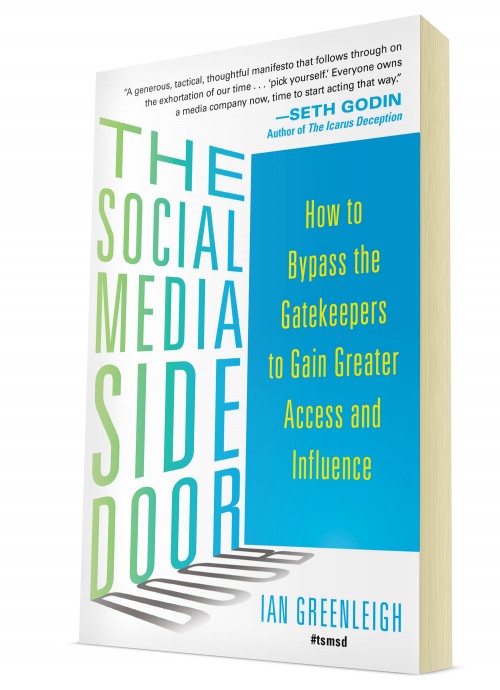
Q&A with Ian Greenleigh, author of The Social Media Side Door

October 17, 2013 by Rosemary

As a small business owner, I’m always hustling to make the most of limited resources. The techniques presented in Ian Greenleigh’s new book, The Social Media Side Door (McGraw Hill, October 2013), are designed to help us take advantage of the seismic shifts that have happened in recent years regarding access and influence.

Ian Greenleigh: The Social Media Side Door

Enjoy this Q&A with Ian, as he offers some great insights from the book.

1. What is the social media side door?

We’re living through an extraordinary time. Social media is decimating the human and technological gatekeepers that have historically prevented non-elites from accessing and influencing powerful people and institutions. The barriers are crumbling all around us, and so many people haven’t even noticed, or they’re simply not yet equipped to take advantage of these massive opportunities, what I call “social media side doors.”

2. How did you discover it?

I really struggled to get a decent job during the recession. I had just graduated with a degree in political science, even though it was a field I didn’t want to pursue. I was in sales, and I wasn’t very good at it. It was pretty bleak. None of the things our society teaches about getting great jobs were working. I thought I was bright, hardworking and creative, but I couldn’t find a way to convey that to the professional gatekeepers in recruiting.

I needed to try something radically different, so I scraped the bottom of my dwindling savings account to attempt something I had seen on a blog. I took out a Facebook ad, pointed it at a special “hire me” page on my blog, pointed the ad at decision-makers at the top companies in Austin, and saw the clicks roll in. Within a few weeks, I had a nice array of options for my next career step.

It wasn’t an anomaly. Once I started looking for them, I realized that social media side doors existed almost everywhere barriers seem to exist. I also realized that no one had written a guidebook to help people spot and take advantage of these new opportunities, so I decided to write it myself.

3. How can people find and open their own side doors in social media?

Realize that side doors often open gradually. For example, every time you leave a comment on a CEO’s blog, or tweet a piece of intelligent feedback to an influencer, you’re opening that side door up an inch or two more.

Think about the goals of the person whom you’re trying to reach, and reflect on how you can help them get there faster. You can do things like introduce them to other influential people via Twitter, interview them on your blog about a project they’re promoting, or help them find information they’re after.

Relationships are still the basis for almost all of the value created in social media. Social media makes it really easy to answer the question, “what has this person done for me lately?” As such, you’ll hear “yes” far more often when you’ve provided value before an ask, or in conjunction with it.

4. Why should we try to open these side doors sooner rather than later?

Imagine it’s the dawn of the 20th century, and you’re a salesperson, marketer or jobseeker. Telephones are expensive and rare, but somehow you’ve acquired one for free. There are no gatekeepers to screen the calls of the rich and powerful, and you can reach any of these fellow telephone owners simply by asking a switchboard operator to put you in touch. If you wait too long to take advantage of this situation, your competition will beat you to the punch, your approach will no longer be unique, and access now seems like more of a liability than an opportunity to those being accessed.

We’re not quite there yet with social media. We see rising adoption among powerful people, but the human and technological gatekeepers haven’t caught up yet. And innovation happens so rapidly, that the arrival of each new social network brings with it a new set of access and influence opportunities.

Author’s Bio: Ian Greenleigh is a social media and content strategist, and author of The Social Media Side Door: How to Bypass the Gatekeepers to Gain Greater Access and Influence. He helps companies turn data, ideas, and relationships into true thought leadership. His words and ideas have been featured in Harvard Business Review, Ad Age, Adweek, Digiday, Ragan, Seth Godin’s The Domino Project, and elsewhere. He writes and speaks on a wide range of topics, including changing consumer-brand relationships, the convergence of personal identities, and the radically shifting landscapes of access and influence. You can connect with Ian on Twitter: @be3d

Filed Under: Marketing /Sales / Social Media, Outside the Box, Successful Blog Tagged With: access, bc, influence, social-media

How to Use Instagram to Promote Your Business

September 19, 2013 by Rosemary

By Brittany Thorley

They say a picture is worth a thousand words, but can the latest social media phenomenon used by a host of celebrities, budding photographers and snap happy users alike be the key to driving traffic to your website?

The social media sphere has become awash with image-based websites like Pinterest, whilst other social favourites like Facebook and Twitter are making it easier to upload and share your favourite snaps. While 54% of major brands use Instagram for promotional reasons, many growing businesses don’t consider using Instagram to market their products or services.

Using Instagram for business

Getting Started with Instagram

Setting up an Instagram business account and incorporating this social favourite into your social media marketing strategy couldn’t be easier and its features ensure you can get and stay connected with existing and potential customers and clients in a fun and frivolous way that still has your business ethics at its heart.

Instagram takes you through the setting up of your profile step-by-step, covering everything from choosing an account name and filling out your bio to adding other social networks and getting started with their photo editor and sharing features. When deciding on your Instagram account name, we recommend using a name similar or exactly the same as your Twitter handle to make it easier for fans and potential customers to find and follow you on multiple platforms. We would also advise downloading the app to make maintaining and updating your Instagram account less of a chore and more spur of the moment!

Instagram also hosts its own ‘Instagram for Business’ blog, which is regularly updated with tips, news and examples of how other businesses, both big and small, use Instagram to drive traffic and subsequently boost sales.

Striking the Right Balance between Fun and Business

A successful Instagram business profile has a mixture of fun images and business-focused additions; we would advise telling the story behind your brand to make it an engaging and fun journey for your customers that still essentially means business. Use the stories of your workforce to add a personal approach. Instagram has a number of helpful options for tracking engagement and the success of individual images, so test the water in the first few months and see what your audience likes best.

More than Images

In addition to uploading and sharing images, you can also use videos to market your business identity and values. These videos can be embedded into your on-site blog and shared via your other social media platforms to create engaging content, cultivate a following and extend your reach.

Be a Trend Follower and a Trendsetter

Instagram uses the same system as Twitter and uses hashtags (#) so that users can follow trends and be a part of the wider community. Keep an eye on what’s trending and use this to influence what you post, and tell your own story with your own hashtags. Use Instagram’s like and comment features to connect on a more personal level with new followers, ‘like’ other users’ images and engage with them with genuine comments.

How Often Do I Post to Instagram?

Like Pinterest, you don’t have to post on Instagram on a daily basis. In fact too much posting can actually do more harm than good and will over-occupy the news feeds of your followers and lead to quite a few ‘no follows’. Instead use your profile to post whenever you feel that the content is a valuable addition and aim to inspire potential customers and clients with your updates – remember with Instagram and any social media marketing strategy, the focus should be on quality, not quantity.

How are you using Instagram for your business? Post your account handle here, if you’d like to share.

Author’s Bio: Brittany Thorley is a social media marketing expert at Think Big Comms, a PR agency with a difference that specialises in ethnic marketing strategies.

Filed Under: Marketing /Sales / Social Media Tagged With: bc, Instagram, photography, social-media

  • « Previous Page
  • 1
  • 2
  • 3
  • 4
  • 5
  • 6
  • …
  • 38
  • Next Page »

Recently Updated Posts

Is Your Brand Fan Friendly?

How to Improve Your Freelancing Productivity

How to Leverage Live Streaming for Content Marketing

10 Key Customer Experience Design Factors to Consider

How to Use a Lead Generation Item on Facebook

How to Become a Better Storyteller


From Liz Strauss & GeniusShared Press

  • What IS an SOB?!
  • SOB A-Z Directory
  • Letting Liz Be

© 2025 ME Strauss & GeniusShared