by Guest Writers Suzie Cheel and Des Walsh

Limbering up. Surfer doing his stretches before hitting the waves.
How will you stretch yourself today?
Limbering up. Surfer doing his stretches before hitting the waves.
How will you stretch yourself today?

While writing this headline, I was a bit worried. Getting things âdoneâ on Twitter can easily be misunderstood. After all Twitter is a place to build connections and meet with great new people. Optimizing things on Twitter has to be done with particular care I think.
Let me therefore introduce you to Buffer – a new Twitter App I have been using a lot recently which does two very important things for me:
The core functionality of Buffer (http://bufferapp.com) is super simple. All you do is you throw a few tweets in your Buffer and the App then schedules these Tweets for you throughout the day. Thatâs it.
The great thing about Buffer is that you can add lots of tweets in at one point without fiddling with individual scheduling. Also you wonât ever overwhelm your followers with too many tweets in a row.
The way I use it is like this. As Buffer comes with a browser extension (Chrome, Safari, Firefox), you can add tweets to your Buffer from any page you are on.
On top of this you can even add tweets from inside Google Reader, which is a big winner for me. Whenever I like an article I hit the Buffer icon and add it to my Buffer. Here is how this looks with one of Lizâs posts:

Add tweets from anywhere on the web.
Now, there is even one more functionality I want to mention here, which allows you to make your tweets really stand out from the rest.
Whenever you read an article and find a good line, just highlight the text and then hit the Buffer icon, here is what happens:

By default Buffer will send out your tweets well spaced out over the day, so you will never have too many tweets sent in a row, flooding your followers with tweets.
Of course you can always go back to your home account, click âsettingsâ and adjust the timing to your needs. You can add more daily tweeting time slots or decrease them. Oh and as of recently there is also a âTweet Nowâ function.
What also comes in very handy is the option to add Tweets to your Buffer from your mobile. Whilst browsing an article you can simply hit the âmail link to pageâ or similar button.
Then you add in add@to.bufferapp.com and voila you have one more tweet scheduled where the link is automatically shortened and the title is in the page:

Caption: Add to Buffer from your Mobile
Even though Buffer is such a simple tool, it helps me a great deal to stay on top of Twitter. I can add tweets from anywhere with just one click and will make sure to add all the great articles I am coming across each and every day.
I have also started to use the mobile function whilst waiting in a queue or whilst sitting on the Bus and it is a great time filler, which actually gives me some results
.
I hope you give Buffer a go. Would love to hear your views about it below.
Leo Widrich writes Tips for Twitter on his blog. You can visit his website, Bufferapp, or find him on Twitter as @leowid.
_________
Thanks, Leo, for checking out bufferapp.com for us!
–ME “Liz” Strauss
Work with Liz on your business!!

By Jael Strong
When I was growing up, it was a family tradition to gather around the television set on Tuesday nights to watch Matlock. We’re suckers for a good who-done-it, but we’re also suckers for a quirky character. And there were certain things about Matlock that were certainly a bit odd. Today’s subject: Matlock’s suits, a quirky element to the brilliance that is Matlock.
If anyone out there is a Matlock fan (and I know that planet is crawling with us!), you know what I am referring. Matlock had plenty of suits, a rather large closet full if I remember correctly. But here is the clincher: They were all identical. This light grey suit, unremarkable in so many ways, was a hallmark of the show. When I think Matlock, I think “grey suit.”
Most of us do not wear the same clothing every day. We have varying outfits and styles. On the other hand, though we may not stray too far from the mainstream, we do tend to take on a style that is uniquely our own. People are able to say, “Sue would love that dress” or “Steve would never wear that tie.” The fact that people are able to say these things means that we have, even unintentionally, projected a style.
The same is true when it comes to our blogs. We may be known as a straight shooter. We could have the reputation of striking up controversy. We may be flamboyant, creative, or humorous. These are generalities that become more fine-tuned as we add certain lingo to our blogs, images, and concepts. Over time, our blog develops a style that is readily recognizable as our own.
Is this a good thing? Absolutely. Developing a style that is uniquely your own as a writer is a must. There are dangers of course. For example, not everyone can pull off the proverbial grey suit. If your style never varies, this could go one of two ways. One, people get tired of seeing that grey suit and eventually they tune you out. Two, they only want to see you in that grey suit; they love the way you wear it. If you insist on keeping your style narrow (à la “the grey suit”), your preference would be for the second option.
Stretching your style is a great idea. Matlock did occasionally don a plaid shirt when he sat on the front stoop and serenaded us with his guitar. There is a lesson here for us (yes, we can learn so much from this show). Don’t avoid other styles of writing. In fact, make it an exercise to include variations to your style in your blog. Add humor. Don’t shy away from controversy all together. Be straight forward, but don’t fear complex topics. Identify your style, then grab it at both ends and stretch.
As you dabble in varying styles, you may discover that your style needed a change. You may find that you like some styles of writing better than others and that people seem to be responding more to your varied approaches. Or you may discover that the grey suit is perfect for you, just don’t be afraid to toss in some sequins from time to time!
—-
Jael Strong writes for TheWriteBloggers, a professional blogging service which builds clients’ authority status and net visibility. She has written both fiction and non-fiction pieces for print and online publications. She regularly blogs at Freelance Writing Mamas.
Thanks, Jael
–ME “Liz” Strauss
Work with Liz on your business!!

Child thinking like a property developer? Why have only one castle when you can have five?
By Terez Howard
Do you ever find yourself furiously typing at your computer, scripting blog posts, guest blog posts, website pages and the like, and you haven’t been attuned to what’s going on in the world? When I say that, I don’t mean to say that you don’t keep tabs on major current events. Instead, you find yourself so immersed in your work that you haven’t taken the time (or had the time, for that matter) to stay abreast on the trends in your niche.
That’s how I feel right now.
That’s what I said. I don’t mind being under a rock. It’s quiet. I get a whole lot accomplished. I don’t have to really deal with anyone because I’m working on my own personal projects. It’s really not that bad.
Here are some of the things I have noticed about life under a rock, engrossed in my work:
In a way, I prefer life under a rock.
I do enjoy people. I’m no introvert. But there’s something to be said when all you have to contend with is writer’s block, research options and sentence structure. No bad attitudes. No annoying behaviors. Nothing to deal with that I cannot control.
That said, I feel like an outsider to the blogging world.
Even though life under a rock can be a productive experience, it can leave you missing some things. For instance, I haven’t been able to regularly keep up with any other bloggers. Sure, I catch a post here and there. But I miss reading their regular work. I haven’t even gotten to stay up-to-date with my favorite bloggers, the people whose information I admire and treasure.
Also, and most shocking to me, I have had to turn down work. (This statement is shocking to me because not so long ago, I didn’t imagine I would be one of those freelancers that had a booked schedule).
I only have so many hours that I have allotted to my writing work, and I will not exceed my limit. I Don’t Want to Be Rich. I want to do what I love, but I want to have time for the people I love. I have chosen to trade time with my family for time that I could have used to make money.
I want to reasonably spend most of my work time under my rock with my personal writing projects and at least some time out of the rock, connecting with the bloggers and other professionals Iâve met. I suppose the best solution is a schedule. I’ve used my schedule to plan out my time under the rock. Now, I need to schedule time out of the rock.
It can be an overwhelming task — reading blogs, commenting, tweeting, etc. It all takes time. How do you allot time to stay out of life under a rock?
—-
Terez Howard operates TheWriteBloggers, a professional blogging service which builds clients’ authority status and net visibility. She has written informative pieces for newspapers, online magazines and blogs, both big and small. She regularly blogs at Freelance Writing Mamas. You’ll find her on Twitter @thewriteblogger.
Thanks, Terez!
–ME “Liz” Strauss
Work with Liz on your business!!
Last Sunday was my first time to participate in #blogchat a weekly held Twitterchat and boy was it an amazing experience conversing with @lizstrauss and @mackcollier. It boasts great personalities each week helping you to answer any Social Media and blogging related questions.
For long I was quite reluctant to join in Twitterchats as I felt I would overwhelm my followers for the time the chat was going on with my tweets.
Fortunately I finally found a solution I can offer, since staying away from this massive amount of great insights at #blogchat is definitely not an option.
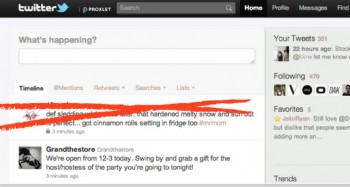
It is a nifty Twitter App called Proxlet.
Facebook has a very useful âHide this postâ option integrated. Proxlet gives you this exact same thing, only for Twitter.
Using proxlet, you can temporarily hide certain things on Twitter which clutter your timeline or arenât currently the core thing of your interest.
Proxlet fortunately takes the âhide thisâ feature a step further and allows you to explain in a very detailed manner which area of tweets you want to block.
The best part of proxlet is that it works not only at twitter.com, but can also be used for your favourite Twitter clients such as Twitter for Iphone, Tweetdeck and others.
Someone approached me that he couldnât take the load of my #blogchat tweets and Proxlet turned out to be a superb solution for both of us. He could continue following me, yet was freed of those unwanted tweets in a short space of time.
What are your thoughts on Proxlet (http://proxlet.com) ? Have you had a similar problem yourself before too? Please let me know below.
Leo Widrich writes Tips for Twitter on his blog. You can visit his website, Bufferapp, or find him on Twitter as @leowid.
_________
Thanks, Leo, for checking out proxlet for us!
–ME “Liz” Strauss
Work with Liz on your business!!