Successful Blog

  • Home
  • Community
  • About
  • Author Guidelines
  • Liz’s Book
  • Stay Tuned

How To Hack Knowledge Through Online Resources

June 14, 2011 by Guest Author

A Guest Post by Lior Levin

The aim of going to college is to learn new things to further your education. Whichever class you take, it is supposed to help you to get further towards the career that you choose. Unfortunately there are some instances where the tutor isn’t as great at explaining things as they should be. If you end up stuck in a class that doesn’t seem to be teaching you anything then there are some options available to you. Maybe you are learning things but you would like to increase your knowledge even more quickly? If so then you should consider using online resources.

What Are Online Resources?

With the Internet you need to be careful which information you study. There is a lot of conflicting information online. Not all sources are credible. This means that you will need to really search the Internet until you find reliable sources.

Online resources basically comprise of websites, blogs and forums. There are several blogs for example, which are run by students just like you and by university professors. Some are even run by scientists. These types of online resources can be extremely useful and you could learn some really fascinating things.

The Benefits of Online Resources

There are numerous benefits of online resources. The main one is that you get to learn things at your own pace. Perhaps you struggle to ask questions about your course in the seminar? Maybe you find your lecturer too hard to understand? If so then online resources can help you to learn everything that you need to know, but in an easier to understand way. Many of these sites also have a community section where you can meet new college students.
The Best Online Resources

If you are struggling to find decent resources then a good site to try out would be Ted.com. There you are able to view talks on various subjects. If you are studying science then you could listen to Paul Root Wolpe talking about why it’s time to question bio-engineering. Or you could view demos about human exoskeletons. There are so many interesting and educational talks on the site. From science to technology and entertainment to business – no matter what you are studying you should find this resource really useful.

If you have any science related query then a good online resource to visit is Refdesk.com. It provides a large number of links to websites that will give you the answer to practically every science related question that you could have.

Another great online resource that you should check out is the Khan Academy site. It provides information on maths, chemistry, economics and history. The site is designed to try to change education. You will find more than 100 different self paced exercises that you can complete. From algebra to biology and brain teasers to currency – there is so much to learn in the form of videos and blogs on this site.

BetterGrads is helping current students connect with older ones to expand their knowledge base. You could take part in eMentoring and there are great college question and answer resources. It is actually a program that you join, and it is run by a non-profit organization.

Overall the above are just a few of the online resources that can help you with your education. Don’t forget to double check the credibility of each resource that you use. There is a lot of misguided information out there. If you do find a resource that you aren’t sure about then you can always ask your lecturer after class.

—–
This was a post by Lior Levin who works for a psd to css company that does psd conversions. Lior also advises to the MA in security program at the Tel Aviv university. You can find Lior on Twitter as Liors

Thank you, Lior. I love the way you approach ideas!

–ME “Liz” Strauss
Work with Liz on your business!!

Buy the Insider’s Guide to Online Conversation.

Filed Under: Business Life, Successful Blog, Tools Tagged With: bc, business, LinkedIn, Resources

Cool Tool Review: Buffer – Get More Done on Twitter with 1 Simple App

April 22, 2011 by Guest Author

A Guest Post by Leo Widrich

cooltext451585442_tools

While writing this headline, I was a bit worried. Getting things “done” on Twitter can easily be misunderstood. After all Twitter is a place to build connections and meet with great new people. Optimizing things on Twitter has to be done with particular care I think.

Let me therefore introduce you to Buffer – a new Twitter App I have been using a lot recently which does two very important things for me:

  • It integrates seamlessly with my work flow and lets me share on Twitter in a consistent and time saving manner.
  • It doesn’t turn me into an “auto-bot” throwing tweets around without any connection to my followers.

How does Buffer work?

The core functionality of Buffer (http://bufferapp.com) is super simple. All you do is you throw a few tweets in your Buffer and the App then schedules these Tweets for you throughout the day. That’s it.

How will I get more done?

The great thing about Buffer is that you can add lots of tweets in at one point without fiddling with individual scheduling. Also you won’t ever overwhelm your followers with too many tweets in a row.

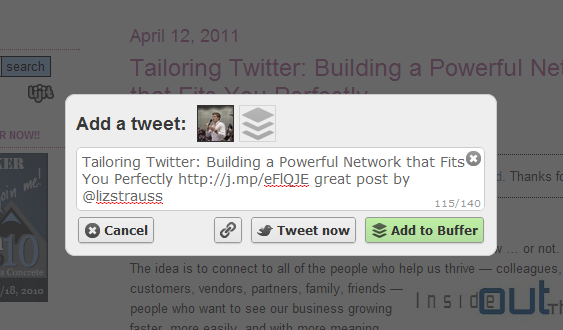
The way I use it is like this. As Buffer comes with a browser extension (Chrome, Safari, Firefox), you can add tweets to your Buffer from any page you are on.

On top of this you can even add tweets from inside Google Reader, which is a big winner for me. Whenever I like an article I hit the Buffer icon and add it to my Buffer. Here is how this looks with one of Liz’s posts:

pic-1


Add tweets from anywhere on the web.

Make your Tweets truly unique

Now, there is even one more functionality I want to mention here, which allows you to make your tweets really stand out from the rest.

Whenever you read an article and find a good line, just highlight the text and then hit the Buffer icon, here is what happens:

pic-2

Make your tweets unique

Timing of your Tweets

By default Buffer will send out your tweets well spaced out over the day, so you will never have too many tweets sent in a row, flooding your followers with tweets.

Of course you can always go back to your home account, click “settings” and adjust the timing to your needs. You can add more daily tweeting time slots or decrease them. Oh and as of recently there is also a “Tweet Now” function.

Add tweets to your Buffer from your mobile

What also comes in very handy is the option to add Tweets to your Buffer from your mobile. Whilst browsing an article you can simply hit the “mail link to page” or similar button.

Then you add in add@to.bufferapp.com and voila you have one more tweet scheduled where the link is automatically shortened and the title is in the page:

pic-3

Caption: Add to Buffer from your Mobile

Wrap Up

Even though Buffer is such a simple tool, it helps me a great deal to stay on top of Twitter. I can add tweets from anywhere with just one click and will make sure to add all the great articles I am coming across each and every day.

I have also started to use the mobile function whilst waiting in a queue or whilst sitting on the Bus and it is a great time filler, which actually gives me some results

.

I hope you give Buffer a go. Would love to hear your views about it below.

Leo Widrich writes Tips for Twitter on his blog. You can visit his website, Bufferapp, or find him on Twitter as @leowid.

_________

Thanks, Leo, for checking out bufferapp.com for us!

–ME “Liz” Strauss
Work with Liz on your business!!
Buy the Insider’s Guide to Online Conversation.

Filed Under: Successful Blog, Tools Tagged With: bc, buffer app, Cool Tools, LinnkedIn

Cool Tool Review: Proxlet – Your Rescue for Twitterchats

April 8, 2011 by Guest Author

A Guest Post by Leo Widrich

cooltext451585442_tools

Last Sunday was my first time to participate in #blogchat a weekly held Twitterchat and boy was it an amazing experience conversing with @lizstrauss and @mackcollier. It boasts great personalities each week helping you to answer any Social Media and blogging related questions.

For long I was quite reluctant to join in Twitterchats as I felt I would overwhelm my followers for the time the chat was going on with my tweets.

Fortunately I finally found a solution I can offer, since staying away from this massive amount of great insights at #blogchat is definitely not an option.

It is a nifty Twitter App called Proxlet.

proxlet

What does Proxlet do?

Facebook has a very useful “Hide this post” option integrated. Proxlet gives you this exact same thing, only for Twitter.

Using proxlet, you can temporarily hide certain things on Twitter which clutter your timeline or aren’t currently the core thing of your interest.

How to best use it?

Proxlet fortunately takes the “hide this” feature a step further and allows you to explain in a very detailed manner which area of tweets you want to block.

  • You can block Apps you don’t want to show up in your Timeline. For example am using it for both foursquare and paper.li since I feel they don’t add enough value.
  • You can also stop certain individual users temporarily, for example because they are at a conference and you are not really interested in their tweets at that point.
  • Another way to make use of Proxlet is to block certain hashtags from showing up in your timeline.

What is the best part of Proxlet?

The best part of proxlet is that it works not only at twitter.com, but can also be used for your favourite Twitter clients such as Twitter for Iphone, Tweetdeck and others.

Someone approached me that he couldn’t take the load of my #blogchat tweets and Proxlet turned out to be a superb solution for both of us. He could continue following me, yet was freed of those unwanted tweets in a short space of time.

What are your thoughts on Proxlet (http://proxlet.com) ? Have you had a similar problem yourself before too? Please let me know below.

Leo Widrich writes Tips for Twitter on his blog. You can visit his website, Bufferapp, or find him on Twitter as @leowid.

_________

Thanks, Leo, for checking out proxlet for us!

–ME “Liz” Strauss
Work with Liz on your business!!

Buy the Insider’s Guide to Online Conversation.

Filed Under: Business Life, Content, Successful Blog, Tools, Trends Tagged With: bc, Leo Widrich, LinkedIn, tools, Twitter

Powerful Blogging: Can Twitter and Email Replace Comments?

March 18, 2011 by Guest Author

A Tools Review by
David Berti

cooltext451585442_tools

Can You Sleek Down YOUR Life This way?

Whether you’re a blogger or an entrepreneur, you’re probably using the net to get in touch with lots of people out there. You also know what to do, how to do that. But you feel there is always something missing to get to that so called “next step” everyone of us is longing for.

As bloggers, we can absolutely tell that wonderful feeling… that feeling of having our digital life going great, that side of our digital existence handled for good; I will be serious about that. The best advice I have been able to find on the net goes like this:

“write the greatest, deepest content you can produce and let the machines do the rest, without worrying about visitors, comments and similar stuff”.

That is to say: all the effort you really have to make is about content. Creating, is the only thing we, as bloggers, editors and writers, are allowed to worry about.

What is not so clear for the vast majority of bloggers is that the interface between the user and the internet can become a great obstacle because of the vast choice of applications, addons, plugins and widgets that are available for us to use on our pages. These features are totally irrelevant on the quality of the material we can find on a blog page.

By simplifying the blog interface, I guess I have made one of the most important and wise decisions ever in my (digital) life. What did I do, exactly to simplify my blog interface?
1. I removed the comments section under every post
2. I removed plugins and reduced my blog interface to the essential

No need for comments and features that bloat my page. I need content that is valuable for what it is. Looks doesn’t really matter to me, and all I want to look at is the content I am interested in. That is why I also removed comments.

The Results:

I uniquely use 2 communication channels that are completely free: my email account and my Twitter. This way, I don’t create clutter in my life and all I do in the virtual world remains there.

Plus, my blog remains clean and usable; no visual clutter is present on my screen and whenever I feel like I can read what I write with no need to close and click ads, useless windows and pop-up stuff.

Moreover, in absence of plugins and different elements I can have a blog which is usable and viewable by almost every kind of device out there, and doesn’t make the user wait for the content to appear and load.

No time to waste, no clutter. Just you and the deep content you’re going to enrich your existence with.

What might you gain or lose by sleeing doen your down your (digital life) to these two communication channels?

David Berti is the creator of the Ubuntulook project. His webisite is(unbuntulook You’ll find him on twitter as @ubuntulook

_______

Thanks, David! Always love a distinctively new point of view!

–ME “Liz” Strauss
Work with Liz on your business!!

Buy the Insider’s Guide to Online Conversation.

Successful-Blog is a proud affiliate of

third-tribe-marketing

Filed Under: Successful Blog, Tools Tagged With: bc, blogging, comments off, LinkedIn, tools

Top 5 Free Video Tools for Producing Internet Marketing Videos

March 4, 2011 by Guest Author

A Tools Review by
Rahil Muzafar

cooltext451585442_tools

Who Says Your Marketing Video Can’t Be Cool?

Whether you’re making

  • a video commercial
  • something funny for YouTube and hoping that it will go viral
  • a video tutorial
  • or a video for any other purpose

And the video requires some sort of editing, you don’t need to pay for editing anymore. The advancement in the technology and a number of user friendly video editing software means that it is quite doable at home even if you have no understanding of how video editing works. Anybody with a little bit of creativity can produce compelling, share worthy, and interesting videos by using these intelligible tools and step by step guides which are freely available on Internet.

Multiple options are available for mixing up still pictures to create a meaningful video, joining different video clips into one, adding music, audio, or jingles to your recordings, and of course, adding titles, text overlays, and credits to describe your company or products. Sounds pretty convincing? Keep on reading to find a list of 5 freely available tools that you can use for making a video and make the most of this cost-effective marketing medium.

1. Windows Movie Maker:

This, as you already know, comes with the Microsoft Windows, without any kind of additional charges. It is a very basic, easy to use, and a beginner’s level software that can be used by just about anybody for producing some impressive projects and editing home made videos. The best thing about Windows Movie Maker is that it has a very familiar interface that syncs well with the overall user experience of Microsoft Windows, which means you will be able to get on with this tool in next to no time. A simple, yet powerful tool to create and edit videos, add audio, and many different effects, Windows Movie Maker is the perfect starting point for your video marketing campaign.

Wax:

Slightly more complicated than the Movie Maker, but still pretty easy to understand, Wax provides a great platform for creating professional looking videos with flexibility and special effects. The special effects include 2D and 3D, and it has a multitude of options for both professionals and home users.

Zwei-Stein and ZS4

This tool is one step ahead of the basic ones (even though it doesn’t appear to be when you first look at it) but once you get going, you will find that it’s an incredible video compositing and editing tool, offering some very unique options as compared to the features provided by other free tools. In fact the features are exploitable by both an average user and the pro. Zwei-Stein lets you edit a large number of videos, putting forward a staggering number of special effects. Both Zwei Stein and ZS4 are free for personal use and available for download on their websites.

Blender:

Blender is not really a video editor, but it totally deserves to be in this list. This one is actually meant for 3D content production and even though 3D animation may take more time, but it’s a great way to stand apart from the crowd. The interface will take some time before you can get used to it, but once you get a handle on the hotkeys, you will find that your effort were totally worth it. Blender lets you create unparalleled animations, and has a plethora of features that seem to offer more and more every time you get a little creative. There are a number of tutorials and lots of websites dedicated to the tips and tricks for 3d enthusiasts. Blender offers a number of tools that will make your task easier and there’s no limit to what you can do with this software.

Jaycut

This is a web based editor, which means you don’t need to download or install anything on your computer, Jaycut gives you the freedom of editing anywhere on the internet with some handy options available for web based software. It provides the functionality similar to the Movie Maker, and includes features like recording audio or video straight from the application. You can publish your videos direct to YouTube or save on your disk; in fact you can save the video on their servers to access it from any computer with Internet access.

So, what are you waiting for? With so many free tools and a platform like YouTube at your disposal, you have got no reasons but to utilize video marketing and publicize your products, create buzz, engage customers, and much, much more.

,

Rahil Muzafar

—-
This post was contributed by Rahil, and this piece of information is not the only thing he has to offer, you can also benefit from Hostgator coupon code and eleven2 coupon code at his website.

Thanks! Rahil!

–ME “Liz” Strauss
Work with Liz on your business!!

Buy the Insider’s Guide to Online Conversation.

Successful-Blog is a proud affiliate of

third-tribe-marketing

Filed Under: Business Life, Successful Blog, Tools Tagged With: bc, LinkedIn, Rahil Muzafar, video tools

SpyFu: The Secret Weapon of the Savvy Internet Marketer

February 3, 2011 by Guest Author

A Guest Post by Lior Levin

spyfu-logo1

Like most people new to Internet marketing, when I first started out, I made the mistake of believing that the Google keyword tool was the only accurate source of information and whatever Google’s tools said had to be treated as gospel. Boy, was I wrong! Not only are there plenty of other tools out there, they are actually a lot more accurate with their numbers because they are impartial.

Google’s goal is to make money, which they do from advertisers, so they care little about Internet marketers trying to make a living and their tools tend to reflect this bias. However, I’m here to tell you about a secret weapon no Internet marketer worth his salt should be without and that is SpyFu.com.

Competitive Data and Keyword Research

successful-blog-spyfu-screen-shot

SpyFu is a comprehensive, online keyword research tool that also offers SEO and PPC tools to allow you to spy on your competition. This online tool will allow to uncover vast amounts of data on your competition, including their daily PPC budget, their keywords, bid prices, how many clicks they get per day and much more. All you have to do is enter the domain name of the site you want to analyze and you are then presented with a plethora of information.

SpyFu allows you to also view the top organic rankings, the best performing ads and the SEO rankings for any of your competitors. It also features a list of the Top 100 Adsense keywords in terms of CPC.

You can also work backwards, by analyzing a specific keyword. You will be offered such information as the number of advertisers bidding on that particular keyword, the price range being paid per click and even the ads and links to the landing pages of the advertisers in question.

The Good, the Bad and the Ugly

One of the things I like most about SpyFu is that the information they provide is straightforward, with no secret formulas. You can see the complete history of a keyword, from how often a certain domain used a keyword in their campaign, to the highest and lowest CPC. It also allows provides information on when the ad copy was changed, which I find extremely useful. If I’m targeting a similar keyword, then I can always analyze the ad copy to see which approach delivered the best results.

The competitive data SpyFu provides is invaluable and I use it for almost every project I work on. After all, to beat the competition you have to know the competition and you would be surprised how much facts and figures can reveal about a competitors marketing strategy. I also save a lot of time by analyzing my competitor’s landing pages and ad copy. For example, if a certain ad has been in use for a while and hasn’t been changed, you can be sure that it is performing well. You can then use the ad copy in question as inspiration when crafting your own PPC ads.

However, SpyFu does have its limitations and I have found it to be somewhat inaccurate when it comes to the daily PPC budget of a competitor. While this information might not be important to you if you don’t do PPC, it is critical to any PPC-based campaign. After all, the budget you set plays a critical role in the ranking of your ad.

Despite its few limitations, I still find SpyFu to be one of the most effective market research tools available online. It certainly delivers much more realistic figures in terms of CPC, search volume and number of advertisers, offering a more accurate overview of a certain market or niche.

—–
This outstanding review was written by Lior Levin who is a consultant to 123 neon signs, and also works with an online task management startup.
You can find Lior on Twitter as Liors

Thank you, Lior. You’re welcome back here anytime.

–ME “Liz” Strauss
Work with Liz on your business!!

Buy the Insider’s Guide to Online Conversation.

I’m a proud affiliate of

third-tribe-marketing

Filed Under: Marketing /Sales / Social Media, Successful Blog, Tools Tagged With: bc, LinkedIn, Lior Levin, Spyfu

  • « Previous Page
  • 1
  • …
  • 4
  • 5
  • 6
  • 7
  • 8
  • …
  • 30
  • Next Page »

Recently Updated Posts

Is Your Brand Fan Friendly?

How to Improve Your Freelancing Productivity

How to Leverage Live Streaming for Content Marketing

10 Key Customer Experience Design Factors to Consider

How to Use a Lead Generation Item on Facebook

How to Become a Better Storyteller


From Liz Strauss & GeniusShared Press

  • What IS an SOB?!
  • SOB A-Z Directory
  • Letting Liz Be

© 2025 ME Strauss & GeniusShared