Successful Blog

  • Home
  • Community
  • About
  • Author Guidelines
  • Liz’s Book
  • Stay Tuned

Analyze Social with Google Analytics Today

September 26, 2012 by Guest Author

by
Franklyn Stephen

cooltext443809602_strategy

Social media reporting in Google analytics

Google analytics provides a reporting which would make you understand little bit easier that efforts you put in social media marketing are worth the investment. Also it gives you in-depth analysis about which social channel gives value to your business and which plans are most effectual.

Business metrics with Social Media

These new reports are framed in a way to span the gap between business metrics and social media. Using these reports, you can assess the traffic/clicks comes to your site from different social channels and how they leads to conversions, future conversions, and where the users navigate within your website and many social activities that are going on and off the website which enables to do in-depth analysis and take further actions in social media for the growth of your business.

If you are unaware of these updates, check through as you log in next time. Here are few things that you can keep an eye.
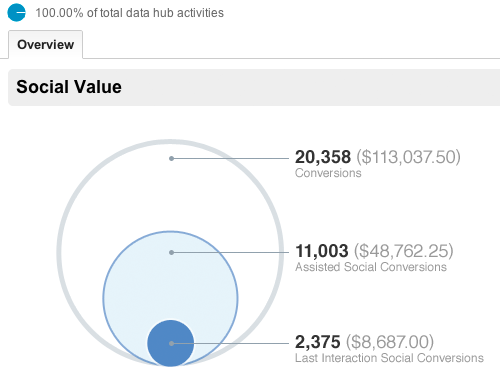
By the above overview report, we can have a quick look at how much conversions has been produced by social channels. Also it gives you comparison between the money invested and profit obtained from all your goal completions obtained through social referrals.

Social Channel Conversions

We can evaluate the conversion rates of each social channel whereby it allows marketers to measure the value of each social network that drives profit and supports your business. This conversion report gives influence of the social content whether it may be from facebook conversion post, or Google plus post or stumble upon post or new video.

Social Plugins Report

Social plugins report gives good insight of how the article pages of website is influenced by the social media through the social buttons (like facebook, Google plus, twitter) being clicked on the article page to share them. By this, clear picture can be availed of which articles are most engaged, interesting among the users and how the users are following socially with your content on and off your site.
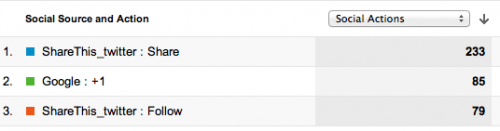
Activity stream: What is going on outside of your website?

All other reports would depict the social content as how it is being engaged inside the website, While this activity stream report will present the activities that are carried out in the social content off the website across the social web.

Social content shared publicly as how it is shared, where it is shared (through facebook, twitter, Google plus, stumble upon etc), what people have commented and URLs of all these sources can be seen. Presently activities are covered for Google+ and the list of social data hub partners is growing which includes Meetup, Badoo, Hatena, Echo, etc…These new reports can be availed through standard reporting tab.

Sources of Social visits

This report gives visits received to the site through different social referrals and how users behave in the site, as shown in the parallel comparative picture . The in-depth details of conversion metrics of each social network and how the content is engaged and interacted among the people is depicted. This report turned out to be handy, because whether visitors are getting the desired outcome in the website can be examined here, which is essentially and really you want to know.

Focus on Content

Recently, Google analytics has brought few updates which enable the users to get adept understanding about their social impact. For the long time this was lagging being unable to find how much the content was socialized. But now Google analytics is able to measure the social reach of content/website/product/services. Notwithstanding the availability of tools on hands, social reach is all about how the content is being used and shared. Keeping all these in track, Google has released few updates designed in its analytics tool. Two significant new updates are centered on assisting the users to get clear understanding on how the content is socializing online and how it’s being viewed across different devices.

Content Experiments

Users can experiment content to test and improvise the website. Site owners can create different versions of a page say A, B, and C experiments to measure how effectively each versions get the visitors to convert. Google analytics already have this facility called website optimizer. It is now called as ‘content experiments’ and incorporated into analytics. Website optimizer isn’t a standalone product any more from August 01_2012. Content experiments assists to hone toward the goals that have already set in the Google analytics which will help to find out which page design and content is most effectual.

To start up with these content experiments, open Standard Reporting of Google analytics, and in the Content section, click Experiments.
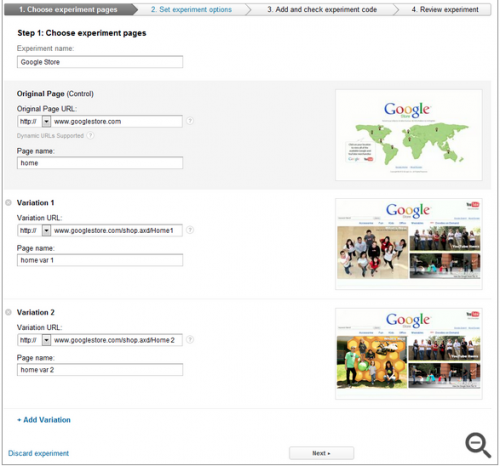
Here you have to go through four steps to complete the set up wizard.

Browser-Size Analysis

The visible portion of a web page is very smaller than the actual screen resolution for the users who are accessing through mobile platforms due to many toolbars and welters. Essential factors for conversion rates are items that are above the fold on a web page. To find the percentage of visitors for whom the page items displays below or above the fold is really baffling. Therefore Google analytics facilitates users by creating a visualization to ascertain which parts of page are viewable to which percent of visitors.

Go to the Content section of Google Analytics, and click In-Page Analytics. Then click on the browser-size to see the shaded portions of the web page that are underneath the fold. Now click in at any place of the screen to find how much percent of visitors can view it or just hold the threshold percentage by using the slider.
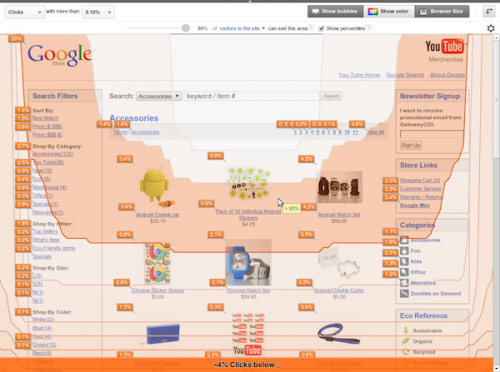
Clicking on show-percentiles will display the summary visualization of several percentiles. This depiction will help to get the clear picture of how the browser sizes are dispersed among different devices. For instance, if you select to compare all the visitors of mobile device traffic, solid difference can be noted.

Concentrating on the good content and where the content flows is so essential to the sound health of any website as well as the experiences it gives to users. Thus far, web analytics focused on page clicks/visits and traffic sources to get the picture of what is working and what not is working in the website. Although it is significant, it is also as important as to perceive how content in the each page of the website impress the user’s/visitors. With this new website optimization tool, more mystification comes into picture!

Conclusion

These new reporting styles will significantly and ultimately help the marketers to generate the desired results who want to produce solid numbers and assist them in furthering their marketing efforts. Nevertheless, it is important for the company to set the fair and sensible goals which would really convert them into indispensable and worthwhile.

Author’s Bio:
Franklyn Stephen Issac.J is a webmaster having substantial four years of experience in analytics, Search engine optimization, social media marketing, SEM and PPC. His achieved results will highlight his profile as one having great passion for analytics and ecommerce solutions. More than 50 keywords ranked prove his strong insight knowledge on keyword research and analysis.


Buy the Insider’s Guide to Online Conversation.

Filed Under: SEO, Successful Blog, Tech/Stats Tagged With: bc, Content Experiements, Google-Analytics, LinkedIn, small business, Social Plugins, Social Visits

10 Reasons Your Blog Could Be Bleeding Readers

September 25, 2012 by Guest Author

how to blog

by
Tara Hornor


BigStock: Eliminate frustrations
to get readership growing again.

Is Your Blog Bleeding Readers?

If you run a blog, then you probably struggle with the age-old issue of bleeding readers. It’s tough to keep folks coming back for more! But there are things you can do to make sure that your readers stay tuned to your blog.

At the end of the day, your blog should be about producing quality content that is relevant to your readers. If you’re giving them what they want, they’ll come back. But sometimes other elements of your blog can be causing frustration as well.

10 Reasons Your Blog Could Be Bleeding Readers

If your content is strong and you are still losing readers, you may want to analyze some of the following aspects of your blog site.

Awkward Layout

Your blog is your virtual home. So, like you would with your real home, make sure that it is warm and presentable for visitors. In other words, your layout should be both aesthetically pleasing and organized. If it looks as though you threw your blog layout together within two minutes (as in, it looks sloppy and haphazard), then your followers won’t want to look at it long.

Do you have too many ads? Are there too many things going on? Is it difficult to find your navigation menus? Consider simplifying your layout so readers focus on the content.

Overkill

While it is important to remain consistent with your blogging, avoid posting more than 5 or 6 times a week. No more than one post on a day, either. Posting more than this can make your followers feel as though you’re blasting them with too much content. Of course, this is very dependent upon the type of blog you’re running. News blogs, of course, will far surpass these limitations. The point here is to remember that too much content can be frustrating. If readers are following your blog and getting updates, you may be flat out annoying them with too many.

Unreadable

Choose fonts that are clear. Don’t make your readers work too hard to read what you’ve written. Additionally, don’t put your font in a color that is difficult to see. Legibility is a key factor in a pleasant reading experience.

Consider balancing white space as well. If your paragraphs are too long, you can cause readers to lose interest. This goes for content that is too wide as well. Therefore, balance your white space (the blank space in between text and graphics) by creating more readable width.

Offensive

If your posts are, on average, overly slanderous and offensive, then you will more than likely see a higher rate of no-returns. It is okay to be opinionated, but there is a way to word your opinions in a respectful manner.

We all like a strong voice that makes us think, smile, laugh, or generally incites an emotional response. But too much negativity just frustrates. So if you have a strong voice and find yourself losing readership, consider toning it down a bit.

Ignorance is Not Bliss

If you are an opinionated writer, make sure you know what you’re writing about. As a silly example, imagine you are ultra-anti-Twilight series. You write all kinds of posts bashing on various aspects of the movies and books. However, if you have not read the books or seen the movies, then you are an uninformed reader and will be viewed as such. While others may agree with your general view, your lack of expertise will eventually result in lost readers.

Length

Keep a balance in the length of your blogs. If they are all over 1,000 words, then you have a problem. You will overwhelm your followers. Occasional long blogs are okay, but make sure to separate them into paragraphs.

Various studies show various results. But generally speaking, posts over 1,000 words will take too long for readers to get through. Look at your metrics and see if you can find a trend in longer vs. shorter posts and adjust accordingly.

No images

People want to read blogs for entertainment, so entertain them. It is not necessary to post an image on every post, but an occasional shot of your post’s subject is appropriate and will add interest to your post. Images also help with search engine optimization, especially if you title your images with the main keyword of your article title.

Grammarly Misuse

See what I did there? Raise your hand if you cringed a little bit. So will your readers. If you are a person who struggles with grammar and spelling, then write your blog drafts in Microsoft Word or other word processing systems that will check grammar and spelling for you. Sites with poor writing and grammar are likely to be unfollowed.

Too touchy feely

We do not need to hear the nitty-gritty details of your life. A blog is not your diary, and it should not be treated as such. Of course, there are exceptions, but balance personal drama with valuable content. A good story requires some personal backstory so we can all relate to it. But keep the personal stuff focused on the point you’re trying to drive home.

Unemotional

Yes, this feels antithetical to the previous reason, but it is not. There should be a balance between personalizing your posts and gushing your deep, dark secrets. If readers wanted to read straight-up dry information, they would read the newspaper. So don’t write like a robot; give your blog a flavor of your personality and life.

Eliminate these 10 frustrations and your quality content will have even more power to keep readers coming back to your blog.

How do you keep your blog from bleeding readers?

Author’s Bio:
Tara Hornor writes about marketing, advertising, branding, web and graphic design, and desktop publishing for PrintPlace.com a company that offers online printing for print marketing media. Find her on Twitter as @TaraHornor .

Want to be a better blogger? Buy the Insider’s Guide to Online Conversation.

Filed Under: Blog Basics, Marketing /Sales / Social Media, Successful Blog Tagged With: bc, blog engagement, blogging, business-blogging, How-to-Blog, increasing comments, LinkedIn, small business

Who Are You to Do Something Like That?

September 24, 2012 by Liz

how to happiness

Who Are You to Do Something Like That?

cooltext443809437_relationships

I leave Wednesday for Portland and SOBCon NW 2012. It’s our 10th event since the first. I’ve been thinking about that first event.

The week before the first SOBCon in 2007. I was filled with the excitement and doubts that come from taking on a huge endeavor such as I’d never taken on before.

It wasn’t like doing something for school or for the place where I worked. Doing things for them always had certain people who defined what we would do. Papers were written to the standards of the teachers. Reports and projects fit the expectation of the manager assigning them.

This was something we — our team — were doing ourselves for the people who would come.

Whose approval and applause was I looking for now? I was comfortable with what we had built and still, I had this doubt. It took a while for me to identify what was lingering there to hold me back.

It was the kids in my 3rd grade class saying something like “Who are you to do something like that?”

Why was a bunch of 8-year-olds from my past still getting real estate in my head?
Why should I care about their approval now? It didn’t make sense.

I’m the One Doing It!

Once I admitted a bunch of kids were the doubters I feared, I could let them know that I’d outgrown their shouting. They couldn’t knock me over with their disapproval now. I have more skills than I did when I knew them at 8 years old. Their power isn’t nearly so big now that I’m grown. So I moved those doubters and shouters out of my head. I’m not sure why they had power then.

I was afraid of childhood events. They doubters and shouters were barely memories at best.
So the next time I thought, “Who are you to do something like that?”
I said out loud, “I’m the one doing it!” and I got on with doing it.

Half the battle is knowing who are the doubters and shouters you’re letting undermine success.
The other half is telling them they don’t count.

Being big enough to tell the doubters and shouters to go doubt themselves is irresistible.

Be irresistible.
–ME “Liz” Strauss

Buy the Insider’s Guide to Online Conversation.

Filed Under: management, Motivation, Successful Blog Tagged With: bc, failure or success, LinkedIn, positive self-talk, positive thinking, small business, success

Guest Blogging Tips for Attracting More Traffic to Your Site

September 21, 2012 by Guest Author

by
Subodh

cooltext443809602_strategy

Guest blogging is a great way to attract people to your website. By guest blogging, you can link your products, services or ideas to new audiences via other websites. Those links also provide more credibility for your own website, which makes it easier for you to improve your chances of getting a better ranking on a search engine.

Effective Guest Blogging Tips to Attract More Traffic

Whether you guest blog for yourself or use a service to help, here are some effective guest blogging tips you might pursue. Use them sensibly to get the best possible results.

Work with Blogs on Your Niche

You need to make sure that your links are of the best possible quality. This includes finding links that are relevant to your site. You must make sure that any guest blog posts you write are on blogs that relate in some way to the site that you run.

This is needed for the best search engine results. You can get better SEO results if the links to your site are relevant to it.

Express Your Knowledge

Another of the guest blogging tips to use is to demonstrate your knowledge of something. You need to express your knowledge so you can show people that you have an interest in whatever it is you are writing about. People are more likely to take your site seriously if they see that you know about your topic.

Avoid Going Big

Start small when trying to get your work onto more blogs. A good tip would be to start off with smaller blogs instead of using the larger ones when you start out. This might help you out because you will have an easier chance of potentially getting more traffic onto your site.

In fact, you are more likely to get exposure on a smaller blog than if you were on a larger one. A smaller blog will be easier to communicate to people in because you’ll have more of a focus on your own post. A larger blog might be cluttered with too many people who are trying to get their ideas out all at the same time.

Keep Links Under Control

You need to make sure all links on your guest posts are controlled well. A good idea is to use them in your resource box or author information box. This is often found at the end of a post.

Of course, you could use links within the body of what you are writing. This works provided that the links are not blatant advertisements and that they directly relate to what you are writing about.

Use these guest blogging tips if you want to get your website more power on search engines. These should not only make it easier for you to get more links on your site but to also express your knowledge of items to a greater audience. It makes it easier for you to get the most out of your site.

Author’s Bio:

Subodh is a SEO expert with over 6 years of experience under her belt. He provide guest posting service at www.seocreations.com

Buy the Insider’s Guide to Online Conversation.

Filed Under: Blog Basics, SEO, Successful Blog Tagged With: bc, guest blogging, guest posts as links, LinkedIn, SEO links, small business

Pay Attention to the Questions

September 20, 2012 by Rosemary

by
Rosemary O’Neill

Answer Questions, Build Relationships with your Prospects

In the classic movie Diner, Eddie subjects his fiancee to a 140-question quiz on Baltimore Colts football trivia in order to go through with the wedding. He loves Elyse, but is compelled to make sure she shares his passion for the Colts before getting hitched.

Have you noticed that your customers are constantly quizzing you, prodding, poking, trying to determine if you are a correct “fit” with their needs and mission? That you share their passion?

Pay attention to the questions


Flickr: Questions count

We’ve started using a gadget that allows visitors to ask questions via live chat on our corporate website. The results have been startling.

By offering a conduit for communication before the sale is made, we have learned what prospects are wondering, what content is missing from our website, how people are finding us, and where they might be confused about the product. In the live chat, they can quiz us with buying questions as well as relationship questions.

We save the transcripts from the chats and use them for sales training, content planning, website updates, and even technical support.

Find ways to bond in case you fail the quiz
Some buyers approach you with a detailed checklist of questions, often prepared by a committee. Many times these checklists include everything from “pie in the sky” dreams to absolute must-have items. It’s your job to help them sort out what’s important, and along the way, start building trust (Steven Covey on trust building: http://www.leadershipnow.com/CoveyOnTrust.html).

Along the path of sorting out the customer’s true needs, find nuggets of common ground to start building on. Train your mind to actively seek out points of connection. It could be with humor, common experiences, or commiserating over something. That’s the foundation of a real human relationship, which is essential for long-term customer retention.

Key takeaways for today:

  • Start building trust with prospects from the first impression
  • Provide a way to listen to and engage with questions
  • Be honest about what you can or can’t do
  • Share lessons-learned and common questions across your business
  • Build a strong enough human relationship that you can survive the “checklist”

Oh, and Elyse did fail the sports quiz by two points. He married her anyway.

Are you building relationships with your prospects so that they’ll marry you anyway?

Author’s Bio: Rosemary O’Neill is an insightful spirit who works for social strata — a top ten company to work for on the Internet . Check out the Social Strata blog. You can find Rosemary on Google+ and on Twitter as @rhogroupee

Thank you, Rosemary!

You’re irresistible!

ME “Liz” Strauss

Buy the Insider’s Guide to Online Conversation.

Filed Under: management, Marketing /Sales / Social Media, Successful Blog Tagged With: answer questions, bc, build relationships, build trust, engage, LinkedIn, listen, small business

Give Your Business Credit for Offering Plastic

September 19, 2012 by Thomas

The smart small business owner is the man or woman who takes care of their customers, offers top of the line products and services, and knows how to market their company. Did we leave anything off?

In the event you are not offering your customers the credit card option, you could find your business is not as successful as it could and should be.

Even in a day and age when shoppers are trying to trim their credit card debts, millions and millions still rely on plastic for purchases. As a result, the smart business owner needs to offer that option. If they do not, they could find some of their potential business ending up in the hands of the competitor who does have a merchant account in place and running.

Whether you are a small business that has been around the block or you are just about ready to put the open for business sign out, here are a few things to consider when it comes to applying for and instituting the credit card option for customers:

* The best means to initiate merchant accounts are via banks, salesmen and going online;

* Small businesses can also run accounts via services such as Google Checkout and PayPal. In these cases, while the business oftentimes does not have its own merchant account, they can feed their processing through an aggregated corporate account that the two mentioned companies provide;

* Prior to applying for a merchant account through a bank, make sure you have all the necessary documentation in place. Being that a credit check will be in order, make sure you can properly explain away any issues regarding bad loans, credit card debt, etc. Also make sure that you include everything from your financial past of note, as it is easier to explain why you defaulted on a loan or had major debt than trying to hide it and hope it does not come up;

* In the event your small business is looked upon as a risky business, your rates to land a merchant account are likely to be higher. Banks and other merchant account providers are looking to avoid small businesses with potential fraudulent activities and those with a large failure rate. Among such businesses would be those from home, eCommerce, mail order, auto rentals, bars, insurance sales, limo services, tour companies, and those merchants who have filed for bankruptcy in the last decade;

* If you are cleared for offering credit cards as a form of payment at your business, remember that you will have the expense of transaction equipment. Another expense that you can be hit with is on charge backs, wherein the customer refuses to pay a bill and a charge back is required to resolve the matter.

So, with more knowledge in your hands on implementing credit cards for your small business, how do you go about finding the best rates?

By all means, shop around, get referrals, and be sure to read the document terms before signing any paperwork. Just as you would with making a major purchase on your own like a car or home, you need to read and understand the language so that you are aware of potential fees, etc. should something go wrong with the account.

Lastly, keep in mind that there is typically not a long-term contract in place when it comes to the constant rate you pay for the service. Your costs are likely to change over time, so be prepared for that.

Offering credit cards as an alternative to cash-only payments just makes good business sense for most small business owners.

The question is, will you take credit for being a smart business owner at the end of the day?

Photo credit: merchantscenter.com

Dave Thomas has more than 20 years’ experience as a writer, covering news, sports marketing, SEO, press releases, social media and more. You’ll find Dave at: http://www.examiner.com/news-in-san-diego/dave-thomas

Filed Under: Business Life Tagged With: bc, credit cards, customers, merchant account, small business

  • « Previous Page
  • 1
  • …
  • 18
  • 19
  • 20
  • 21
  • 22
  • …
  • 73
  • Next Page »

Recently Updated Posts

Is Your Brand Fan Friendly?

How to Improve Your Freelancing Productivity

How to Leverage Live Streaming for Content Marketing

10 Key Customer Experience Design Factors to Consider

How to Use a Lead Generation Item on Facebook

How to Become a Better Storyteller


From Liz Strauss & GeniusShared Press

  • What IS an SOB?!
  • SOB A-Z Directory
  • Letting Liz Be

© 2025 ME Strauss & GeniusShared