Successful Blog

  • Home
  • Community
  • About
  • Author Guidelines
  • Liz’s Book
  • Stay Tuned

Cool Small Biz Tools: PollDaddy – Need a Poll on Taxes?

April 15, 2010 by Liz

Todd Hoskins Reviews Tools for Small Business

cooltext451585442_tools

Todd Hoskins chooses and uses tools and products that could belong in a small business toolkit. He’ll be checking out how useful they are to folks who would be their customers in a form that’s consistent and relevant.

Survey Says . . . Polldaddy
A Reveiw by Todd Hoskins

Ask for feedback. Ask for feedback. Ask for feedback.

It’s so important, I wrote it three times. I was reminded of this wisdom recently when I asked a circle of friends for some input regarding transitions in my personal life. The responses I received were surprising, and multiple people thanked me for the invitation to share what been unspoken for months or years.

Not every customer will volunteer his or her opinions on your service, product, or brand experience. A simple, “How are we doing?” or “What could we do better?” can yield a library of rich information.

So, Problem #1 is getting the feedback. Problem #2 is dealing with the data. PollDaddy can provide assistance on both fronts.
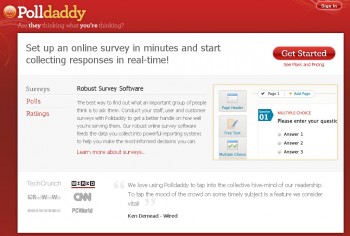
polldaddy

Most people love to share their perspective, some openly, some anonymously. Also, they love to compare themselves to everyone else. This is what ESPN learned when they created a poll at ESPN.com. This led to a featured tab, additional interactive programming, and widespread promotion on television as well as radio. The polling was driving traffic. When they promoted their polls, visitors flocked to vote and compare.

I have used SurveyMonkey in the past to systematically gather feedback. It’s a great tool as well. What I love about PollDaddy is the ability to do email surveys, plus polls embedded in a blog, distributed via Twitter, or within social networking sites such as Facebook, MySpace, or Ning. For both SurveyMonkey and PollDaddy, the service is free for up to 100 responses. Annual subscriptions are very affordable at $15 to $75 a month. When the responses have been collected, PollDaddy provides reports that can be easily downloaded into a number of formats.

Polls are valuable for getting a quick read on more of a day-to-day basis. You can adjust your tactics based on questions like, “Was this helpful?” (PollDaddy also has a ratings feature for this). For bloggers, it’s insightful to poll your readers’ intentions for reading your blog: Inspiration? Community? Information? Get a feel for their background – professions, demographics, and interests.

The non-intrusive and entertaining aspect of a poll also makes it a great way to inject humor into your brand. A balance of asking questions to learn, and asking to be creative, silly, or human will win points with customers and readers. Don’t take it too seriously.

Surveys can provide more in-depth assistance for developing your strategy. I have asked customers to rank strengths and weaknesses of a client’s service, and asked them where clients should expand their products and businesses. It is important to keep the surveys brief (under 15 questions usually), and minimize the number of open-ended questions. While providing the most unbiased responses, too many open ends will result in a low response rate.

Polls and surveys are no substitute for real, natural dialogue. They are imperfect, but they both show that you care and give you valuable data to make decisions. This leads us to the final issue.

Problem #3 is being responsive to the data. PollDaddy can’t help you with that. When you ask people for input, their expectations increase. It doesn’t mean you need a redesign, a new feature, or more promotions. But your customers will expect you to respond – either with actions or words. Thank them for their participation. Send a note to the responders who were most impassioned. And, when possible, make public what you learned.

Summing Up – Is it worth it?

Enterprise Value: 4/5 – continuous feedback is as important as large-scale research

Entrepreneur Value: 5/5 – cheap, easy, and brings you closer to your customers

Personal Value: 2/5 – if you want to raise your geek flag, go for it

—-
Thanks, Todd! You can find Todd on Twitter @ToddHoskins

Thanks, Todd, I think it might be time for a poll around here.

What do you find polls useful for in the work that you do?

–ME “Liz” Strauss
Work with Liz on your business!!

Buy the ebook. Learn the art of online conversation.

Register Now!! for sobcon-vmc

Filed Under: Successful Blog, Tools Tagged With: bc, LinkedIn, PollDaddy, Todd Hoskins

Cool Biz Tools: Brizzly

April 8, 2010 by Liz

Todd Hoskins Reviews Tools for Small Business

cooltext451585442_tools

Todd Hoskins chooses and uses tools and products that could belong in a small business toolkit. He’ll be checking out how useful they are to folks who would be their customers in a form that’s consistent and relevant.

Pick Your Client, Any Client by

Todd Hoskins

Although Twitter has worked hard to improve the user interface at twitter.com, it is worth the time to choose a client for your desktop and mobile use. Like Microsoft Outlook or Thunderbird seeks (and often fails) to improve email productivity, Twitter clients offer more tools and a better user experience.

The most popular desktop clients are TweetDeck, HootSuite, and Seesmic. Some of he most popular mobile clients include Tweetie (iPhone), Echofon (iPhone), Twidroid (Android), and UberTwitter (Blackberry). Increasingly, developers of desktop applications are making mobile apps as well and vice versa.

I currently use none of the above. For my small business purposes, I chose Brizzly for desktop and Twikini for my Windows Mobile device. I would prefer to avoid the topic of Windows Mobile 6 (and my wireless contract), so let’s look at desktop web applications.

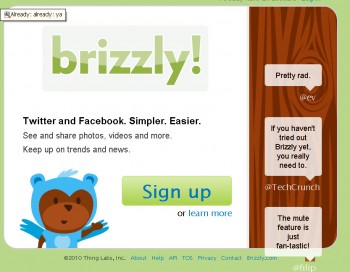
Brizzly is a browser-based application, which means there is nothing to install. The app has a clean interface with inline maps, photos, and video. With embedded media, infinite scrolling, and auto refresh, my stream requires very little clicking. It’s all there when I “dip in” for a bit.

brizzly

Importantly, applications like Brizzly allow you to handle multiple handles or accounts at once. This is where the difference of needs between applications for the enterprise and smaller businesses becomes most pronounced. An enterprise may need the ability to elevate, forward, share, or archive a tweet or conversation. There are fee-based applications for this. An individual user may be perfectly satisfied with twitter.com. For small businesses there are good free options in between.

I need to be able to find the relevant people and conversations and participate seamlessly without logging out and logging in of accounts. Saved searches, easily accessible bios, and a well-designed user experience are essential to me. Brizzly does this well.

Brizzly could improve with better management of contacts and followers (Seesmic’s latest version is impressive on this front). As customer service becomes more commonplace on Twitter for all sizes of companies, Brizzly may need to conservatively add CRM features. Let’s hope they stick with simplicity.

Summing Up – Is it worth it?

Enterprise Value: 1/5 – try CoTweet, PeopleBrowsr, or HootSuite

Entrepreneur Value: 4/5 – new iPhone application as well

Personal Value: 4/5 – also integrates with Facebook

—-
Thanks, Todd! You can find Todd on Twitter @ToddHoskins

Which clients do you use? What would it take you to try a new one?

–ME “Liz” Strauss
Work with Liz on your business!!
Buy the ebook. Learn the art of online conversation.

Register Now!! for sobcon-vmc

Filed Under: Successful Blog, Tools Tagged With: bc, Brizzly, LinkedIn, Todd Hoskins

Simple Social CRM Tool: Rapportive

April 1, 2010 by Liz

Todd Hoskins Reviews Tools for Small Business

cooltext451585442_tools

Todd Hoskins chooses and uses tools and products that could belong in a small business toolkit. He’ll be checking out how useful they are to folks who would be their customers in a form that’s consistent and relevant.

Rapportive
A Review by Todd Hoskins

If you do not use Gmail for personal or business use, sorry, this review is not for you. Please come back again next week. If you do have a Gmail account, or your business utilizes Gmail, install the Rapportive plug-in. Believe me, it will be worth it.

Why?

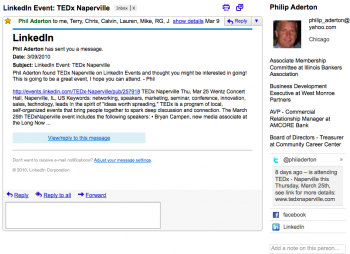
Rapportive removes the ads on the right column of your Gmail page, and replaces them with the social network information of the person sending you an email. This is simple social CRM, immediate information on where to find and interact with friends and customers outside of email. A field to take notes. And, it’s free.

Your browser may not support display of this image.

The latest tweets, job information from LinkedIn, and geographic location all help provide context. For a salesperson, entrepreneur, executive, or customer service representative, the value of getting information right within your browser saves time, can help you prioritize responses, and allows you to know more about your customer than their email address. The notes section is handy for recording birthdays, kids, and conversation cues.

screenshot-rapportive

Takes less than two minutes to set up. Privacy concerns are minimal because Rapportive only has access to your contacts, not your Gmail password. (Thank you OpenID). The Rapportive extension is available for the Firefox and Chrome browsers.

Summing Up – Is it worth it?

Enterprise Value: 3/5 – more complex CRM’s are available, but this is simple if you have corporate Gmail.

Entrepreneur Value: 5/5 – Bridges the personal and the professional and saves time.

Personal Value: 5/5 – Did you know Johnny had a Flickr account? Now you do.

—-
Thanks, Todd! You can find Todd on Twitter @ToddHoskins

I’ve installed the plugin. It’s not perfect, but it’s already way more useful than the ads it replaces!

What about you? Have you used it? What do you think of Rapportive?

–ME “Liz” Strauss
Work with Liz on your business!!
Buy the ebook. Learn the art of online conversation.

Register Now!! for sobcon-vmc

Filed Under: Successful Blog, Tools Tagged With: bc, LinkedIn, Rapportive, Todd Hoskins, tools

Cool Tool Review: Plancast

March 25, 2010 by Liz

Todd Hoskins Reviews Tools for Small Business

cooltext451585442_tools

I’m delighted to introduce a new feature. Todd Hoskins will be choosing and using tools and products that could belong in a small business toolkit. He’ll be checking out how useful they are to folks who would be their customers in a form that’s consistent and relevant.

Plancasting
A Review by Todd Hoskins

How do I break into an industry? Where should I go to meet the people who can help me broaden or deepen my network? What events are worth my time?

plancast

Plancast, a new free service from Worldly Developments, helps answer these questions.

There’s been a lot of attention paid lately to location-based services. Foursquare, Gowalla, and Twitter are effective at communicating where people are geographically and what they are doing. Plancast shows you the future – the places and events people are planning to attend.

The business value can be immediately grasped. Subscribing to the plans of investors, clients, or people within your industry or network, allows you to prioritize the events you want to attend. By sharing your own plans, you give people the chance to find you.

Signup is simple with Facebook Connect and Twitter integration. Your profile is imported, along with the option of Facebook friends and Twitter followers. Then, you enter event information – what, when, and where. There is no RSVP functionality – it’s a plan not a commitment. The option exists to share your plan through Facebook or Twitter, or you can export through the iCal format. You can subscribe to others’ plans, then view them on the Plancast site or within their new iPhone app.

Personally, it’s a great way to keep track of parties, festivals, or concerts friends are planning to attend. The effectiveness is entirely dependent upon adoption. Since Plancast is only a few months old at this point, there are a limited number of people casting their plans onto your laptop. But I predict this will change.

Worldly Developments has secured some new funding, so we expect some improvements hopefully including better tagging and categorization of events (an aggregated database would be ideal), grouping of subscribers, alerts, integration with event sites, and more mobile apps.

Summing Up – Is it worth it?

Enterprise Value: 1/5 – more events, dashboard would provide some value

Entrepreneur Value: 4/5 – user base of influential people already

Personal Value: 3/5 – with widespread adoption this functionality will become a must-have for social scheduling

Thanks, Todd! You can find Todd on Twitter @ToddHoskins

What about you? Have you used it? What do you think of Plancast?

–ME “Liz” Strauss
Work with Liz on your business!!

Buy the ebook. Learn the art of online conversation.

Register Now!! for sobcon-vmc

Filed Under: Successful Blog, Tools Tagged With: bc, Cool Tools, LinkedIn, Todd Hoskins

Using Cooliris … Here's How You Do It!! Part 2

December 10, 2009 by Liz

Brand New Today

relationships button

Social business has left the world of broadcasting to enter the world of making customers into heroes and celebrities. Every chance we get to bring them together and allow them to shine, shines well on our business too.

Our customers are the fuel that lead our businesses to thrive. Why not give them some traction and support by letting the world know what they mean to our success?

One easy way to do that is choosing great tools from those the social web supplies.

As you might remember from two days ago, I started to make a Cooliris wall from some photos of my SOBCon09 heroes …

A typical use case to share rich media involves selecting content from Flickr. So I’m making a Flickr Set from SOBCon09. I’ve been playing with it to see how I might include some SOBCon09 heroes in my blog …

expresssharepage

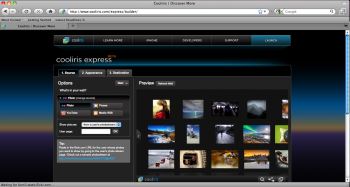
Unfortunately I got stuck in the middle … with a static screenshot.

cooliris

I couldn’t find a way to fully integrate it yet.

Good Customer Service Still Happens

A few hours after I blogged about it, Matt from Cooliris called offering to help. We decided that it might be easier if he sent me directions that I could share with you.

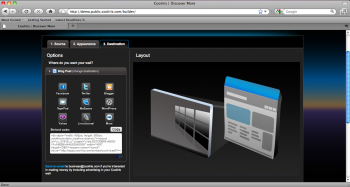
To embed your cooliris wall in your blog post … start your journey at cooliris.com/express/builder and follow the instructions below.

  • Copy and paste the URL of your Flickr photostream (based on your blog post I think this is http://www.flickr.com/photos/14089532@N08/). You should see your Flickr albums and many photos in the wall.
  • To only display one album, click the “Filter by” drop down and select “A single set (album)”
  • Go to the appearance tab and customize your wall!
  • Go to the destination tab. Since you’re on a custom WordPress installation – copy and paste the embed code that shows up beneath the share options.

I did that and here’s the result!!

Thank you, Matt and cooliris! I appreciate your patience, your help, and your service!
You’ve converted my photos and converted me into a fan!!

–ME “Liz” Strauss
Work with Liz on your business!!

Buy the ebook. Learn the art of online conversion. .

I’m a proud affiliate of

Teaching Sells

Filed Under: Marketing /Sales / Social Media, Tools Tagged With: bc, cool tool, cooliris, LinkedIn

Using CoolIris to Make Customer Heroes — in more time than I have! Ma

December 8, 2009 by Liz

Brand New Today

relationships button

Social business has left the world of broadcasting to enter the world of making customers into heroes and celebrities. Every chance we get to bring them together and allow them to shine, shines well on our business too.

Our customers are the fuel that lead our businesses to thrive. Why not give them some traction and support by letting the world know what they mean to our success?

One easy way to do that is choosing great tools from those the social web supplies.

Meet Cooliris and Make Social Heroes

Cooliris , innovator of the fastest and most stunning way to browse photos and videos from desktops or mobile devices, today announced Cooliris Express, a free tool that lets non-technical users create compelling digital experiences that showcase their photo and video content.

With Cooliris Express users can easily build and share fully customizable, cohesive, and immersive walls of photos and videos – not just a single photo or album – to websites, social networks, and blogs.

expressstartpage

Customized Media Walls in Seconds
Cooliris makes it easy for users to get started creating custom galleries by providing a simple to understand, intuitive, step-by-step wizard that walks them through the gallery building and posting process. First it prompts them to locate their personal media-rich content, then it provides options for where the content will be viewable, and finally with just one-click post they are able to share their custom galleries to the world, or just to their friends.

expresssharepage

A typical use case to share rich media involves selecting content from Flickr. So I’m making a Flickr Set from SOBCon09. I’ve been playing with it to see how I might include some SOBCon09 heroes in my blog …

cooliris

I couldn’t find a way to fully integrate it yet, but I hear that’s coming … meanwhile, click on the screenshot above to see more.

Leaves ME Feeling like not such a Hero

Another compelling feature is that the Cooliris Express galleries are dynamic. Once you create and post a gallery you can update it at the content source (ie: YouTube or Flickr) and the galleries you have posted to your blog or social media sites will be automatically updated with no additional steps required from the end-user.

Express works across the web
Incorporating Gigya social media technology, Express supports social media sites and blogs include: Twitter, Facebook, WordPress, TypePad, Netvibes, Yahoo, Hi5 and Orkut.

In addition to social media sites and blogs, Cooliris Express also allows uss to intntegrate the Cooliris Wall into their person websitetes. Instead of selecting a social media location, the user would select a personal site and the tool automatically generates the code they need to copy and paste into their page for the Cooliris Wall to appear.

Hold , cowboy! I have to go somewhere else to make it work on my blog? Not cool.
I just spent more time than I had trying to make this work.

You didn’t make that clear in the demo. This program has power and I can’t wait to learn more about how to get it into my blog!

Thanks to Matt from Cool Iris who brought me the directions on how to make the rest happen.
See part two of this post …

–ME “Liz” Strauss
Work with Liz on your business!!
Buy the ebook. Learn the art of online conversion. .

I’m a proud affiliate of

Teaching Sells

Filed Under: Successful Blog, Tools Tagged With: bc

  • « Previous Page
  • 1
  • …
  • 10
  • 11
  • 12
  • 13
  • 14
  • …
  • 30
  • Next Page »

Recently Updated Posts

Is Your Brand Fan Friendly?

How to Improve Your Freelancing Productivity

How to Leverage Live Streaming for Content Marketing

10 Key Customer Experience Design Factors to Consider

How to Use a Lead Generation Item on Facebook

How to Become a Better Storyteller


From Liz Strauss & GeniusShared Press

  • What IS an SOB?!
  • SOB A-Z Directory
  • Letting Liz Be

© 2025 ME Strauss & GeniusShared