Successful Blog

  • Home
  • Community
  • About
  • Author Guidelines
  • Liz’s Book
  • Stay Tuned

Why You Shouldn’t Put Your Title on a Business Card

April 10, 2014 by Rosemary

(Updated in 2020)

By Rob Young

If you’ve sought help to create the perfect business card you’ve probably found many people insist that you include your title on it. While including your title on a business card has its uses, in some cases it does more harm than good. Whether you’re the founder of a startup or an employee in an international company, these are a few reasons you might consider removing the title from your business card.

business cards

It can make you complacent

Printing your title on your business cards after you’ve just launched your start up might make you feel important, but it could be counter-productive. While it can inspire some people to take bold decisions and work night and day to ensure their business is a success, more commonly this false sense of importance clouds judgement and contributes to a false sense of achievement that leaves you vulnerable to complacency.

Leaving the title off your business card is a great (and free) way to remind yourself that you still have plenty to achieve — who knew that getting rid of a title could provide so much motivation?

You can appear egotistical or delusional

If you you’ve given yourself a fancy sounding title in the hopes of impressing potential clients, business partners or even your employees, be prepared for the opposite, especially if you appear young and inexperienced. At best people could think that you have an inflated ego, which might put people off from working with you. Worse still, you might just come across as delusional, with an unrealistic and immature approach to business.

It limits you

A job title is meant to give people an idea of what you do, but sometimes it can unintentionally give them a false impression of what you don’t do and if someone thinks you’re incapable of doing something and chooses not to pursue a relationship with you your business card might as well have been a blank piece of paper. Leave the job title off your business card and you give yourself the flexibility to adapt your responsibilities and abilities to the individual situation. And remember, as long as you have a pen handy, you can always add information to a business card.

Going incognito has its benefits

You might imagine that it’s always best to introduce yourself as the boss, but if you’ve ever seen Undercover Boss you’ll understand the value of being able to assume a different role. Whether it’s trying to leverage a better deal with a supplier or find out what other people really think of your company, the ability to be a chameleon in business comes with many benefits.

It’s a conversation starter

Maintaining a little bit of mystery is a great way to pique someone’s interest. Remove your job title from your business card and you’’ll find that people will start asking what exactly it is you do. This is a great opportunity to really sell yourself and the business you represent, you don’t have to reply with just your job title. Just bear in mind that removing all your details from your business card will only make you look foolish and incompetent.

It looks elegant, bold and chic

It’’s universally accepted that your business card shouldn’t be overloaded with information. Being ruthless and leaving out unnecessary details is a straightforward way to make an impact with your business card. Think your title is a necessary detail? Think again. Your email address or contact telephone number is essential, your title is an extra.

To avoid politics and resentment

Titles could lead to resentment and jealousy in a company. You could say that such employees shouldn’t be appeased by leaving job titles off business cards, but if something so simple could lead to a more productive company culture shouldn’t it at least be considered, especially when there are so many other reasons to ditch titles?
Do you really need that title?

Of course there are plenty of valid reasons to include your title on a business card, if you’re dealing with businesspeople with inflated egos, for example, they might consider titles important enough that they only want to deal with people they believe to be on their level. What’s important is that you don’t assume your job title should automatically be on your business card. Instead weigh up the pros and cons and do what’s best for your business or career.

Author’s Bio: Rob Young is Head of Online Marketing at business card printers MOO. He likes to share his knowledge and experience on a number of topics including networking and design.

Photo Credit: antoniocasas – homofotograficus.com via Compfight cc

Filed Under: Design, Personal Branding, Successful Blog Tagged With: branding, business cards, marketing

Get a Grip on Visual Content

April 8, 2014 by Rosemary

By Lisa D. Jenkins

The saying, “A picture is worth a thousand words” is cliche for a reason.

It’s no secret that images receive more engagement on Facebook than their text only counterparts. The growth of audiences on Pinterest and Instagram, even Tumblr, supports the notion that at our core, we humans are a visual bunch.

And now there’s a whole lot of talk going around about visual content and its rapidly increasing influence online.

So, what exactly is this visual content all the cool kids are talking about? Let’s agree to set jargon aside and not make this harder than it has to be. We’re talking about images; photos, videos and graphics. Visual content uses all types of imagery to communicate and support your messaging clearly and quickly. As a delivery medium, visual content is perfectly suited to social media because it’s easily consumed and shared.

Lowe’s uses Vine shorts like this one to give helpful life hacks to their customers who then share the hack and extend Lowe’s reach and visibility.

From video to photos and infographics to animated GIFs, marketers are using visual content to their advantage in pursuit of goals such as establishing market authority, gaining share of voice, driving higher CTR’s and contributing to the bottom line.

One of the most attractive things about adding visual content into your online, digital and/or social marketing strategies is that you can include not only brand generated content but user generated content as well. With some forethought, your content creators get a break, and your fans get a nod from a brand they’re passionate about.

This collection of #sharelove images from Starbucks fans generated over 26k Likes, 200 Comments and 600 Shares – that’s a lot of news feed visibility, and we all know how hard that is to come by these days.

Starbucks visuals

If you want to learn more about what’s out there and how you can apply it to your own marketing activities, come back here every other Tuesday. I’ll share some examples of visual content from brands, give you some ideas for implementation and execution, and throw in a helpful tool or two to get you started.

What do you most want to learn?

For today, I’m just going to say thanks for dropping in and leave you with this infographic from On.com that explains how we got here.

The Growth of the Visual Web - On.com
Author’s Bio: Lisa D. Jenkins is a Public Relations professional specializing in Social and Digital Communications for businesses. She has over a decade of experience and work most often with destination organizations or businesses in the travel and tourism industry in the Pacific Northwest. Connect with her on Google+

Filed Under: Content, Design Basics, Successful Blog Tagged With: bc, Design, images, visuals

Instant Impressions: 7 Popular Web Design Trends

April 4, 2014 by Rosemary

By Teddy Hunt

The Internet is continuously involving, and people are constantly finding new ways to attract others to their website. Design trends are about as shifty as fashion, so it’s important to keep your website updated with the latest that web design has to offer. With that said, here are seven of the most popular web design trends spicing things up in 2014.

Funky Typography

Funky as in experimental, not funky as in overly complex and unreadable. Graphic designers are having as much fun as ever playing around with fonts and injecting them with flare. These fonts are spicier than your average serif or san-serif like Times New Roman or Helvetica. As the web further expands and more people take to creating their own websites, the need to branch out and come up with unique fonts that stand out is more important than ever before.

Super-Sized Navigation Menus

There’s been a plethora of fancy navigation menus designed, tested, and approved over the past few years, with mobile responsive design (we’ll get to that later) and HTML5/CSS3 influencing that. But the most recent trend seems to involve super-sized menus that expand to huge blocks of content and links. These menus are commonly found on websites that publish great volumes of unique content in high volumes. Although it takes up a lot of space on the page, it provides visitors a broader choice to navigate your website.

Mobile-First Design

The purpose of mobile-first design is to develop your website so that it has a responsive layout that’s accessible by mobile users without sacrificing quality. Essentially, you want to cut of the excess fluff and keep the critical elements. From this perspective, it’s easier to scale up your website’s design to devices that have wider screens. Mobile-first design emphasizes the mobile experience and becomes the foundation for the entire layout. Just make sure that you’re not committing mobile web design mistakes when designing your website.

More Videos

Website visitors are spending less time reading text and more time watching videos and looking at pictures (infographics). With that in mind, it’s time to trash the boring blurbs about what your company can offer and showcase that point in video format (don’t make them too long, though).

Not only is this media format more popular today, but it’s also easily sharable on social media, resulting in more views and greater brand awareness.

Endless Scrolling

Guess what? Scrolling through an in-depth website is easier and faster than clicking through 25 different links to get access to the information you want — and graphic designers are noticing.

These websites aren’t cluttered with content on long scrolling pages, either.

Designers use new website design techniques to format and organize the content in a way that’s easy to read and comprehend. Endless scrolling design can change the layout and design of the page as your scroll further, making you forget you’re scrolling through a lot of information to begin with.

Simple and Subtle Color Schemes

color wheel

The days of eye-popping graphics, complex animations, and crazy color schemes are coming to an end — at least for now. If you’re a smart graphic designer, you’ll use one or two colors instead in the future. One of the more popular trends today is to use a single bright color and a single clean background color like red, teal, or orange (including images or black and white text on top). Not only is this effect minimalistic, but it’s user-friendly.

3D Transition Effects

Whether it’s in animated image galleries, elements, or navigation menus, 3D animations are becoming more popular by the day. You can create 3D effects using jQuery; although, CSS3 has slowly caught up. Unfortunately, not all browsers support these types of animations, so designers avoid using too many on one page. Check out these 3D animated code examples to work from if you want to give a shot.

What website design trends do you expect in the near future? Have you implemented any that make your website stand out better than before? Leave a comment and share your thoughts on the subject.

Author’s Bio: Teddy Hunt is a freelance content writer with a focus on technology. When not behind a computer, Teddy spends the majority of his free time outdoors and resides in Tampa, Florida.

Photo Credit: Viktor Hertz via Compfight cc

Filed Under: Design, Web Design Tagged With: bc, fonts, graphics, web design

Book Review: Spin Sucks, By Gini Dietrich

April 3, 2014 by Rosemary

Gini Dietrich is on a mission.

She is aiming to shift the practice (and then the perception) of the public relations profession, one mind at a time.

It’s a tough row to hoe, when we are inundated daily with reports of sneaky native advertising, journalist fakeouts, and “astroturfed” social content, much of it generated by so-called PR pros.

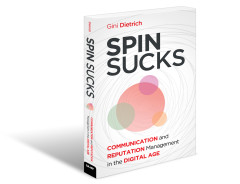
But Gini and the Arment Dietrich team represent the good guys, and in her new book, Spin Sucks: Communication and Reputation Management in the Digital Age, she explains exactly how communications, PR and media relations can be done with integrity and still get stellar results.

In fact, the tectonic shift is taking place everywhere. Power that used to reside in the hands of a few gatekeepers is now democratically spread out to the masses. You can no longer spray out a press release to a purchased list of emails and hope for the best. In a strange way, the digital tide is forcing us to hone our storytelling craft by taking away the crutches we used to rely on. Spin Sucks is full of real stories of success and #FAIL, told in Gini’s down-to-earth style.

Spin Sucks, by Gini Dietrich

I strongly recommend this book to anyone who is running a business (large or small), regardless of whether you’re working with an agency or doing it guerrilla style. If you are working with an agency, this book will give you a great baseline knowledge of an integrated marketing/communications/PR/media relations strategy. If you’re going it alone, use the book to experiment and be successful enough to hire a team of pros.

Key Takeaways from Spin Sucks

  • Be a storyteller, not a spinner.
  • Content creation is a long-term strategy, not a quick fix.
  • Create assets that reflect a mix of paid, earned, shared, and owned media.
  • Be honest and transparent in your dealings with the public; manipulation will backfire.
  • It’s time to stop working with content farms, scrapers, and plagiarists.
  • Get comfortable with the fact that your customers are really in control of your brand.
  • Learn to say “I’m sorry” with no embellishment or caveats.
  • The best way to repair online reputation is by overwhelming the negative content with your own great, useful, customer-valued content.
  • If you want to be prepared for the future, stay tapped into all of the disciplines that make up marketing communications…the lines are getting blurrier and blurrier.

What’s your best communications “war story?” Have you had to deal with a communications crisis?

Author’s Bio: Rosemary O’Neill is an insightful spirit who works for social strata — a top ten company to work for on the Internet. Check out the Social Strata blog. You can find Rosemary on Google+ and on Twitter as @rhogroupee

Disclosure: I was given an advance free digital copy of this book for review purposes; however that in no way altered my opinion or the content of this review. My personal story of guerrilla digital PR is mentioned in the book.

Filed Under: Business Book, Successful Blog Tagged With: bc, book review, communications, marketing, PR

Tools For Writers: Save Time, Work Better

April 1, 2014 by Rosemary

By Angela England

I have a ton of projects at any given time. In fact, as I was just offered the position of Organic Gardening Guide for About.com I will be busier than ever! I wouldn’t survive all of that with five homeschooling kids, if I didn’t have some great tools under my belt to make it easier.

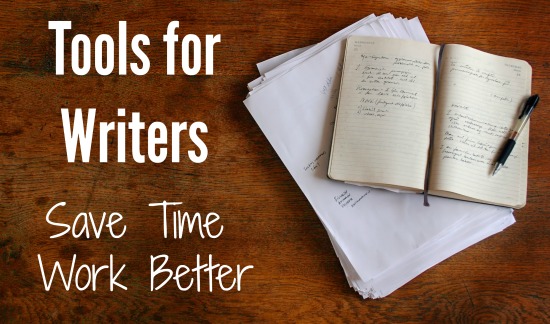
Tools for writers

Here are some of my favorites.

Steno Pads and Pencils

This seems so…so…eighteenth century, I know. But I carry half-sized steno pads with me everywhere for those times when I need to scribble something in analog. Don’t think that high-tech is the ONLY way to go. When it comes to brainstorming and outlining it is often faster for people to “think out loud” on paper and then translate that to digital once you’ve had that initial brain dump. I buy steno pads in bulk at Sam’s Club so I can easily scrawl in them whenever I want and they fit easily in the side pocket of the car, in the diaper bag, in my purse or laptop case, glove box, etc.

Poster Board or Big White Board

Large brainstorming sessions need bigger amounts of space. I have a technique I will use periodically to brainstorm about a hundred blog post ideas in less than an hour. I taught a workshop about it and you can watch the video here: Brainstorming Blog Post Ideas With Ease

The key is to write quickly and not be worried about how it looks or whether it makes sense. Or is spelled correctly. Get all the ideas out of your head and THEN focus on working them into a logical semblance of order.

Evernote

Speaking of working things into a logical semblance of order – Evernote is one of my favorite tools for capturing ideas on the go. I can clip a website, photo, screenshot, email, type a quick idea, etc from any connected device. My Evernote accounts link my phone, iPad, computer, laptop, etc., so I can easily grab that inspiring phrase from Facebook and plug it into Evernote to explore later. I can also gather research notes and materials and place them into “notebooks” according to website or book project to help me find it easily later. Evernote’s robust tagging and search functions make it one of the best online filing systems I’ve ever used. For more tips on using Evernote, I love this post by Alli Worthington – 10 Way to Use Evernote Like a Pro.

Scrivener

Whether I’m writing non-fiction or fiction, Scrivener is my favorite place to write now. And not only books, but other long-form projects like courses, blog series, feature articles for magazines, and more. The features Scrivener offers writers make it the perfect tool for any professional writer. Call it a cross between Word, Evernote, and your favorite Moleskine. It’s the best online writing tool I’ve come across yet and highly recommend it for anyone who writes anything bigger than 500 words in length.

Dropbox

Writers often have to send large chunks of material. Whether you’re sharing a project with a reviewer, sending your book to an editor, or working collaboratively with several people on a project, Dropbox is a great solution for storing and sharing large files. I especially love the ability to access Dropbox files while NOT connected to the internet (on the road with my laptop, for example) and update files (i.e., write more on my book or course or blog post series) and then have Dropbox automatically sync those changes with my main Dropbox account as soon as I’m connected again. I can store a file in Dropbox and access from any of my other connected devices (including mobile) and from public computers by logging in temporarily at dropbox.com. Keep folders private or share as desired for easy-to-control privacy levels.

These are the main tools I use on a near-daily basis when it comes to writing. Some are free, some are paid, some are high-tech, some are as old as time. All impact the work that I do in profound ways. What are your favorite tools as writers?

Author’s Bio: Angela England is a mother of five living in rural Oklahoma but more, she’s also a problogger, speaker, and author of several books including Backyard Farming on an Acre (More or Less) and Getting Prepared. Her most recent projects are helping people transform their blogs and business by publishing amazing books and producing multiple books this year under the Untrained Housewife brand.

Filed Under: Content, Successful Blog, Writing Tagged With: bc, tools, Writing

How to Prepare for Your Wake-Up Call

March 27, 2014 by Rosemary

My Academy Award slipped through my grasp when I was in college.

Although I was a Political Science major, I had signed up for Acting as an elective. Sure that I would accidentally become the next Meryl Streep, I emoted my guts out, hung around with artsy friends who were making student films, and made it into the school musical.

There was just one tiny problem.

I was a terrible actor.

In the same way the Hindenberg was a terrible blimp.

And I only realized it when my acting teacher told me I’d better withdraw from the class or she was going to fail me. (Seriously? Who flunks the acting elective?)

Sometimes it takes an outside, objective force to bring you to your senses when you’re in the throes of a bad idea. A wake up call.

wakeup call

Recognizing When to Pivot

Starting a new business is the ultimate gamble. You’re pulling up a chair to the poker table and pushing all of your chips to the center.

It takes a special kind of guts to go beyond having a great idea, and actually start something that creates value.

It’s wonderful to have guts.

But it’s more important to keep perspective on the situation. Blindly charging ahead without ever stopping to evaluate your strategy is not smart.

“Insanity: doing the same thing over and over again and expecting different results.” Albert Einstein

In gambling, you’re taking a calculated risk in order to potentially earn a big reward. Business is the same thing. You don’t have to put all of your chips on the table at once. You can test some ideas, play a few hands while you evaluate your fellow poker players.

When Odeo became Twitter, there was no guarantee that short, wonky status messages would become something that dominated the entertainment industry (hello, hashtag fever). The founders got the wake-up call that podcast subscriptions were about to be gobbled up whole by iTunes, and made a rapid course change.

Just because you decide to change direction, doesn’t mean success is guaranteed either. The jury is still out on whether Fab’s revamp from a social site to a shopping curation engine has worked.

The point is that when the wake-up call comes, you need to paying attention. You need to have resources you can marshal to respond to the call.

Make Sure You Recognize the Wake-Up Call

  • Have someone around who will speak the truth. Don’t hire yes men (or women).
  • Don’t fall in love with your own ideas. Keep an open attitude toward your creations, and allow the oxygen of alternatives into the picture.
  • Read, read, and read some more. Always be learning from others and improving your knowledge base.
  • Build in time to stop and evaluate the numbers. Look brutal reality in the eye on a regular basis.

Are you prepared for a wake-up call?

Author’s Bio: Rosemary O’Neill is an insightful spirit who works for social strata — a top ten company to work for on the Internet . Check out the Social Strata blog. You can find Rosemary on Google+ and on Twitter as @rhogroupee

Photo Credit: Alan Cleaver via Compfight cc

Filed Under: Strategy/Analysis, Successful Blog Tagged With: bc, business, pivot, strategy

  • « Previous Page
  • 1
  • …
  • 35
  • 36
  • 37
  • 38
  • 39
  • …
  • 84
  • Next Page »

Recently Updated Posts

Is Your Brand Fan Friendly?

How to Improve Your Freelancing Productivity

How to Leverage Live Streaming for Content Marketing

10 Key Customer Experience Design Factors to Consider

How to Use a Lead Generation Item on Facebook

How to Become a Better Storyteller


From Liz Strauss & GeniusShared Press

  • What IS an SOB?!
  • SOB A-Z Directory
  • Letting Liz Be

© 2025 ME Strauss & GeniusShared