Successful Blog

  • Home
  • Community
  • About
  • Author Guidelines
  • Liz’s Book
  • Stay Tuned

Solve Communication Breakdowns with Your Blog

March 5, 2013 by Rosemary

By Brian Milne

Communication Breakdown,
It’s always the same,
Havin’ a nervous breakdown,
Drive me insane!

– Led Zeppelin, “Communication Breakdown”

Is it just me, or is all of this technology that’s “connecting us” actually discouraging real communication.

By definition, communication is an “exchange of information,” but even Webster suggests it should include a “personal rapport.”

But in today’s fast-paced, attention-deficit world, personal phone calls have given way to occasional emails and text messages. And, in many cases today, those one-on-one messages are being replaced by shotgun Facebook and Twitter blasts to a faceless social mediasphere.

So what about those defining moments in life, or business, that warrant more than 140 characters? Babies being born, companies doing actual good in the community and for the environment?

Those are the types of communications blogs were made for. Whether it’s a personal or corporate platform, your blog is your most important communication tool online.

Not only does the blog allow you to let your hair down, and write more freely about topics that will engage users, but it allows you to share that narrative with hundreds, thousands, even millions of readers.

And it allows you to complement your prose with strong images, videos and all of the other assets and plugins we can integrate into our blogs today.

But how do you make sure your blog doesn’t turn into another source of one-sided noise in this overly-saturated blogosphere? Here are six tips to help turn your blog into a two-way communication tool.

Use the Blog Often, and Well

They say quality over quantity. I say quantity AND quality.

For a majority of the blogosphere, blogs are successful because they do both. Their content is solid, so it gets shared. Their content is frequent, so it gets traffic.

A good blog is a two-headed monster, and you have to feed it often if you want your site to become a beast to be reckoned with online.

Don’t have time to blog as often as you’d like? Here are 10 tips for finding more time to blog.

Use the Blog to Keep Connections Updated

Ever have a situation where you’re traveling in a remote place, or are in the middle of an adventure and don’t have time to update all of your friends on your whereabouts? The blog is a great vehicle for updating the masses on your situation.

I used this same approach in 2007 when I paddled nearly 100 miles of California’s coast, and again this past fall with a photo blog from McCovey Cove during the World Series.

Posting updates to your blog will not only keep your friends and family informed, but it also saves you time so you don’t have to reach out to everyone in your social circle to give them a unique update.

Use the Blog to Share and Engage

For corporate blogs, running diaries like the examples above probably aren’t realistic, but taking the same, real-time updates approach will work for major events and conferences when content ideas are coming your way at a furious pace.

Take advantage of these events (which are content gold mines) by posting frequently around the topics and using social media (and the appropriate hashtags) to promote your work, because these types of milestones are often more timely and newsworthy than everyday posts.

Use the Blog to Collaborate

Have you ever thought of your blog as a collaboration tool?

Active online communities and blogs have amazing potential when it comes to collaborating online.

Turn your blog into a collaboration tool by: concluding posts with open-ended questions to drive reader comments, driving interaction through mobile engagement, and embedding polls, surveys and forms to pull user-generated content from the community.

The key is driving at that engagement and making sure your blog isn’t just a one-way communication.

Use the Blog to Motivate

The best part about having a phone conversation with a friend, colleague or mentor that you respect, is that the call is a two-way conversation.

Two-way conversations help resolve issues, breed new ideas and inspire and motivate both sides to strive for more.

Take the same approach on your blog.

The best posts in the blogosphere (think about all of the great content here on Successful-Blog.com) motivate and inspire, and your blog shouldn’t be any different.

Use the Blog to Listen

In conclusion, don’t just treat your blog as a one-way communication tool. Allow for comments on your posts.

Listen to and engage with those in the comments section and continue the conversation beyond the author tagline.

Take the discussion to your social networks to engage more connections in your social circle, and, gulp, even offline in the real world.

Imagine that, actually communicating with folks offline.

Robert Plant would be proud.
Author’s Bio: Brian Milne is the founder of the Hyped Blog Network and Meadows Interactive, an authorized seller of the WorkTraits behavioral assessment and work compatibility program. Share your communication tips and challenges with him on Twitter @BMilneSLO.

Filed Under: Blog Basics, Blog Comments, Content, Successful Blog Tagged With: bc, blog comments, blogging, communication

6 Tips to Boost Your Productivity

March 4, 2013 by Rosemary

By John Murphy

I don’t think I have ever met anyone who does not want to be more productive each and every day.

The day just never seems enough to get all you want done! Recognize this? Let’s be honest, it is an issue for all of us and is a constant challenge that comes up in all my coaching work.

Books have been written, courses delivered and seminars run on this subject – many wonderful (some not so much!) but the volume of advice can be so overwhelming that it actually inhibits your productivity. Not quite what you were looking for!

So, to assist in the elimination of the overwhelm I have set out my 6 Tips to Boost Productivity, which, if undertaken, will vastly improve your productivity and give you that sense of achievement at the end of the day that you are really seeking.

1. Be Razor Sharp About Priorities.

You can never be effective unless you have clarity about your priorities – otherwise you are just engaged in the next activity that lands on your desk or in your head. Busy? Yes. Efficient? No!

To get really clear about your priorities you need clarity about your goals so that you can decide if the specific activity you are undertaking is moving you towards the achievement of your goal.

Your priorities are those actions that will support the delivery of your goals. So, those things on your to do list today – do they progress your goals or not? If they don’t why are you doing them?

Get your priorities crystal clear!

2. Schedule Your Activities

This is fundamental to any discussion about time management and effectiveness! Schedule your activities as if they are appointments with yourself – and make that time as sacred as a meeting with your most valued client.

If one of your priorities this week is to prepare a performance review of your staff, or draft a proposal to a prospective client, then do not leave that activity on some to do list to do when you find time. Be disciplined about it and schedule to do it at a specific time and then be resolute about adhering to that.

An item on your to do list is an aspiration, a scheduled activity is a commitment! Being productive is all about commitment!

3. Be a Continuous Learner

Never be content about how productive you are – we can all get better! So have an attitude of continuous learning about ways to improve productivity. Now, just to be clear, I am not suggesting you spend your life trying out different systems for productivity. What I am saying is that new technology is being developed all the time that can really help your productivity, and don’t just ignore it. Check it out to see if it will improve your productivity – if it does, then incorporate it. If it doesn’t just dump it!

For example, I have become a recent convert to Evernote – a great tool to capture “stuff” on the go that I can refer to later. It really does help me to be more productive – I can have folders for various pieces of information I want to keep to look at later, and I know it is all in one place.

4. Celebrate Progress.

Every day celebrate your progress! Sound naff? Not at all! There is great value in reviewing your day and celebrating your successes and the progress you made towards your goals.

It is the fuel that boosts your energy for the following day.

5. No Multi-Tasking

I take real exception to those who laud “multi-tasking!” I do not believe it is a male/female thing – I believe it is simply a bad habit we can get into and then justify as a virtue!

Multi-tasking has to be inefficient because we are not giving full attention to any one thing, and consequently the output will reflect the input, which is divided and lacking focus!

Do one task at a time, and do not move to the next one until you have completed it. If you have scheduled the time for that activity, then give it 100%.

6. Restrict Your Time on Email

Email is one of the great tools we posses but it is also one of the greatest time stealers and inhibitors to productivity.

How often do you check your emails every day? Go on, be honest!

Checking your emails that frequently is only ensuring that your agenda is being run by everyone else – you want to know who has sent you what, and then you find that really interesting link.. ! 15 minutes later you realize that you are not doing what you should be.

I heartily advise that you allocate 3 periods in the day to check your email – and that is it! The world will not stop turning because you have not checked your email for 2 or 3 hours! Be in control of your time, not reacting to other people’s priorities.

We all can do something about our own productivity – and it is our responsibility to do so. So, now that you have read this – what are you going to do? And when are you going to do it?

Author’s Bio: John Murphy a business coach who writes about what makes executives and business owners more productive at www.johnmurphyinternational.com. You can find him on Twitter as @jmicoaching.

Filed Under: Business Life, Productivity, Successful Blog Tagged With: bc, Motivation, Productivity

How to Boost Blog Visits: Make Your Blog into a Mobile App

March 1, 2013 by Rosemary

By Natalie Bracco

Just because you know how to write an interesting blog that gets visitors to come back time and time again doesn’t necessarily mean that you know how to make your blog accessible to people who access online content through mobile devices. Without a tech background, it might seem impossible to turn a blog into a mobile app. Luckily, with the right tools, even a newbie can make blogs mobile-friendly and reach even more readers.

Make Your Own App with Conduit Mobile

Conduit Mobile

Creating your own app might sound intimidating, but you don’t need a degree in computer programming to make one that puts your blog into the hands of people using mobile devices.

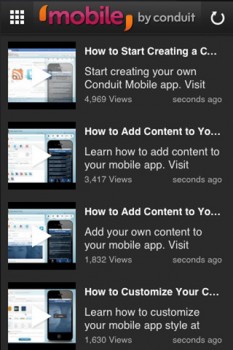
A free tool called Conduit Mobile will do most of the work for you. Conduit Mobile takes content directly from your blog and makes it easy for mobile phones to access. You can even add YouTube videos, RSS feeds, and other social media to stay connected with your readers. Conduit Mobile is currently free for all users.

Go Mobile with GoMobi

GoMobi

GoMobi is similar to Conduit Mobile, but it’s slightly different in that it creates a .mobi domain for your site’s registrar. With GoMobi, you can quickly add your content to a mobile app that lets readers view your pictures, videos, and words. If you can upload images to your website, then you can use GoMobi. GoMobi even adds a link that will take visitors to your full website, allowing them to peruse all of the content that you have available. To use GoMobi, you have to purchase it from one of the product’s authorized dealers, such as eNom or DigiWeb. Typically it will cost about $7.50 per month.

Easy Integration with Uppsite

Uppsite

Uppsite claims that it can take your Web content mobile within two minutes. Its designers created it specifically it to work with popular publishing platforms like WordPress and Twitter, so you can integrate them into your mobile site easily without any technical knowledge. Uppsite also lets you add advertising to your mobile site without bogging down your content with ugly images. That could easily help you make more money. Uppsite comes in three plans to choose from: Basic, Premium, and Deluxe. The cheapest plan costs $9.99.

Use a Plug-in to Reach Mobile Readers

MobilePress

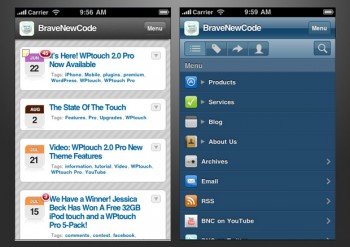
If you already use WordPress for your blog on your website, then you can add plug-ins that will instantly make content readable on smartphones. The basic version of WPtouch makes your WordPress content available without slowing down your website. If you want to maintain the look of your current site and access additional features, then you might need to upgrade to WPtouch Pro, which comes in at $39 per site.

MobilePress is another plug-in that makes your WordPress content easier to see and use on a mobile device. It, and several other plug-ins like it, is totally free.

Mobile devices are quickly becoming the most popular way for people to access online content. What steps have you taken to make sure all the people out there have a good experience when they visit your site?

Author’s Bio: Natalie Bracco writes about technology and blogging, especially on devices like LG cell phones. She also writes about finance and lifestyle. You can follow her on Twitter @NatalieBracco.

Resources

  • http://lifehacker.com/5809888/how-to-make-a-blog-or-site-into-a-mobile-app-without-programming-knowledge
  • http://www.bravenewcode.com/product/wptouch-pro/
  • http://wordpress.org/extend/plugins/wptouch/
  • http://gomobi.info/take-a-tour/

Filed Under: Tools Tagged With: bc, mobile, plug-in, tools

Clarify Your Site’s Purpose and Stop the Terminator

February 28, 2013 by Rosemary

The average web page visit lasts less than one minute.

Humans are programmed to sort everything they see into familiar labels, or buckets. Our brains scan the immediate environment to find threats, food, competitors, and potential mates. Like the Terminator searching for John Connor, we make fast assessments and move on.

The same thing is happening with visitors to your blog or website.

You’re doing the same thing right now reading this blog post. You read the headline, decided it was applicable to your situation, and started scanning. Maybe these quick bullets will keep you reading.

Tactics for Building a Useful Web Presence

  • Use your Google Analytics to view landing and exit pages. If certain landing pages lead to an immediate exit, tweak the content. Keep testing what is resonating with your visitors.
  • Have a clear path. People don’t usually land on the home page and click a giant “buy” button immediately. Have a plan for how you want visitors to progress through your information, and where you want them to end up.
  • Use markers like arrows, visual flow, friendly text. Design can’t be an afterthought. In “Terminator” mode, people need simple visual clues about where to click next.
  • Make your “ask” very clear. Is your site supporting a business? What are you selling? Is it a hobby/journal blog? Are you supporting a non-profit? Don’t make your visitors guess.
  • Declutter. Set up a routine review of your blog or website, with the intention of taking out anything that’s not crucial. Old badges, social buttons, ads that aren’t getting clicks, be ruthless, like you are with your closet.
  • Stop sending people away to other sites. You may have noticed that a lot of the big bloggers have started removing their “follow me on…” buttons from the home page (replacing it with email capture instead). Consider whether you really want to send your visitors away like that.
  • Check your mobile experience too. Whip out your smartphone and look at your site. Is it fugly? Do something about it! Here’s a handy post from Shonali Burke if you’re running WordPress.

Why do you have a blog or website? How do you make that clear to your visitors?

Author’s Bio: Rosemary O’Neill is an insightful spirit who works for social strata — a top ten company to work for on the Internet . Check out the Social Strata blog. You can find Rosemary on Google+ and on Twitter as @rhogroupee

Filed Under: Blog Review, Checklists, Strategy/Analysis, Successful Blog Tagged With: bc, Blog Basics, Design, retention, traffic

Quick LinkedIn Checkup

February 27, 2013 by Rosemary

By Charles Mburugu

LinkedIn is the world’s leading professional social network. With a membership of almost 80 million, it has become a popular marketing tool for many businesses and individuals. Here are some tips which will help you make the most out of LinkedIn.

Your LinkedIn Profile

Your LinkedIn profile is basically an online resume. Therefore, it needs to be updated and complete. Some of the details which need to be completed include:

  • Your profile summary
  • Your current position
  • Two past positions
  • Your education
  • Your specialties
  • At least three recommendations

Be sure to add a clear, professional-looking photo of yourself to the profile. A good photo will not only reveal your identity, but will also be a vital aspect of your personal brand.

Choose Your Keywords

Many professionals and businesses are using LinkedIn to identify top talent. Therefore, you need to think about what keywords do you want to be known for. Carry out some research to find out which keywords would be most suitable for your skill set, and make sure these words appear prominently on your profile. This will result in a high page rank, thus ensuring better visibility for your profile.

Customize Your URL

Make sure your name appears in your LinkedIn URL. This will make you more visible in the LinkedIn search bar, as well as in search engines. To make changes, go to “edit profile”. Scroll down to the “public profile” section, click on the edit link and add your name to the URL. If you have a common name, you could consider adding a period or hyphen between the first and last name.

Add Your Full Experience History

Don’t leave out any details of your work history. A full history gives a clearer indication of your abilities. Remember to include targeted keywords to enhance your ranking. You can find many free templates online which will help you create your digital resume. Once complete, the resume can then be imported to your profile.

Make Use of LinkedIn Applications

You can enhance your LinkedIn experience by using one of the many applications available. Events and TripIt would be useful for people who travel a lot and want to share their experiences. People with Twitter accounts or blogs can use WordPress or Blog Link to add posts to their LinkedIn profiles. SlideShare is ideal for people who would want to share presentations with others.

Recommendations

To leave a good impression on other professionals, make sure you have positive recommendations on your profile. Get in touch with people you have worked with before and ask them to put in a good word for you. The more recommendations you have, the more credible your profile will be. Don’t forget to also offer positive recommendations to other people. They will be grateful and might even return the favor.

Have you brushed up your LinkedIn profile lately?

Author’s Bio: Charles Mburugu is a HubSpot-certified content writer/marketer for B2B, B2C and SaaS companies. He has worked with brands such as GetResponse, Neil Patel, Shopify, 99 Designs, Oberlo, Salesforce and Condor. Check out his portfolio and connect on LinkedIn.

Filed Under: Marketing /Sales / Social Media Tagged With: bc, expertise, LinkedIn, profiles, resume

Are You Selling Your Content Enough?

February 22, 2013 by Rosemary

By Reese Jones

A lot of creative people often suffer from the problem of failing to market themselves efficiently, and by extension, the work they create. This is especially true when it comes to any content that makes its home on the internet, as quite frequently people are not fully aware of the options available to them.

Sure, there’s the more obvious choices – linking your WordPress account to Twitter or Facebook to ensure that all your content is appearing on the relevant social media platforms. But are you reaching out and actually offering your content to people in subtle or more proactive ways? Do you engage with other bloggers, network at events, reach out for interviews and go on blog tours? If not, you’re not doing your hard work enough justice.

It’s also arguable you might not be working hard enough, either, but that’s only the case about half of the time – some people simply aren’t aware of other techniques and assume that just writing posts and hitting “publish” will do the job. So here’s five ideas to get you started when it comes to getting your work out there and ensuring it receives the attention it deserves.

Blogger outreach.

It’s not often that people blog about a specific topic on a regular basis without being aware of the community that surrounds that topic. Social media, mental health, videogames – there are no niches devoid of discussion on the internet, so take advantage of this, and get involved with debates and conversations. Try commenting on blogs with similar topics and engaging with their writers – even offering them a guest post on your blog, should they be interested.

Engaging with the community.

Following on from the previous point, it’s also worth thinking about what you could be doing to better engage with the community. Connect with those who enjoy the topic and are deeply involved in and/or knowledgeable about it, but who don’t write about it themselves. These are your readers, and in order to appeal to them, there are many simple steps you can take. These include getting involved in your own comments threads, in forums, and also taking on suggestions for topics from readers who’d like to read your take on something.

Mix up your media.

Don’t just stick to writing unless you’re really not keen on doing anything else. These days, successful blogs are a balanced mix of text, images, video, and even audio. No one says you have to become a jack of all trades, but even using images to bolster a blog post with a little visual aid isn’t going to hurt – neither is looking up relevant YouTube videos and embedding them into the post. After all, it’s content for both you and the video producer, so your blog looks more enticing, and they receive more plays.

Go on tour!

If you’re not sure what a “blog tour” is, it’s pretty simple to get the hang of. You simply do a series of guest posts on various other blogs, in essence, touring the blogosphere and offering people your hard work – ie content – usually for free. Why for free? Because it’s an incredible way of making the audiences of ten sites aware of you in one big tour, and if you’ve got an article going up every weekday at a different site with a by-line that points them over to your blog, things will get busy for you, in a good way.

Keep improving.

Don’t just assume that you’re at the top of your game – there is no point in your career where that should be your mindset, and even if you’re blogging casually, it’s a bad attitude to have. Think about how you can improve your writing, your variety of content, the blog’s overall aesthetic – don’t give it 50%. People will always enjoy what you’ve got going on already, but by never evolving you’re damaging your chances of growing your audience.

Blogging isn’t easy. It requires hard work, commitment, scheduling, imagination, talent and intelligence. But after all that, if you’re not receiving any attention, something is wrong. Don’t be afraid to self-analyse and use these tips to improve things – you can only get better if you’ve got the right attitude. Happy blogging!

Author’s Bio: Reese Jones is a tech and gadget lover, a die-hard fan of iOS and console games. She started her writing venture recently and writes about everything from quick tech tips, to mobile-specific news from the likes of O2, to tech-related DIY. Find more about her and her work at Reese+ and tweet her @r_am_jones.

Filed Under: Successful Blog Tagged With: bc

  • « Previous Page
  • 1
  • …
  • 65
  • 66
  • 67
  • 68
  • 69
  • …
  • 84
  • Next Page »

Recently Updated Posts

Is Your Brand Fan Friendly?

How to Improve Your Freelancing Productivity

How to Leverage Live Streaming for Content Marketing

10 Key Customer Experience Design Factors to Consider

How to Use a Lead Generation Item on Facebook

How to Become a Better Storyteller


From Liz Strauss & GeniusShared Press

  • What IS an SOB?!
  • SOB A-Z Directory
  • Letting Liz Be

© 2025 ME Strauss & GeniusShared